

Global design settings
Open Cart settings from the editor sidebar to reach the cart’s global design. Settings are grouped into Design, Buttons, and Layout.Design
Buttons
Layout
Per-block design overrides
Every block except Custom code has its own per-block design overrides at the bottom of its settings panel — headed Design on every block but Express payments, whose overrides sit in unlabelled Style and Spacing sections. (Custom code has no settings panel at all — the block is the code, so it shows only a Code tab.) They control things like style, spacing and other block-specific design settings. These per block design settings, when blank, will fall back to the global setting for that property. Many blocks also include a Text section within their Design panel, where you can set typography for specific text elements in that block — font family, size, line height, and letter spacing. Blocks with multiple text elements (such as Notes and Empty cart) show a Text element picker so you can style each one independently.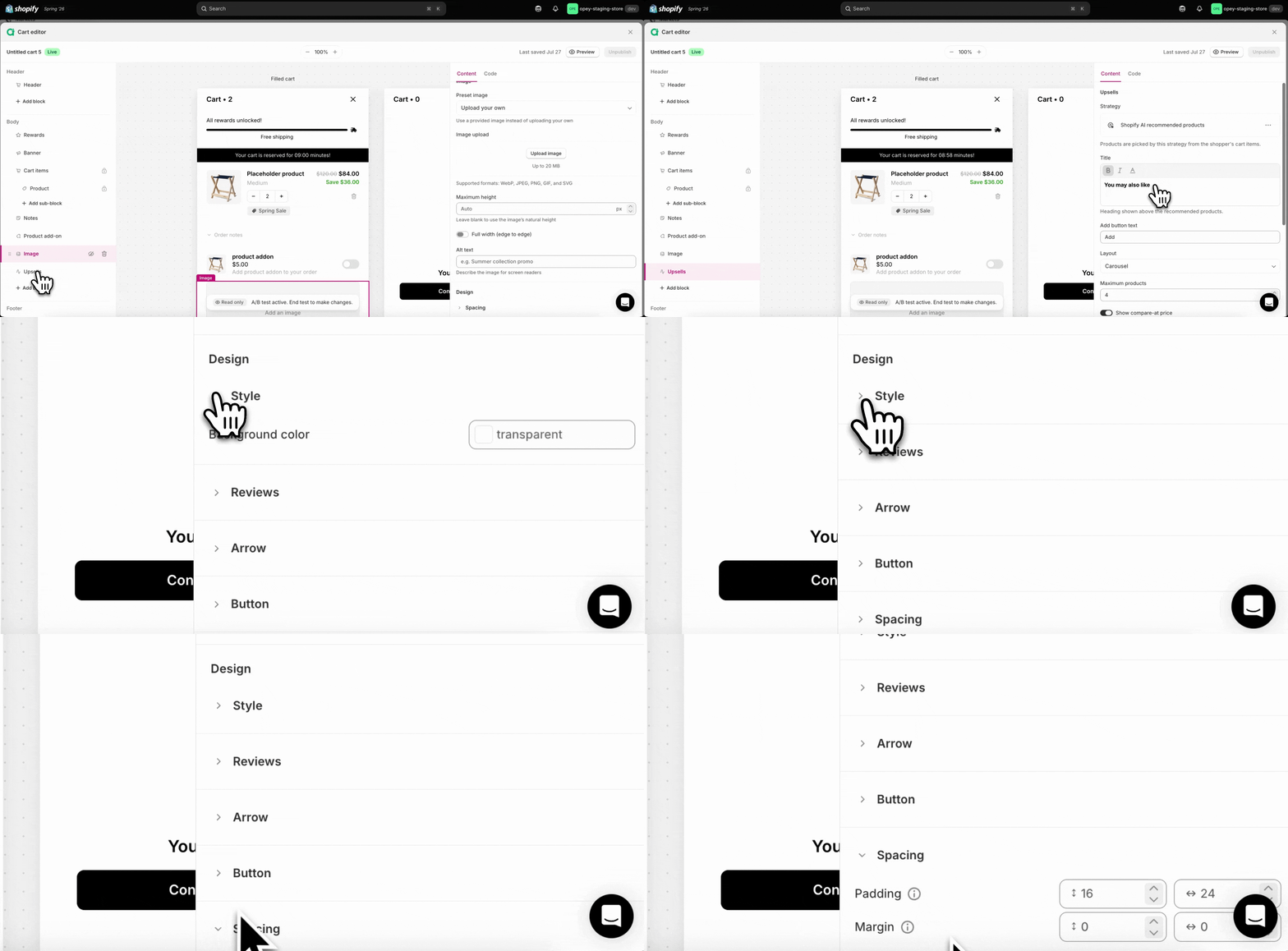
Fonts and drawer position
- Fonts: the cart inherits your theme’s font by default. You can set a custom font family for select text elements (such as the product title and upsells heading) from the Text section in each block’s Design settings — see Cart items block and Upsells block for details.
- Drawer position: the drawer’s width is adjustable (Desktop width, above); there’s no left/right position setting.