

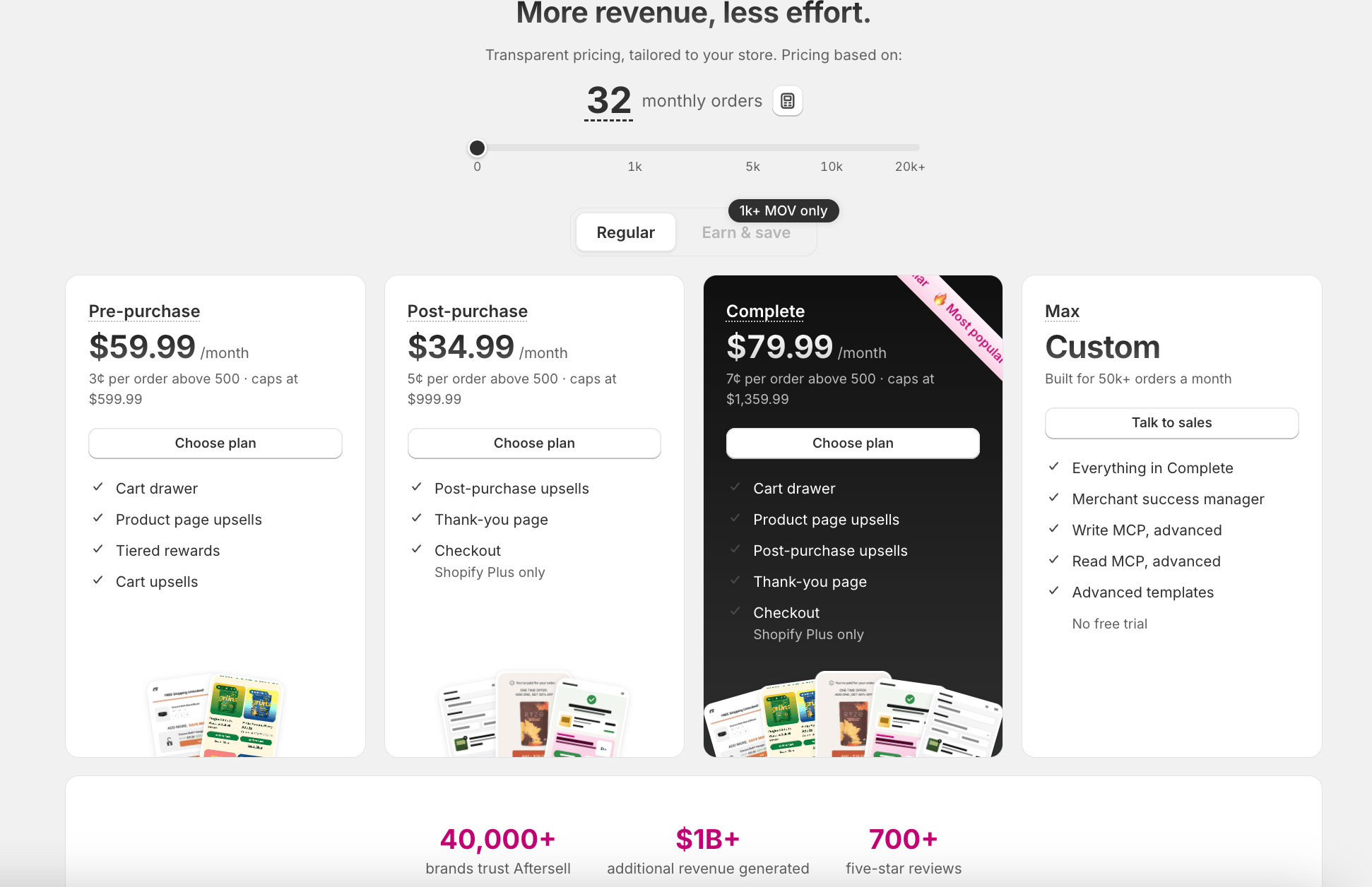
Plans
*Checkout requires Shopify’s Checkout Extensibility, which is available to Shopify Plus merchants only.
How your bill is calculated
Your monthly bill is your plan’s base fee plus the per-order fee on every order above 500 that month, up to the plan’s monthly cap.Store orders refers to the total number of orders placed on your Shopify store in the last 30 days. This includes every order on your store. The first 500 orders each month are not charged a per-order fee.
Because your bill tracks order volume, it can rise or fall month to month. Once your usage would exceed the plan cap, your bill stays flat at the cap no matter how much more your store grows.
Offset your bill with Earn & Save
Your Aftersell bill can be reduced through Earn & Save, an opt-in program with two parts that work together:- Earn (Rokt Thanks). When you activate Rokt Thanks, vetted brands show their offers on your order confirmation page, and you earn revenue each time a customer accepts one. On average, stores earn about $0.30 to $0.50 per accepted offer, and these earnings pay out to you in full.
- Save (the matching discount). Each billing cycle, Earn & Save adds a discount to your Aftersell bill sized to match your Rokt Thanks earnings from the last 30 days, up to your bill amount. This is the part that lowers what you pay Aftersell.
Free trial
Every new install on the Pre-purchase, Post-purchase, or Complete plan includes a 30-day free trial. You can use your plan during the trial at no charge, and billing begins right after the trial ends, on your next Shopify invoice. Aftersell Max does not include a free trial. If you previously uninstalled Aftersell and are reinstalling, your free trial eligibility is determined automatically based on your account history at the time of reinstall. If you have questions about your specific trial status, contact the Aftersell support team.When you’re charged
Aftersell submits your charge to Shopify once every 30 days, starting from the day your plan first became billable. Each charge is calculated from your store’s order volume over the previous 30 days. For example, if your charge fires on April 1, it reflects your order volume across the previous 30 days, and your next charge fires around 30 days later. The charge continues for as long as your plan is active. Turning individual widgets or settings off inside the Aftersell admin does not stop it. The charge stops only when you uninstall Aftersell.Your Billing page
To open the Billing page, navigate to Settings → Billing in the Aftersell admin. It is organized into these sections:Frequently asked questions
What happens to my existing pricing?
What happens to my existing pricing?
If you are already an Aftersell merchant, nothing changes automatically. You stay on your current plan and pricing, because your plan is grandfathered. The plans on this page apply to new merchants.If you would like to move to a current plan, open the billing page and select one.
One thing to know: the new Aftersell Cart is available only on current plans, so adding it means moving to the Complete plan.
One thing to know: the new Aftersell Cart is available only on current plans, so adding it means moving to the Complete plan.
How do I change my plan?
How do I change my plan?
Open Settings in the left-hand navigation under Aftersell, select Billing, then choose Compare plans on the Current plan card. From the comparison, pick the plan you want and confirm the switch.Keep in mind that the base price is a starting point, not the whole bill. Each plan scales with your order volume through the per-order fee, up to the plan cap, so a higher-volume store pays more than the base.If your store is on a grandfathered plan, contact the Aftersell support team to move to a current plan rather than switching here.
Which plans include the Aftersell Cart?
Which plans include the Aftersell Cart?
The Aftersell Cart is available on the Pre-purchase, Complete, and Aftersell Max plans.
How can I lower my Aftersell bill?
How can I lower my Aftersell bill?
Eligible stores can offset their bill through the Earn & Save program: your Rokt Thanks earnings pay out to you in full, and Earn & Save adds a matching discount to your Aftersell bill, up to your bill amount. Earn & Save eligibility starts at 1,000 or more orders per month. See the Earn & Save Program page for details.
How do I get a refund?
How do I get a refund?
To request a refund, contact the Aftersell support team via the in-app chat or email support@aftersell.com. Include your store URL, the charge date and amount you are requesting a refund for, and a short explanation of why.What happens next depends on the status of the charge in Shopify’s billing system:
- Charge already paid. Refunds are processed via Shopify’s refund flow and post back to your original payment method.
- Charge sent to Shopify but not yet collected. A refund cannot be processed directly. You can either wait for Shopify to collect the charge and request the refund afterwards, or request an app credit equivalent to the amount.
- Charge not yet submitted. In some cases the Aftersell support team can stop the charge from being submitted, so it never appears on your Shopify bill.
How can I cancel my subscription?
How can I cancel my subscription?
You can cancel your subscription directly from the Aftersell app. Navigate to Settings → Billing and click Uninstall in the row of buttons on the Current plan card. A modal will guide you through selecting a cancellation reason and confirming the uninstall. This cancels your subscription and removes the app from your store in one step.After uninstall, your settings and data are retained for up to 1 year, so a reinstall within that year finds your configurations, widgets, and funnels already in place. To avoid charges for the next billing cycle, uninstall at least one day before your next billing date.For the full cancellation walkthrough, see How do I cancel my Aftersell subscription.
Do you still offer a Checkout-only plan?
Do you still offer a Checkout-only plan?
No. The old Checkout plan is no longer offered. Checkout is now bundled into the Post-purchase and Complete plans.If your store is still on a legacy Checkout-only plan, you stay on your current pricing because it’s grandfathered in. To move to a current plan (for example, to add the Aftersell Cart) open the billing page and select one.Checkout still requires Shopify’s Checkout Extensibility, which is available to Shopify Plus merchants only.
Why was I billed after uninstalling?
Why was I billed after uninstalling?
Shopify collects app billing charges on your Shopify subscription’s billing cycle, not on the day the charge is submitted. So even though Aftersell may have submitted a charge before you uninstalled, Shopify collects it on the next Shopify billing cycle.If you uninstalled but were still billed, this usually means the uninstall happened after the billing cycle had already processed. To avoid this, uninstall at least one day before your next billing date.