

Using a fraud detection app like NoFraud or Riskified that captures payment before the upsell is added, or seeing customers get free product from failed upsells? See Payment capture with fraud detection apps.
Confirm Your Payment Capture Settings
This article only applies to stores on Manual Payment Capture. Your store may have an automatic payment capture system set up, yet still have the Shopify Manual Payment Capture setting enabled. Confirm your store’s payment capture settings in: Shopify Admin > Settings > Payments > Payment Capture Method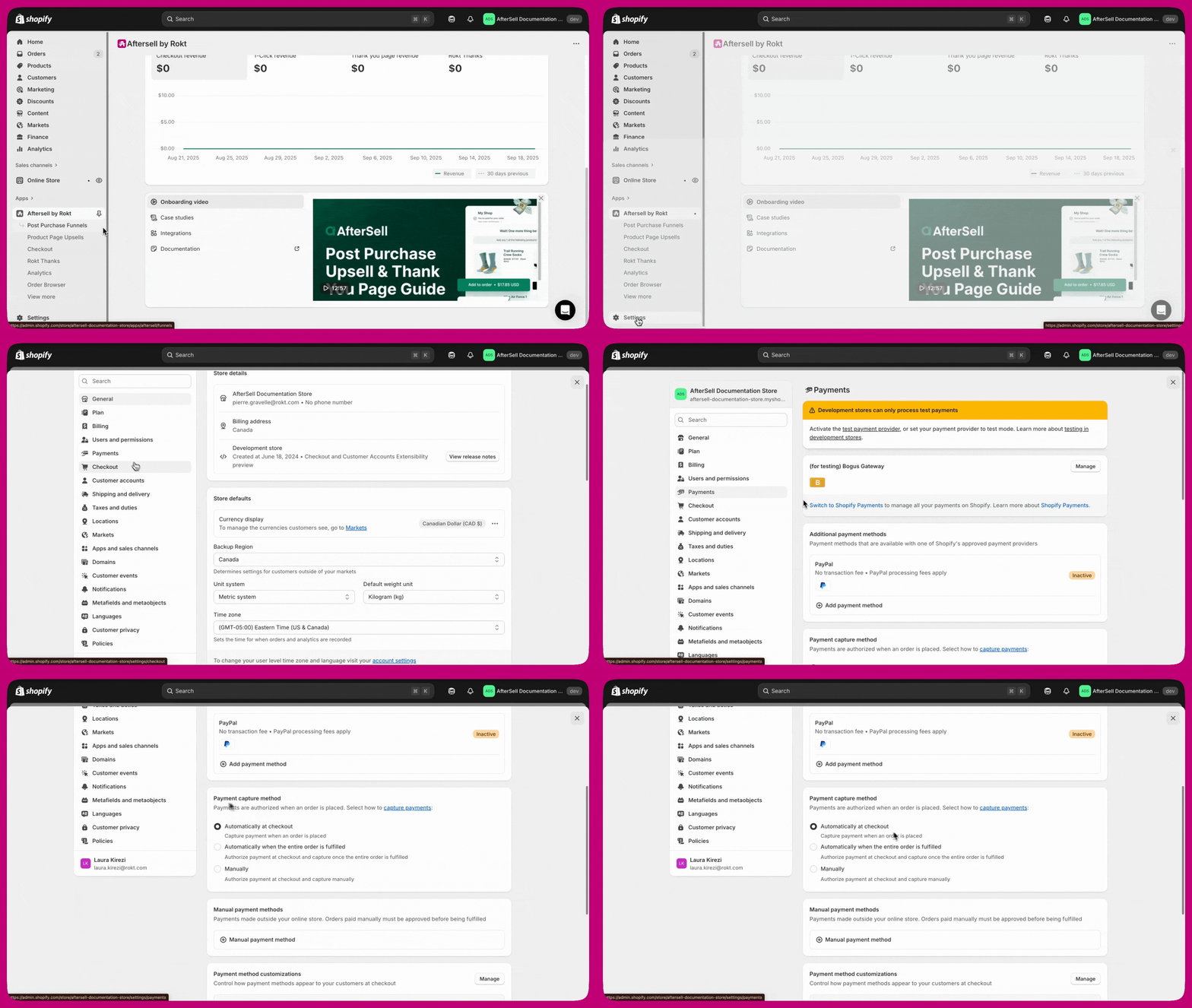
What Changed
Shopify updated their built-in automation template “Capture payment if order is not high fraud risk” around March 31, 2026. This update changed how Shopify evaluates fraud risk on order edits, which broke the automatic payment capture for post-purchase upsells. Previously, Shopify would re-run fraud analysis when an order was edited (such as when a post-purchase upsell item was added). This risk-level change would re-trigger the payment capture template flow, capturing the upsell payment. Shopify no longer re-runs fraud analysis on order edits, so the template flow does not re-trigger and the upsell payment is not captured. This issue affects stores with or without a fraud detection app.Symptoms
You may be experiencing this issue if:- You have noticed a sudden spike in Partially paid orders on post-purchase upsells
- Only orders where a customer accepted a post-purchase upsell are showing as Partially paid
- Payment for the original order is captured, but the upsell payment is authorized and not captured
- You did not change anything in your store settings around the time the issue started
Install the Aftersell Flow Template
Aftersell publishes a pre-built Shopify Flow template that sets up the complete workflow for you in a single click. We recommend using the template rather than building the flow manually.1
Open Shopify Flow
In your Shopify Admin, go to Apps > Flow and open the Templates library.
2
Find the Aftersell template
Search for “Capture payment when a post-purchase upsell is accepted” (listed under the Orders category) and select it.
3
Install and turn on the workflow
Click Install workflow, review the steps, then turn the workflow on. No further configuration is needed.
Your existing Shopify automation for capturing payment on the original order can stay as-is. This new flow runs alongside it and only handles the post-purchase upsell payment.
How the Template Works
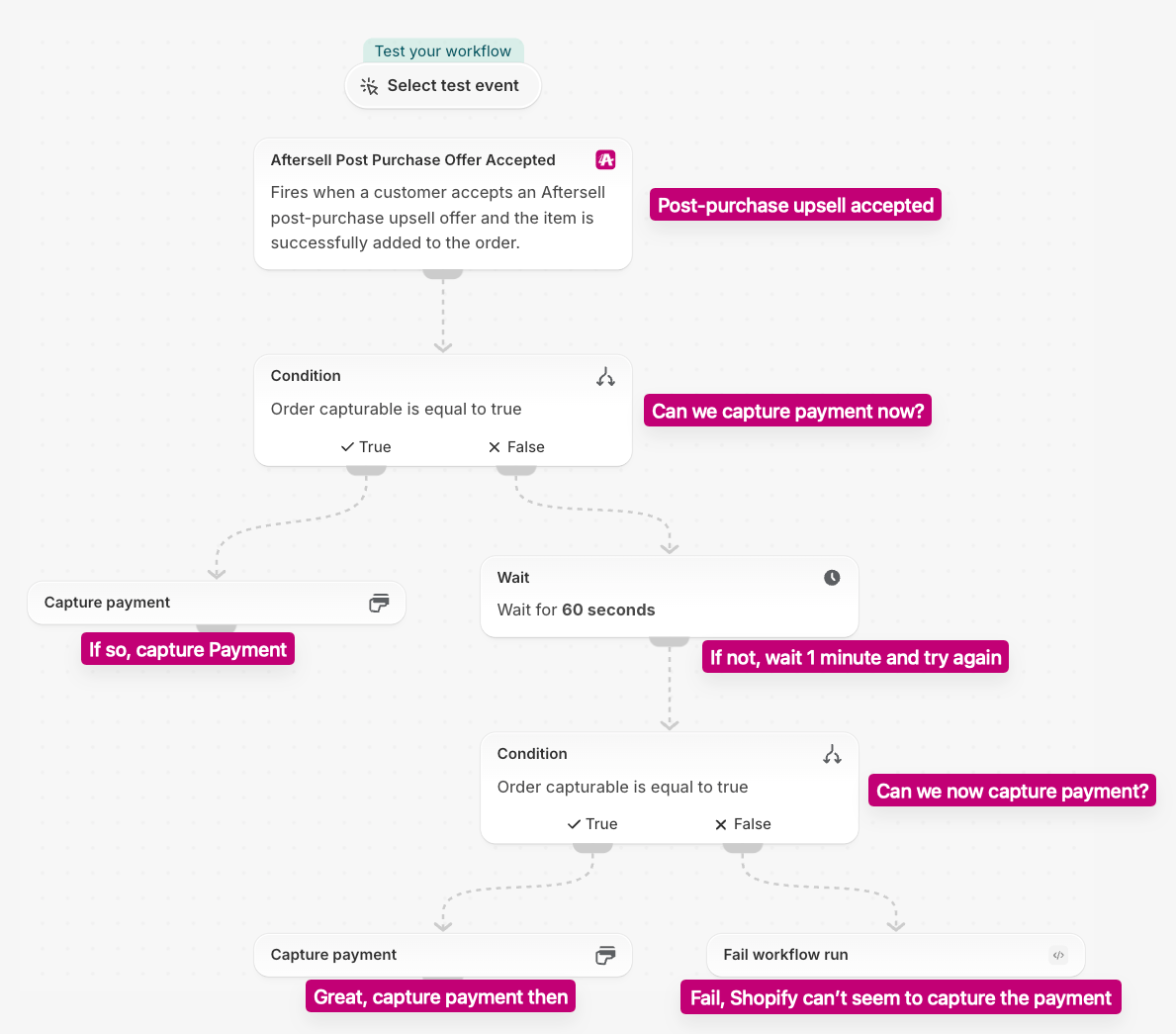
- Trigger: “Aftersell Post Purchase Offer Accepted”. The flow starts when a customer accepts an Aftersell post-purchase upsell offer and the item is successfully added to the order.
- Condition: “Order capturable is equal to true”. The flow checks whether Shopify can capture payment on the order right now.
- If true, the flow runs Capture payment and captures the outstanding upsell amount.
- If false, the flow moves to the next step.
- Wait: 60 seconds. Shopify sometimes needs a moment before the upsell payment can be captured, so the flow waits one minute before trying again.
- Condition: “Order capturable is equal to true”. The flow checks a second time.
- If true, the flow runs Capture payment.
- If false, the flow runs Fail workflow run. Shopify still can’t capture the payment, so the run is marked as failed in Shopify Flow for you to review.
Build the flow manually
Build the flow manually
If you can’t use the template, create a new workflow in Shopify Flow with these steps:
- Add the Aftersell Post Purchase Offer Accepted trigger.
- Add a Condition: Order capturable is equal to true.
- On the True branch, add the Capture payment action.
- On the False branch, add a Wait action set to 60 seconds.
- After the wait, add a second Condition: Order capturable is equal to true.
- On the second condition’s True branch, add the Capture payment action.
- On the second condition’s False branch, add the Fail workflow run action.
- Turn on the workflow.
After Setting Up the Flow
- Test the flow on a development or sandbox store before enabling it in production.
- Monitor your orders for a few days after enabling the flow to confirm payments are being captured as expected and no invoice emails are being sent to customers.
- Check your fulfillment workflow. If you use external fulfillment services, make sure this payment capture flow does not trigger fulfillment before you are ready. For more details, see our Fulfillment Documentation.
- Review your order hold settings. If you have had orders ship without completed payment, confirm your order hold settings are configured to prevent fulfillment until payment is fully captured.
Frequently Asked Questions
Is Aftersell involved in payment capture?
Is Aftersell involved in payment capture?
No. Aftersell is not involved in payment authorization or capture. Aftersell tells Shopify to add the upsell product to the order via Shopify’s post-purchase API. Shopify handles the rest of the payment process. The Shopify Flow described in this article is the recommended way to ensure payment is captured.
I don't use a fraud app. Why are my post-purchase upsell payments not being captured?
I don't use a fraud app. Why are my post-purchase upsell payments not being captured?
Shopify updated their built-in “Capture payment if order is not high fraud risk” automation template around March 31, 2026, and no longer re-runs fraud analysis when an order is edited. As a result, the upsell payment is not captured. Install the Aftersell Flow template to fix this.
Will the flow capture the full order amount or just the upsell amount?
Will the flow capture the full order amount or just the upsell amount?
The flow only captures the outstanding upsell amount. It does not re-capture or double-capture the original order payment.
What happens if the order is not capturable when the flow runs?
What happens if the order is not capturable when the flow runs?
The Aftersell template checks Order capturable first and captures payment straight away if the order is capturable.If it isn’t, the template waits 60 seconds, checks Order capturable a second time, and captures payment if the order has become capturable in the meantime. If the order still isn’t capturable, the run ends with the message “Order did not become capturable in time”. Payment is never captured too early either way.A manually built flow with only a single condition (no wait and retry) stops at the first check instead of retrying.
I already have a Shopify automation for capturing payment. Do I need to change it?
I already have a Shopify automation for capturing payment. Do I need to change it?
No. Your existing Shopify automation (such as “Capture payment if order is not high fraud risk”) can stay as-is. The new Shopify Flow runs alongside it and specifically handles the post-purchase upsell payment gap.
My customers are receiving invoice emails after accepting a post-purchase upsell. What is happening?
My customers are receiving invoice emails after accepting a post-purchase upsell. What is happening?
This can happen if the Shopify Flow includes a presentment money amount condition. Shopify sometimes returns the presentment money amount as 0 even when there is an outstanding balance. When this happens, the flow skips payment capture, and Shopify sends an invoice email to the customer instead. Remove the presentment money condition from the flow and keep only the “Order capturable” check.
Where can I learn more about Partially paid orders?
Where can I learn more about Partially paid orders?
See our Partially Paid Orders article for details on what causes Partially paid orders and how to resolve them.