

Overview
The Additional Notes module displays a collapsible notes section that allows customers to leave a message before proceeding to checkout. These notes appear in your Shopify admin under the order details.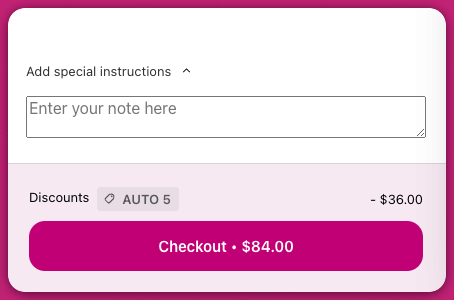
Learn more: Shopify – Managing Order Details
Customizing Additional Notes
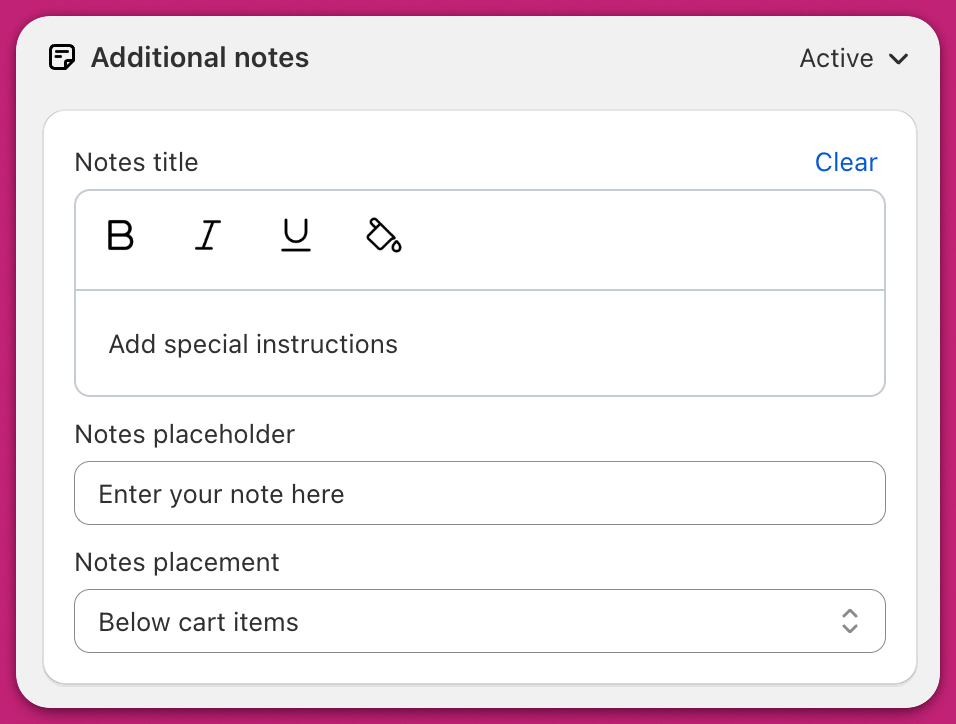
Notes Title
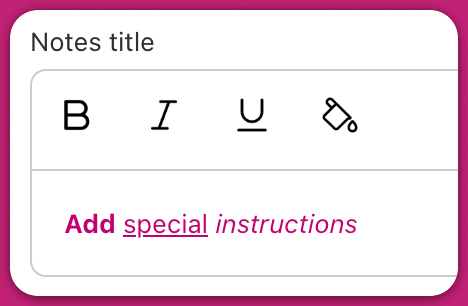
The title is the text that prompts customers to leave a note. It is clickable and can be customized with formatting options such as bold, italic, underline, and color. When applying a color, you can use the color picker swatch or type or paste a hex code (for example#DDDDDD) into the text field below the picker.
⚠️ If the title text is set to white, it may become invisible depending on your background. Highlight the entire field to check if it’s readable.
How it works
The notes section is collapsed by default. When a customer clicks on either the title or the chevron next to it, the notes input box expands. After a customer types a note, it saves automatically. A status icon appears beside the title to show the save state:- Spinner — the note is being saved
- Checkmark — the note was saved successfully
Notes Placeholder
This is the placeholder text that appears inside the input field before the customer types anything. For example, “Special instructions for your order.” As soon as the customer starts typing, their message will replace the placeholder. The submitted note is passed to Shopify and included in the order.Notes Placement
You can choose where the notes field appears in the cart layout:Below Cart Items
- The notes section is placed below all items in the cart.
- Customers may need to scroll to find it, especially if the cart contains many items.
- Upsells and add-ons may be displayed below the notes field.
Top of Footer
- The notes field appears at the top of Upcart’s sticky footer.
- It remains visible at all times unless the sticky footer is disabled.
-
In this layout:
- Upsells are placed above the notes section
- Add-ons are placed below the notes section