Documentation Index

Fetch the complete documentation index at: https://docs.aftersell.com/llms.txt

Use this file to discover all available pages before exploring further.

Overview

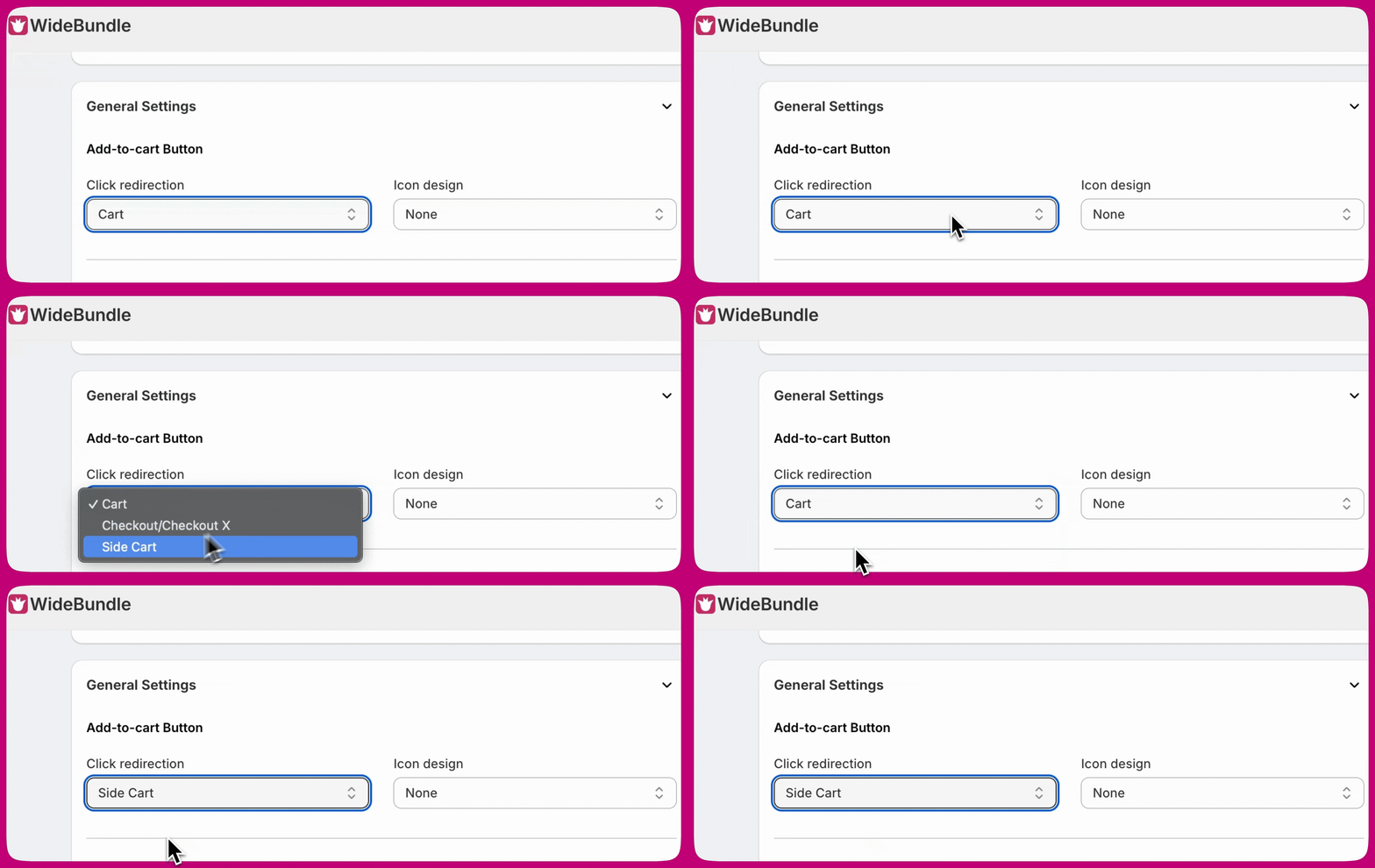
When using Wide Bundles and Upcart together, you may notice that the cart does not open correctly after a customer adds an item. This usually happens when the Add-to-Cart Redirection setting in Wide Bundles is not configured to work with Upcart.

How to Fix It

Follow these steps to resolve the issue:
  1. Open your Wide Bundles settings.
  2. Locate the option for Add-to-Cart Redirection.
  3. Set this option to Side Cart.
Setting it to Side Cart ensures that your cart opens correctly in Upcart after a customer adds a product to their cart: Image

Need More Help?

For any support questions about the integration with Wide Bundles, or if this integration is not working, please email the Wide bundle support team at: support@widebundle.com. If you’re a developer looking for more integration options, check out our Upcart Public API.