

Overview
This module supports both an admin-side configuration UI and a storefront display for customers. You can mix and match triggers and rewards to create powerful combinations, such as: Use tiered rewards to visually motivate customers towards milestones and triggered rewards for unobtrusive rule-based promotions.- “Get 10% off when you add a snowboard and spend $500+”
- “Get a free gift card when you subscribe to any product”
- “Free shipping for logged-in customers”
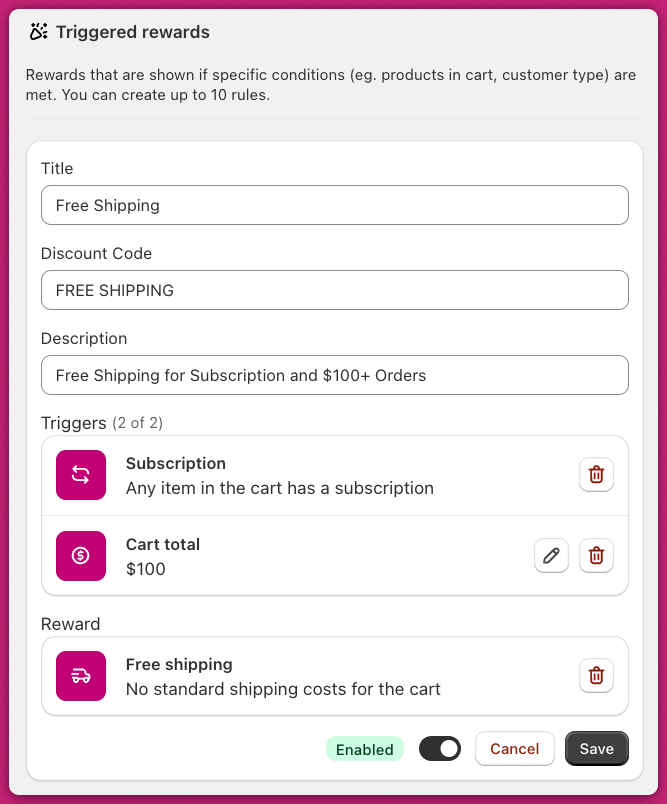
Trigger Conditions
Each rule can contain up to 2 triggers, and all conditions use AND logic (both must be true for the reward to activate).Specific Products
Triggers when any selected product or variant is in the cart.Supports:
- Full products or specific variants
- Multiple selections using OR logic
- Add the amount match (default to 1)
Specific Collections
Triggers when any cart item belongs to a selected collection.Supports:
- Multiple collections
- OR logic across collections
- Add the amount match (default to 1)
Cart Total Threshold
Triggers when the pre-discount cart total meets a set dollar amount.Calculated before any discounts (including other triggered rewards). This trigger only supports store’s main currency, and will not apply automatic currency conversion for international markets. Great for rewards like “Spend $100, get a free gift.”
Cart Quantity Threshold
Triggers when the total number of items (not unique SKUs) reaches a set number. Example: 2 of one product + 1 of another = 3 total items. Perfect for promotions like “Buy 4 or more items, get 20% off.”Subscription Products
Triggers when the cart includes any item with a subscription.Checks for a Shopify selling plan ID. Useful for rewards like “Free shipping with subscriptions” or “Free gift for subscribers.”
Customer Login Status
Triggers when the customer is logged in (authenticated).Supports both email/password and social login. Great for member-only rewards or loyalty perks.
Reward Types
Once trigger conditions are met, you can automatically apply one of the following rewards:Cart Discount
Applies a discount to the entire cart.Supports:
- Percentage discounts (e.g. 20%)
- Fixed dollar discounts (e.g. $5 off)
Max 99.99% or $9,999.99 per rule.
Free Gift
Makes a specific product 100% free when conditions are met.Requirements:
- The gift will be automatically added to the cart
- Discount applies only to the exact product/variant selected
- Product must be in stock and published
Free Shipping
Removes the shipping cost by discounting the cheapest available method to $0. No configuration needed.Rule Management
Each rule contains:- Name: Internal label, may appear in cart if using the default template. Maximum 50 characters.
- Discount Code: Optional customer-facing promo code. Maximum 25 characters.
- Description: Customer-facing explanation of the rule
- Status: Toggle to enable or disable the rule
Viewing free gift details
For rules with a free gift reward, a chevron toggle appears next to the reward badge in the rules list. Click it to expand a Free gift items section that shows the product name and image for each gift item in the rule. Click the chevron again to collapse the section. In the Discounts table, free gift reward badges include a chevron that opens a popover listing all free gift product names and images for that discount.Storefront Behaviour
The cart dynamically updates as conditions are met. Rewards appear instantly based on real-time evaluation of the cart. Upcart uses a default display template for triggered rewards, showing the title and description for each active rule. If you’d like full control of the layout, the module supports custom templates using React-based code. You can access this under the Custom Template section. The props exposed include:rulesidtitledescriptiononToggleSection
How Triggered Rewards Work with App Embed Status
Important: Triggered rewards discounts are applied through Shopify’s discount system, not through the Upcart cart drawer interface. This means:- Discounts remain active even when the Upcart app embed is off. As long as your cart is live, triggered rewards will continue to apply discounts via Shopify’s backend discount system.
- The app embed controls the cart drawer display. Turning off the app embed only hides the Upcart cart drawer from your storefront. It does not disable triggered rewards discounts.
- Discounts apply at checkout. Customers will see triggered rewards discounts applied when they reach checkout, regardless of whether the Upcart cart drawer is visible.
- Set your cart status to Disabled in the Cart Editor, or
- Delete or disable the individual triggered reward rules
Example Use Cases
- Buy X Get Y: “Buy any snowboard + spend $500 → Get 20% off”
- Subscription Incentive: “Subscribe to any product → Get a free gift card”
- Login-based Perk: “Logged-in customers → Get free shipping”
Troubleshooting
I can’t save my Triggered Reward- Name and Description are required fields. The Save button will not become active until both are filled in.
- Ensure the reward product is published on the Online Store sales channel. If the product is only live on other sales channels, the reward will not be added to the cart.
-
Rewards only activate if all triggers are true
-
Gifts must be in cart to apply the discount
-
Consider renaming the “Checkout” button to “Review Order” if using complex rewards