

Overview
When configuring a post-purchase offer, you can fill the product slot in a few ways: hand-pick a specific product, let AI recommend one, or attach a Strategy. Each is a different tool for a different job. Strategies are for dynamic merchandising in real time - pairing the right accessory with a parent product, suggesting the next step in a routine, or surfacing a complementary item. Where triggers initiate a funnel + layout; a Strategy then decides what products go inside it. Triggers are the gateway, Strategies are the brain behind the experience.Attaching a Strategy to a post-purchase offer
Strategies are attached per offer step, not to the funnel as a whole. You can mix strategy-driven steps and static-product steps in the same funnel.- Open the funnel you want to edit and go to the Upsells section.
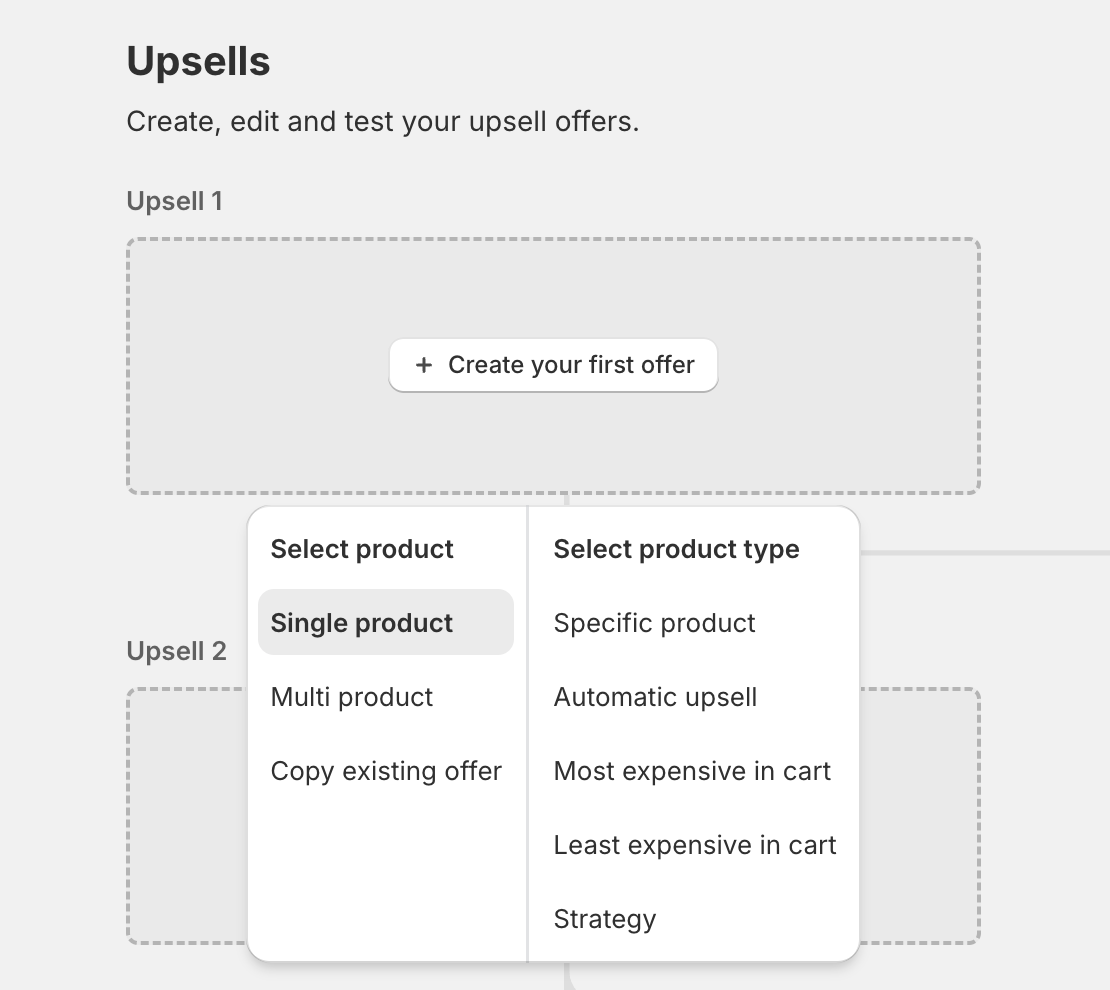
- On the upsell slot you want to configure, click Create your first offer (or + to add another offer).
- Under Select type, choose Single product upsell or Multi product upsell.
- Under Select product type, choose Strategy.
- In the Strategy picker, search for and select the Strategy you want to use.
- Click Confirm, then save the funnel.
What the Strategy sees
When a post-purchase offer evaluates a Strategy, the following context is sent automatically. You don’t need to configure any of it - it’s pulled from the shopper’s order and session as the offer is prepared.Product context
The line items from the just-completed order are sent as the input products. Triggers like product tags, product collections, product type, vendor, and product metafields all evaluate against these items. Selling plan doesn’t evaluate here. The order’s line items don’t carry a selling plan in this payload, so a Selling plan trigger never matches on post-purchase offers.Cart context
- Subtotal - the order subtotal.
- Item count - total quantity across all lines.
- Line count - number of distinct line items.
Customer context
- Customer tags
- Order count (lifetime orders for the customer)
- Country / province
- Locale
Session context
Post-purchase offers don’t send a session context automatically - no landing URL, shipping, or store-currency data is included in the payload. Marketing and Location triggers (see Building Strategies) won’t match on post-purchase offers unless you evaluate the Strategy yourself through a custom integration and supply that context.What happens when the Strategy returns
The product(s) returned by the Strategy replace the placeholder in the offer step - they don’t add to it. The shopper sees the offer as if you had hand-picked that product yourself. A single-product offer uses the first returned product. A multi-product offer fills its slots from the returned products in priority order.When no product is returned
If no rules match and the Strategy returns no products, the post-purchase upsell is not shown to the shopper. To keep your funnel firing, configure a Catch all in the Strategy so there is always a fallback product to return. See the Building Strategies page for how to set up a Catch all.Tips for post-purchase Strategies
- Use Catch all as a safety net. A Strategy without a Catch all will skip the offer step if nothing matches. A simple Catch all keeps the funnel showing something.
- Mix dynamic and static steps. Not every step has to be Strategy-driven. A common pattern is a Strategy on the first offer (most personalized) and a static fallback offer on the second offer (proven seller).