> ## Documentation Index
> Fetch the complete documentation index at: https://docs.aftersell.com/llms.txt
> Use this file to discover all available pages before exploring further.
# Upcart x Zepto Product Personalizer integration
> 了解在同时使用 Zepto Product Personalizer 与 Upcart 时如何修复重定向和价格更新问题,自助操作指南。
# 概述
Zepto Product Personalizer 与 Upcart 兼容,但可能需要调整一些设置以获得最佳性能。本指南涵盖两个常见问题——购物车重定向和价格更新——以及相应的解决方法。
# 1:Zepto 重定向到购物车页面(而不是 Upcart)
默认情况下,Zepto 会将顾客重定向到购物车页面,而不是显示 Upcart 侧边购物车。
**解决方法:**
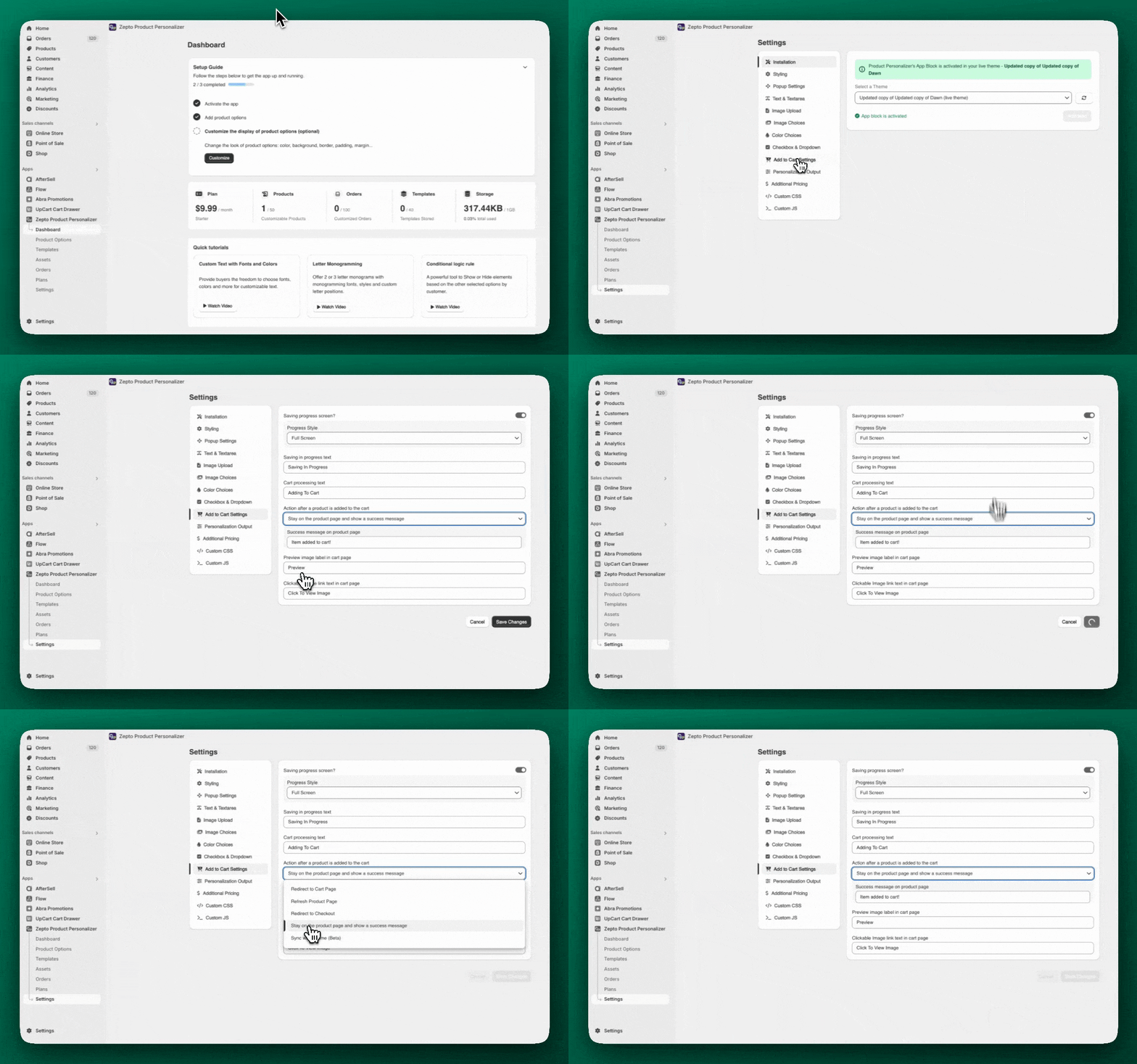
1. 前往 **Zepto** > **Settings** > **Add to Cart Settings**
2. 找到名为 **“Action after a product is added to the cart”** 的部分
3. 选择 **“Stay on the product page and show a success message”**
4. 保存更改
你可以在 Zepto 的以下位置找到这些设置:
 ***
***
# 有时,个性化定制后产品价格不会在 Upcart 中更新。这通常是因为 Zepto 使用了 Shadow DOM,导致 Upcart 无法检测到价格变化。
**解决方法:**
1. 前往 **Upcart** > **Cart Editor** > **Settings** > **Cart settings**,然后展开 **Advanced Settings**
2. 取消勾选名为 **Shadow DOM** 的复选框
3. 保存更改
4. 进行充分测试,因为这可能会影响其他应用或主题功能的行为
💡 \*\*注意:\*\*禁用 Shadow DOM 可能会解决此问题,但可能会与你的主题产生 CSS 冲突。请参阅 [Shadow DOM 设置](/zh/upcart/render_cart_in_shadow_dom_setting)文档,了解完整的利弊权衡。
有关更多详情,你也可以参考 [Zepto 的文档](https://productpersonalizer.com/docs/)
## ⚠️ 什么是 Shadow DOM?
Shadow DOM 是 Upcart 中的一项高级设置,通过将 Upcart 与页面上的其他代码(如你的主题或应用)隔离,帮助 Upcart 顺畅运行。但在某些情况下(例如使用 Zepto 时),需要拆除这堵“墙”,购物车才能正确更新价格。
***
# 需要更多帮助?
如果你仍然遇到问题:
* **关于 Zepto 设置**,请联系 **[Zepto 支持团队](mailto:support@product-personalizer.zendesk.com)**
* 如果是其他问题,请再次确认所有设置均已保存并经过测试。
* 如果你需要高级自定义方面的协助,我们建议咨询 [Shopify Expert](https://www.shopify.com/partners/directory)