> ## Documentation Index
> Fetch the complete documentation index at: https://docs.aftersell.com/llms.txt
> Use this file to discover all available pages before exploring further.
# Upcart x PageFly landing page builder
> 本文介绍在同时使用 PageFly 与 Upcart 时如何避免重定向到购物车页面。
## 解决方法
按照以下步骤确保你的 **Add to Cart** 按钮与 Upcart 正常配合:
1. 在 Shopify 后台打开 **PageFly** 应用。
2. 进入 **Add to Cart** 按钮设置。
3. 找到名为 **After add to cart action** 的部分。
4. 选择 **Stay on the same page** 选项。
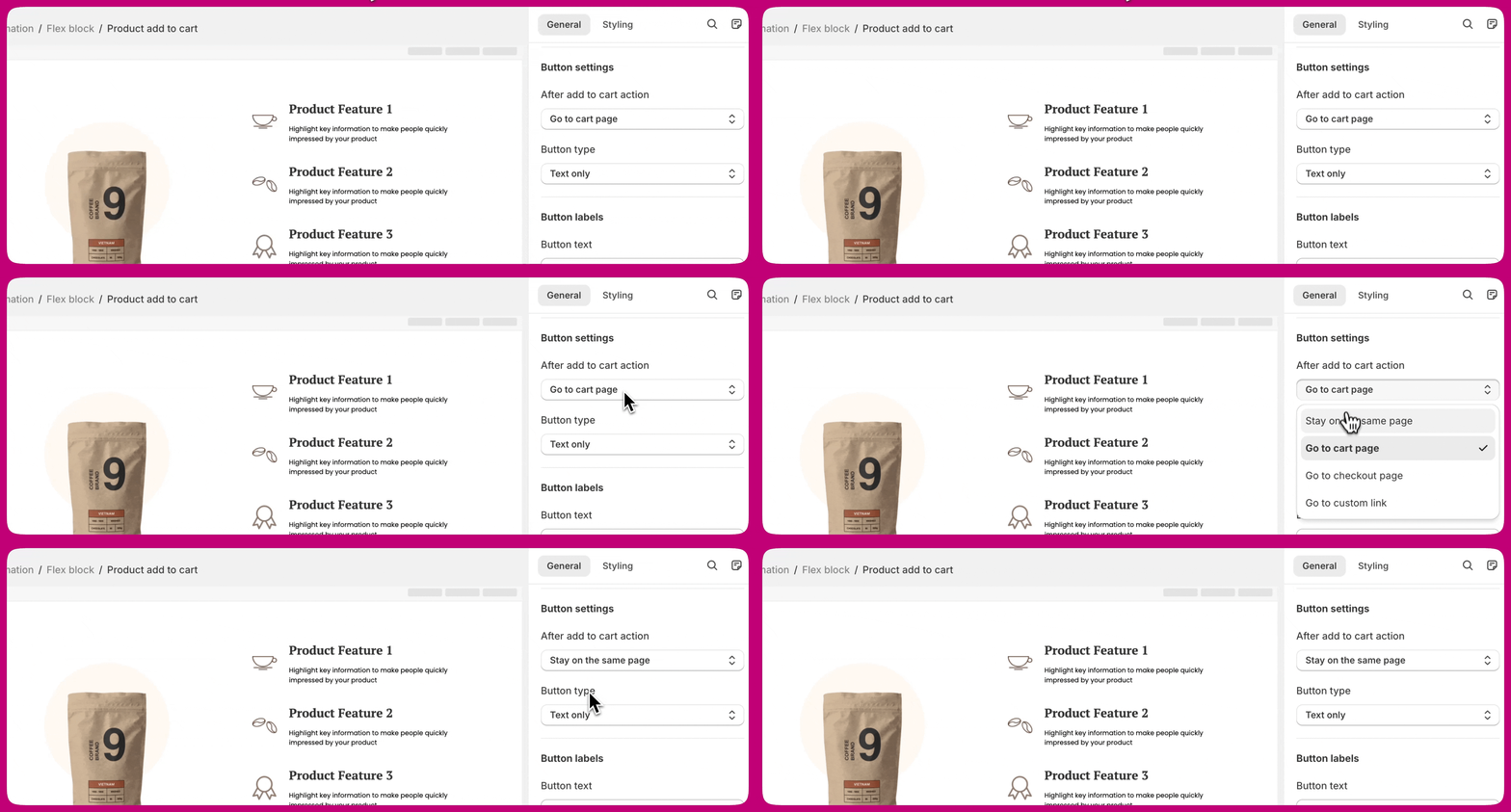 这样可以确保顾客在将产品加入购物车后停留在同一页面,并且 **Upcart 抽屉**能正确打开。
***
这样可以确保顾客在将产品加入购物车后停留在同一页面,并且 **Upcart 抽屉**能正确打开。
***
## 了解更多
有关此设置的更多详情,请参阅 \*\*[PageFly 的文档](https://help.pagefly.io/manual/shopify-elements-product-add-to-cart/)\*\*中关于配置 **Add to Cart** 按钮的内容。