> ## Documentation Index
> Fetch the complete documentation index at: https://docs.aftersell.com/llms.txt
> Use this file to discover all available pages before exploring further.

# 购物车图标数量/计数器未更新

> 本文介绍当 Upcart 中购物车图标数量未更新时如何修复。

<div id="overview">
  # 概述
</div>

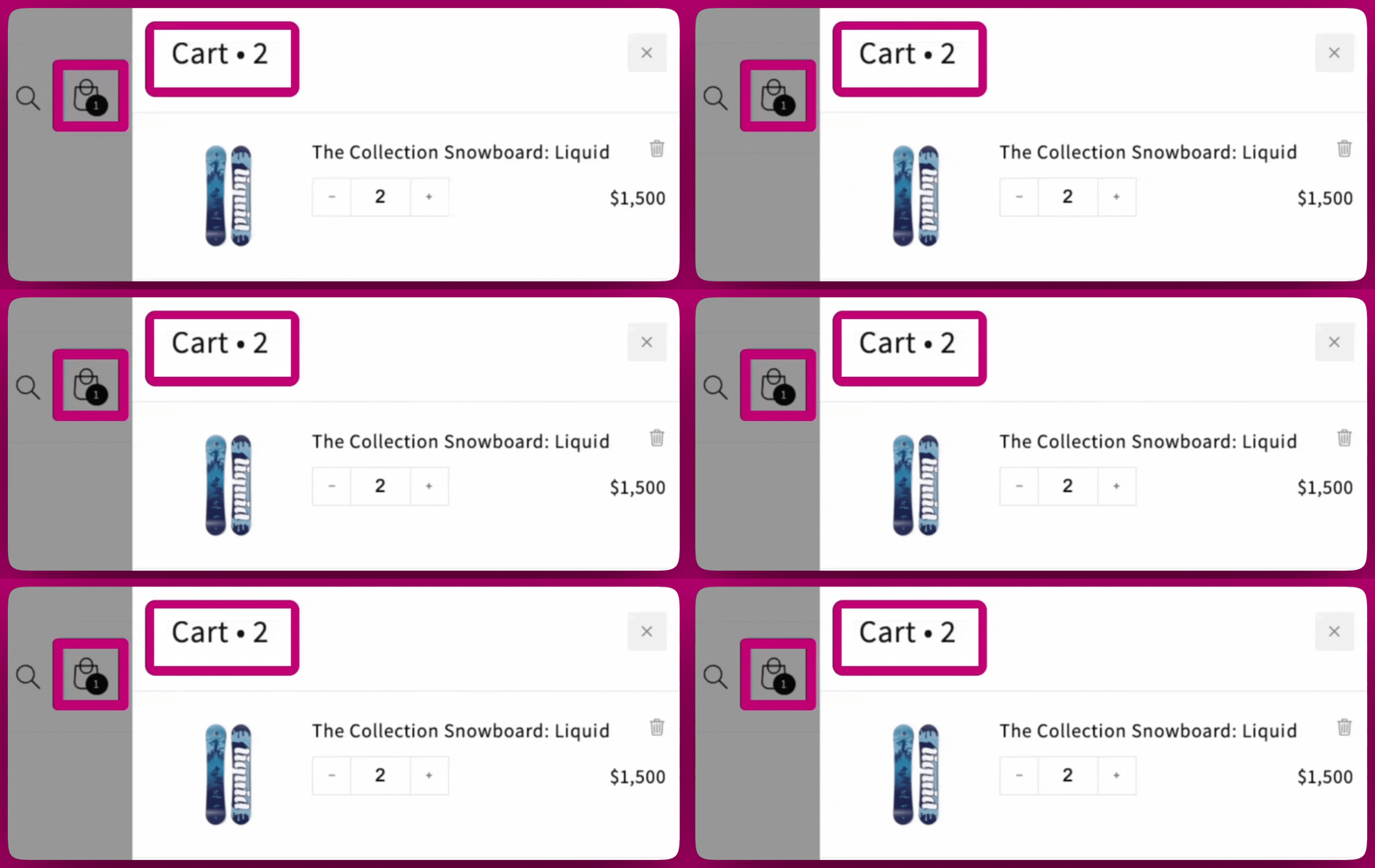
有些主题不会自动更新图标，本指南将带你了解如何使用少量自定义代码来修复这个问题。请按照以下步骤操作，让一切正确同步。

**以下是这种不一致的示例：**

<img src="https://mintcdn.com/aftersell/uxKAdY-e0h16xa48/images/upcart/cart-counter-drawer-vs-theme-icon.gif?s=2b4c08af3555b89b66d7926793bc3833" alt="Upcart 抽屉显示购物车有 2 件商品，而主题购物车图标气泡仍显示 1" width="2560" height="1080" data-path="images/upcart/cart-counter-drawer-vs-theme-icon.gif" />

***

<div id="important-steps-before-you-start">
  # 开始前的重要步骤！
</div>

要修复购物车图标问题，你需要找出购物车图标的类名。每个主题都不相同，此步骤可确保代码专门针对你的商店生效。

<div id="1-use-chrome-developer-tools">
  ### **1. 使用 Chrome 开发者工具**
</div>

每个主题都不相同，因此你需要使用 Chrome 开发者工具（Inspect）来找出购物车图标的类名。

* 在店面上右键点击购物车图标，然后在 Google Chrome 中选择 **Inspect**。
* 找到购物车图标的 HTML 元素（例如 **`<span class="cart-count-bubble">`**）。
* \*\*需要帮助使用 Chrome 开发者工具？\*\*查看[这份指南](https://developer.chrome.com/docs/devtools/overview/)获取分步说明。

<div id="2-reach-out-for-help-optional">
  ### **2. 寻求帮助（可选）**
</div>

如果你无法找到购物车图标的类名或感到无从下手，别担心！你还有以下选择：

* \*\*联系你的主题开发者：\*\*他们最了解你的主题，可以帮你找到正确的类名。
* \*\*聘请 Shopify Expert：\*\*如果你需要额外支持，Shopify 提供了值得信赖的专家目录。[在此查找 Shopify Expert](https://experts.shopify.com/)。

<div id="custom-code-disclaimer">
  ## 🚧 **自定义代码免责声明**
</div>

以下提供的示例代码只是一个模板，**直接复制粘贴是无法生效的**。你必须将占位符类名（例如 **`.cart-count-bubble > span`**）替换为你购物车图标的具体类名。

***

<div id="step-by-step-fix">
  # 分步修复
</div>

我们将此过程分为三个级别的修复方案，从最简单的方案（级别 1）开始。每个级别都建立在前一个级别之上——请先尝试级别 1，仅在需要时再转到级别 2 或 3。

<div id="step-1-add-custom-code-in-upcart">
  ## **步骤 1：在 Upcart 中添加自定义代码**
</div>

首先，由于我们需要在 Upcart 编辑器中添加一些自定义 HTML 代码，让我们先准备好该部分：

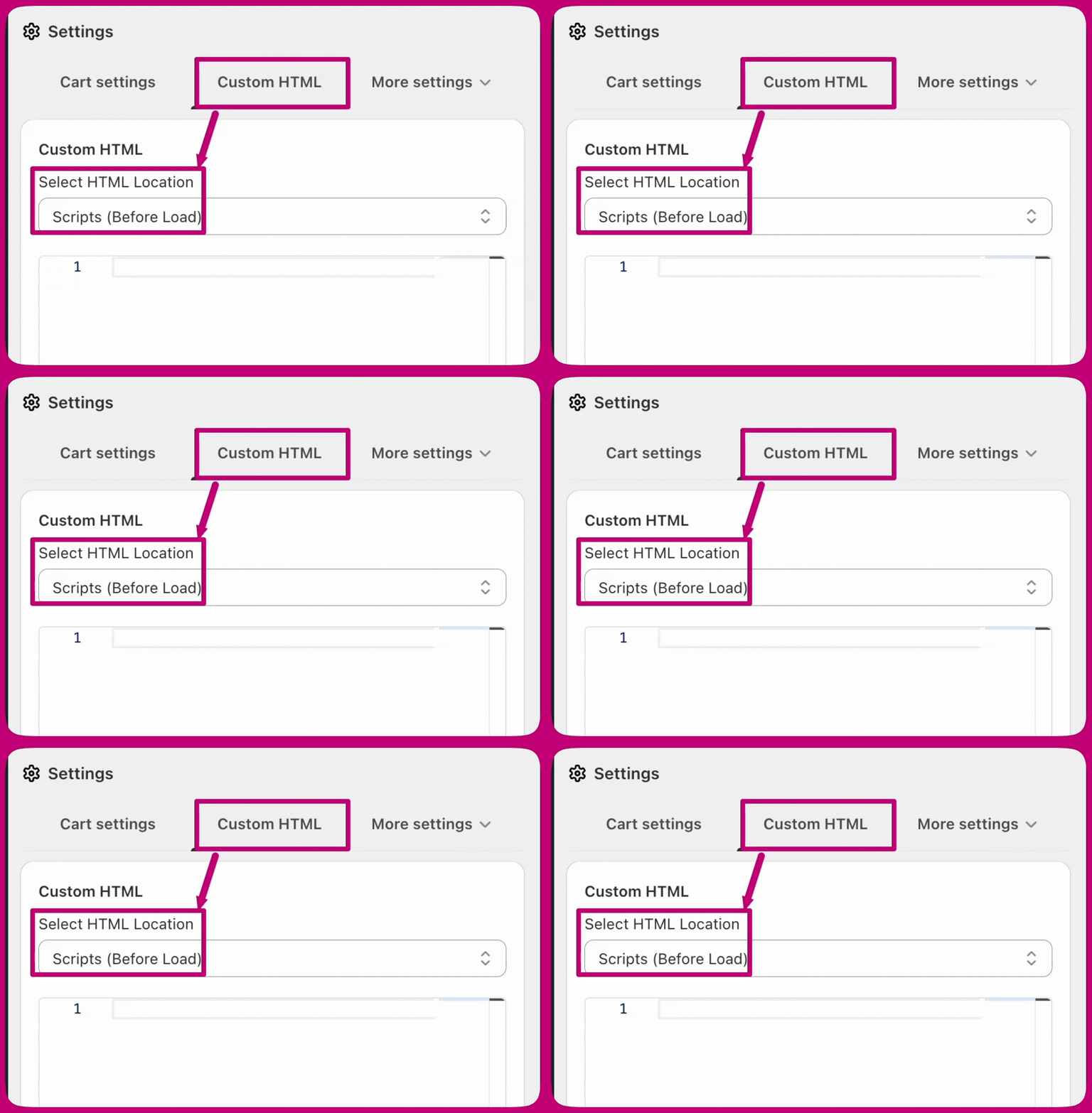
1. 前往 **Upcart Editor > Settings**，然后打开 **Custom HTML** 标签页（如果标签行放不下，它位于 **More settings** 之下）。
2. 将位置设置为 **Scripts (Before Load)**。
3. 在此粘贴你编辑好的代码（下文将为每个级别提供示例）。

效果如下：

<img src="https://mintcdn.com/aftersell/uxKAdY-e0h16xa48/images/upcart/cart-counter-custom-html-settings-location.gif?s=d70ce32a4328c99bf2d0b9d18efcd853" alt="Upcart Custom HTML 设置，HTML 位置设为 Scripts Before Load" width="1588" height="1080" data-path="images/upcart/cart-counter-custom-html-settings-location.gif" />

***

<div id="step-2-apply-the-fix-by-level">
  # **步骤 2：按级别应用修复**
</div>

<div id="level-1-basic">
  ## 级别 1（基础）
</div>

当购物车加载时，此脚本会汇总购物车行项目的数量，并将其写入主题购物车气泡内的计数元素。它适用于计数位于简单嵌套元素中的主题（例如 `.cart-count-bubble > span`）。

**别忘了**

* 将 **`.cart-count-bubble > span`** 替换为你的购物车图标类名。
* 添加代码后在店面上测试。
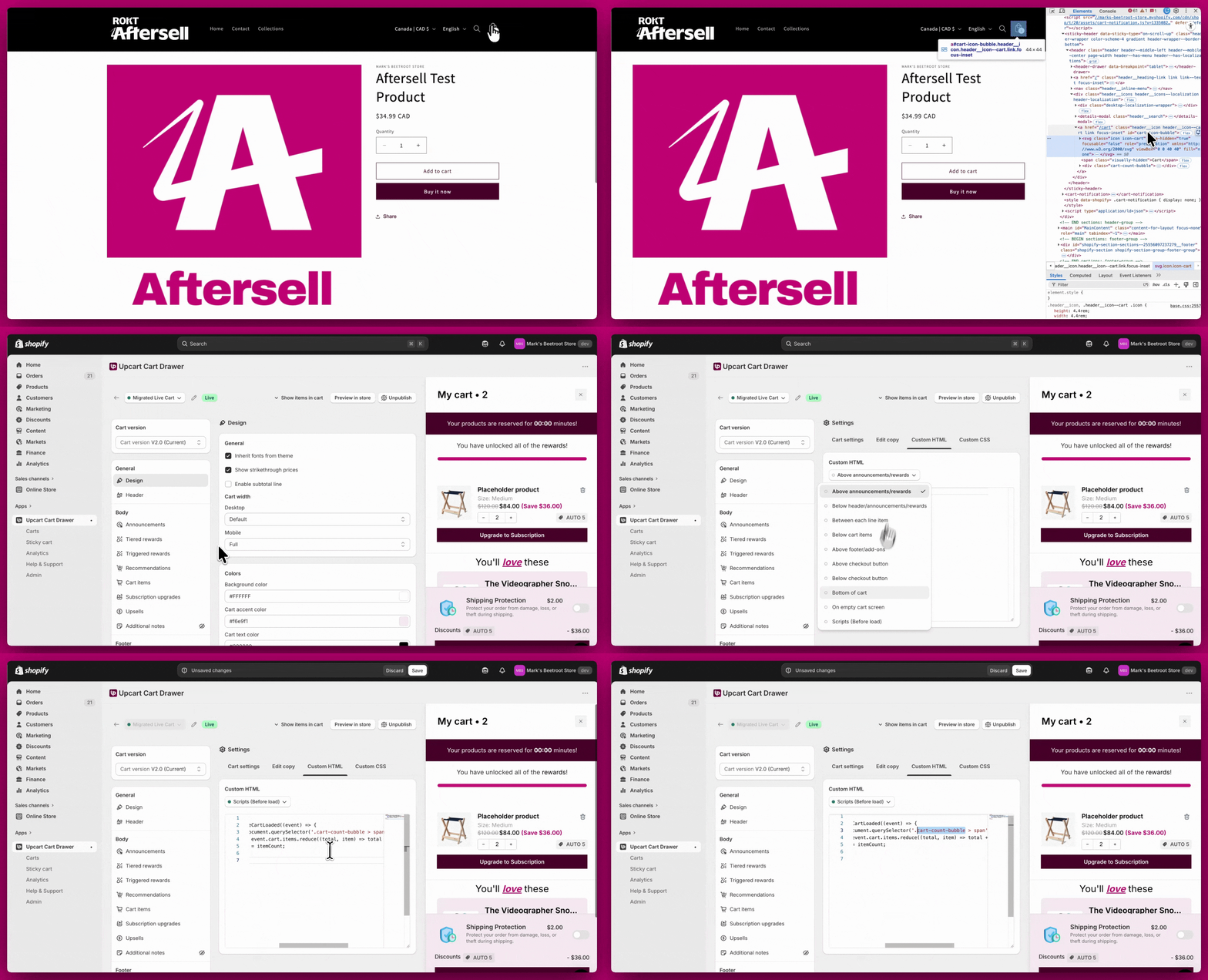
<img src="https://mintcdn.com/aftersell/uxKAdY-e0h16xa48/images/upcart/cart-counter-level-1-count-bubble-script.gif?s=ef698547d55d921009278b3a006e4a9d" alt="使用 cart-count-bubble 选择器将级别 1 计数脚本粘贴到 Upcart Custom HTML 中" width="1996" height="1080" data-path="images/upcart/cart-counter-level-1-count-bubble-script.gif" />

<div id="example-code-for-level-1">
  ## 级别 1 示例代码
</div>

```text theme={"theme":{"light":"snazzy-light","dark":"github-dark"}}
<script>  
window.upcartSubscribeCartLoaded((event) => {  
    const countEl = document.querySelector('.cart-count-bubble > span');  
    const itemCount = event.cart.items.reduce((total, item) => total + item.quantity, 0);  
    countEl.innerText = itemCount;  
});  
</script>
```

<Note>
  **旧版说明：**`window.upcartOnCartLoaded` 回调仍然可用，但已弃用并会在控制台记录警告。所有新脚本请使用 `upcartSubscribeCartLoaded`。请注意，`event.cart` 没有 `item_count` 属性，请使用 `event.cart.items.reduce((total, item) => total + item.quantity, 0)` 来计算商品总数。
</Note>

***

<div id="level-2-moderate">
  ## 级别 2（中等）
</div>

如果级别 1 不起作用，你的主题可能会在数量变化时替换整个购物车图标的 HTML。此版本会针对空购物车和非空购物车状态重建图标标记，使计数和图标保持同步。

**别忘了**

* 将 **`#cart-icon-bubble-custom`** 替换为你主题的购物车图标外层选择器。
* 保存后进行测试。
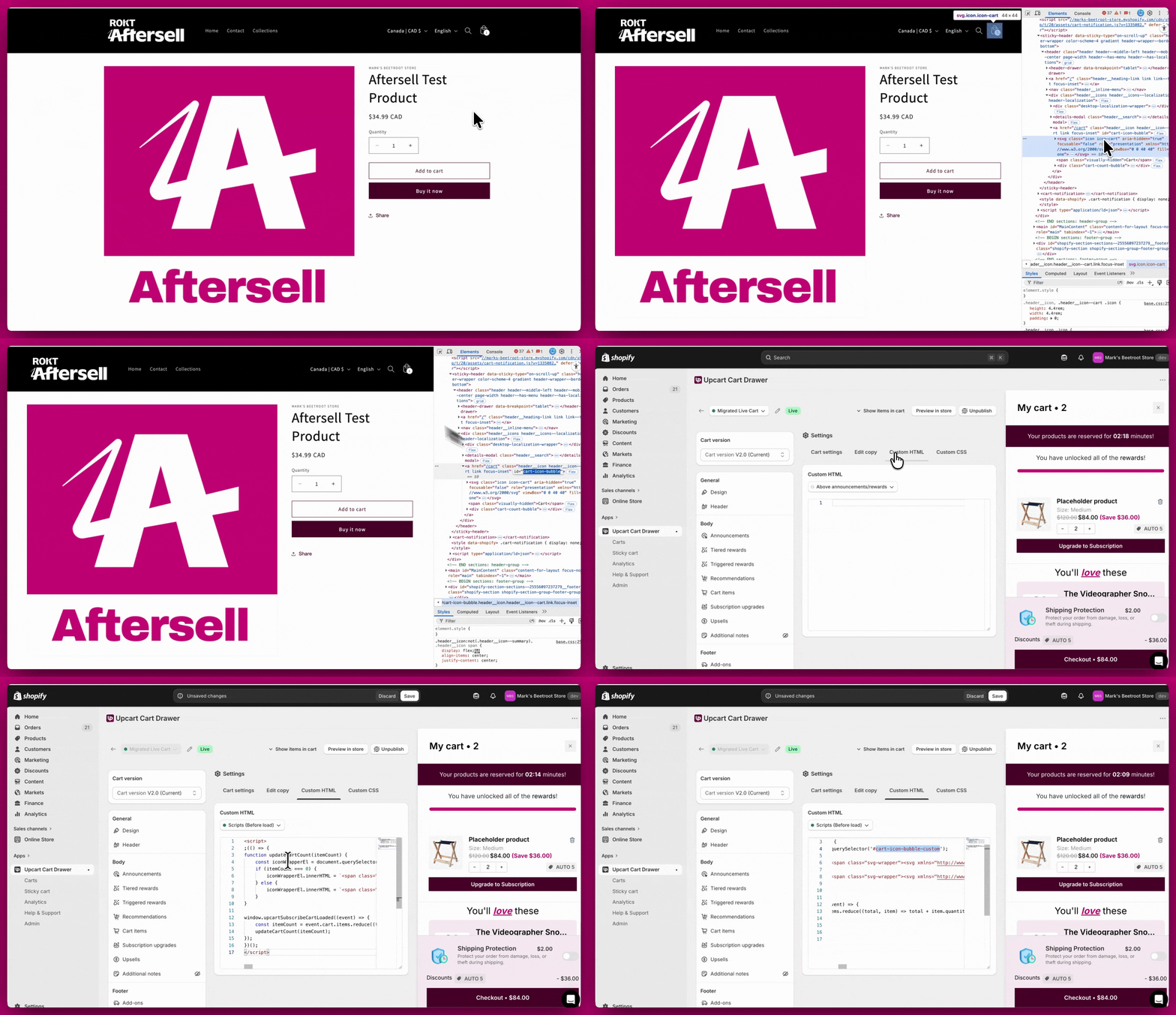
<Frame>
  <img src="https://mintcdn.com/aftersell/uxKAdY-e0h16xa48/images/upcart/cart-counter-level-2-icon-bubble-script.gif?s=7d36ca92c77564a670a1940818b7d86b" alt="使用 cart-icon-bubble-custom 选择器将级别 2 购物车图标脚本粘贴到 Upcart Custom HTML 中" width="1876" height="1080" data-path="images/upcart/cart-counter-level-2-icon-bubble-script.gif" />
</Frame>

<div id="example-code-for-level-2">
  ### 级别 2 示例代码
</div>

```text theme={"theme":{"light":"snazzy-light","dark":"github-dark"}}
<script>  
;(() => {  
function updateCartCount(itemCount) {  
    const iconWrapperEl = document.querySelector('#cart-icon-bubble-custom');  
    if (itemCount === 0) {  
        iconWrapperEl.innerHTML = `<span class="svg-wrapper"><svg xmlns="http://www.w3.org/2000/svg" fill="none" class="icon icon-cart-empty" viewBox="0 0 40 40"><path fill="currentColor" fill-rule="evenodd" d="M15.75 11.8h-3.16l-.77 11.6a5 5 0 0 0 4.99 5.34h7.38a5 5 0 0 0 4.99-5.33L28.4 11.8zm0 1h-2.22l-.71 10.67a4 4 0 0 0 3.99 4.27h7.38a4 4 0 0 0 4-4.27l-.72-10.67h-2.22v.63a4.75 4.75 0 1 1-9.5 0zm8.5 0h-7.5v.63a3.75 3.75 0 1 0 7.5 0z"></path></svg></span><span class="visually-hidden">Cart</span>`;  
    } else {  
        iconWrapperEl.innerHTML = `<span class="svg-wrapper"><svg xmlns="http://www.w3.org/2000/svg" fill="none" class="icon icon-cart" viewBox="0 0 40 40"><path fill="currentColor" fill-rule="evenodd" d="M20.5 6.5a4.75 4.75 0 0 0-4.75 4.75v.56h-3.16l-.77 11.6a5 5 0 0 0 4.99 5.34h7.38a5 5 0 0 0 4.99-5.33l-.77-11.6h-3.16v-.57A4.75 4.75 0 0 0 20.5 6.5m3.75 5.31v-.56a3.75 3.75 0 1 0-7.5 0v.56zm-7.5 1h7.5v.56a3.75 3.75 0 1 1-7.5 0zm-1 0v.56a4.75 4.75 0 1 0 9.5 0v-.56h2.22l.71 10.67a4 4 0 0 1-3.99 4.27h-7.38a4 4 0 0 1-4-4.27l.72-10.67z"></path></svg></span><span class="visually-hidden">Cart</span><div class="cart-count-bubble"><span aria-hidden="true">${itemCount}</span><span class="visually-hidden">${itemCount} item</span></div>`;  
    }  
}  
  
window.upcartSubscribeCartLoaded((event) => {  
    const itemCount = event.cart.items.reduce((total, item) => total + item.quantity, 0);  
    updateCartCount(itemCount);  
});  
})();  
</script>
```

<Note>
  **旧版说明：**`window.upcartOnCartLoaded` 回调仍然可用，但已弃用并会在控制台记录警告。所有新脚本请使用 `upcartSubscribeCartLoaded`。

  请注意，`event.cart` **没有** `item_count` 属性——上面的脚本使用 `event.cart.items.reduce((total, item) => total + item.quantity, 0)` 计算总数，并将其作为 `itemCount` 传入。旧版代码片段若插入 `cart.item_count`，会抛出 `ReferenceError` 并在无任何提示的情况下无法更新图标。
</Note>

***

<div id="level-3-advanced">
  ## 级别 3（高级）
</div>

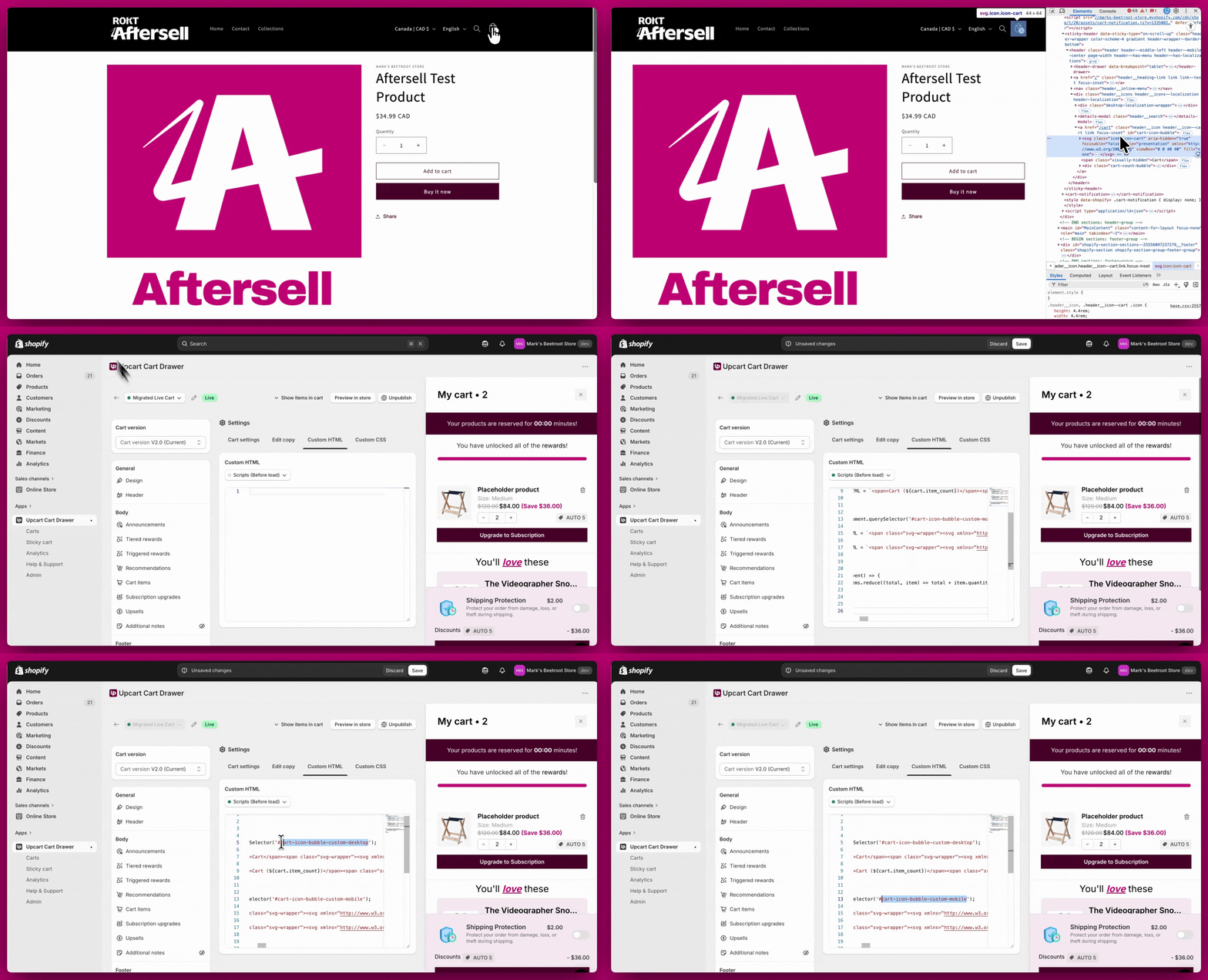
如果你的主题在桌面端和移动端使用**各自独立**的购物车图标标记，请针对两个选择器运行相同的更新逻辑，使每种视口都能获得正确的 HTML 和计数。

**别忘了**

* 将 **`#cart-icon-bubble-custom-desktop`** 和 **`#cart-icon-bubble-custom-mobile`** 替换为你主题的类名。
* 在桌面端和移动端视图上进行全面测试。
<img src="https://mintcdn.com/aftersell/uxKAdY-e0h16xa48/images/upcart/cart-counter-level-3-desktop-mobile-script.gif?s=36058384ee181aa8fc630e3c7bfc8716" alt="将级别 3 脚本粘贴到 Upcart Custom HTML 中，使用分开的桌面端和移动端购物车图标选择器" width="1996" height="1080" data-path="images/upcart/cart-counter-level-3-desktop-mobile-script.gif" />

<div id="example-code-for-level-3">
  ### 级别 3 示例代码
</div>

```text theme={"theme":{"light":"snazzy-light","dark":"github-dark"}}
<script>  
;(() => {  
function updateCartCount(itemCount) {  
    // Desktop  
    const desktopIconWrapperEl = document.querySelector('#cart-icon-bubble-custom-desktop');  
    if (itemCount === 0) {  
        desktopIconWrapperEl.innerHTML = `<span>Cart</span><span class="svg-wrapper"><svg xmlns="http://www.w3.org/2000/svg" fill="none" class="icon icon-cart-empty" viewBox="0 0 40 40"><path fill="currentColor" fill-rule="evenodd" d="M15.75 11.8h-3.16l-.77 11.6a5 5 0 0 0 4.99 5.34h7.38a5 5 0 0 0 4.99-5.33L28.4 11.8zm0 1h-2.22l-.71 10.67a4 4 0 0 0 3.99 4.27h7.38a4 4 0 0 0 4-4.27l-.72-10.67h-2.22v.63a4.75 4.75 0 1 1-9.5 0zm8.5 0h-7.5v.63a3.75 3.75 0 1 0 7.5 0z"></path></svg></span>`;  
    } else {  
        desktopIconWrapperEl.innerHTML = `<span>Cart (${itemCount})</span><span class="svg-wrapper"><svg xmlns="http://www.w3.org/2000/svg" fill="none" class="icon icon-cart" viewBox="0 0 40 40"><path fill="currentColor" fill-rule="evenodd" d="M20.5 6.5a4.75 4.75 0 0 0-4.75 4.75v.56h-3.16l-.77 11.6a5 5 0 0 0 4.99 5.34h7.38a5 5 0 0 0 4.99-5.33l-.77-11.6h-3.16v-.57A4.75 4.75 0 0 0 20.5 6.5m3.75 5.31v-.56a3.75 3.75 0 1 0-7.5 0v.56zm-7.5 1h7.5v.56a3.75 3.75 0 1 1-7.5 0zm-1 0v.56a4.75 4.75 0 1 0 9.5 0v-.56h2.22l.71 10.67a4 4 0 0 1-3.99 4.27h-7.38a4 4 0 0 1-4-4.27l.72-10.67z"></path></svg></span>`;  
    }  
  
    // Mobile  
    const mobileIconWrapperEl = document.querySelector('#cart-icon-bubble-custom-mobile');  
    if (itemCount === 0) {  
        mobileIconWrapperEl.innerHTML = `<span class="svg-wrapper"><svg xmlns="http://www.w3.org/2000/svg" fill="none" class="icon icon-cart-empty" viewBox="0 0 40 40"><path fill="currentColor" fill-rule="evenodd" d="M15.75 11.8h-3.16l-.77 11.6a5 5 0 0 0 4.99 5.34h7.38a5 5 0 0 0 4.99-5.33L28.4 11.8zm0 1h-2.22l-.71 10.67a4 4 0 0 0 3.99 4.27h7.38a4 4 0 0 0 4-4.27l-.72-10.67h-2.22v.63a4.75 4.75 0 1 1-9.5 0zm8.5 0h-7.5v.63a3.75 3.75 0 1 0 7.5 0z"></path></svg></span><span class="visually-hidden">Cart</span>`;  
    } else {  
        mobileIconWrapperEl.innerHTML = `<span class="svg-wrapper"><svg xmlns="http://www.w3.org/2000/svg" fill="none" class="icon icon-cart" viewBox="0 0 40 40"><path fill="currentColor" fill-rule="evenodd" d="M20.5 6.5a4.75 4.75 0 0 0-4.75 4.75v.56h-3.16l-.77 11.6a5 5 0 0 0 4.99 5.34h7.38a5 5 0 0 0 4.99-5.33l-.77-11.6h-3.16v-.57A4.75 4.75 0 0 0 20.5 6.5m3.75 5.31v-.56a3.75 3.75 0 1 0-7.5 0v.56zm-7.5 1h7.5v.56a3.75 3.75 0 1 1-7.5 0zm-1 0v.56a4.75 4.75 0 1 0 9.5 0v-.56h2.22l.71 10.67a4 4 0 0 1-3.99 4.27h-7.38a4 4 0 0 1-4-4.27l.72-10.67z"></path></svg></span><span class="visually-hidden">Cart</span><div class="cart-count-bubble"><span aria-hidden="true">${itemCount}</span><span class="visually-hidden">${itemCount} item</span></div>`;  
    }  
}  
  
window.upcartSubscribeCartLoaded((event) => {  
    const itemCount = event.cart.items.reduce((total, item) => total + item.quantity, 0);  
    updateCartCount(itemCount);  
});  
})();  
</script>
```

<Note>
  **旧版说明：**`window.upcartOnCartLoaded` 回调仍然可用，但已弃用并会在控制台记录警告。所有新脚本请使用 `upcartSubscribeCartLoaded`。

  请注意，`event.cart` **没有** `item_count` 属性——上面的脚本使用 `event.cart.items.reduce((total, item) => total + item.quantity, 0)` 计算总数，并将其作为 `itemCount` 传入。旧版代码片段若插入 `cart.item_count`，会抛出 `ReferenceError` 并在无任何提示的情况下无法更新图标。
</Note>

***

<div id="still-not-working">
  # 仍然不起作用？
</div>

如果这些级别的方案都无法解决问题，别担心，你还有其他选择！这很可能意味着你的主题需要更高级的自定义。

**接下来你可以这样做：**

* 联系你的主题开发者寻求帮助。
* 聘请 [Shopify Expert](https://www.shopify.com/partners/directory)，为你的商店打造量身定制的解决方案。