> ## Documentation Index
> Fetch the complete documentation index at: https://docs.aftersell.com/llms.txt
> Use this file to discover all available pages before exploring further.
# 购物车抽屉模块简介
> 本文说明如何使用 Upcart 中的购物车模块菜单。
# 概述
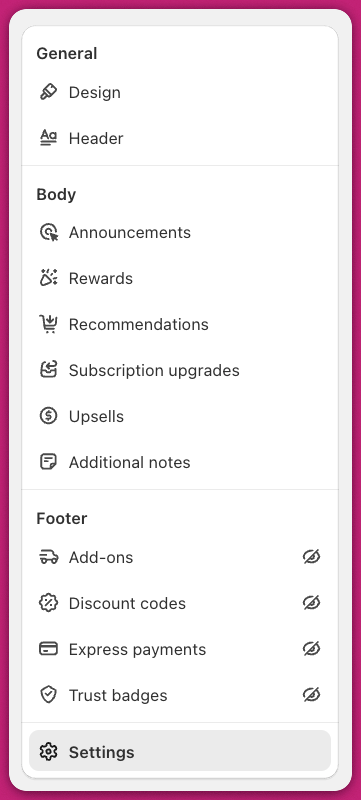
你可以在 Upcart 后台中打开 Cart Editor 标签页,查看可用模块的列表。
Upcart 中的购物车抽屉由多个模块组成。每个模块都提供独特的功能,并拥有各自可自定义的设置。
如果某个模块已停用,其旁边会显示一个划掉的眼睛图标。 要访问所有可用模块,请前往 Upcart 后台的 Cart Editor 标签页。
 想快速轻松地了解 Upcart 模块,请查看我们的 **[Upcart 快速入门指南](/zh/upcart/quickstart_guide_to_upcart)**
***
在开始使用 Upcart 或浏览应用时需要帮助?欢迎随时联系我们的 24/7 支持团队。
想快速轻松地了解 Upcart 模块,请查看我们的 **[Upcart 快速入门指南](/zh/upcart/quickstart_guide_to_upcart)**
***
在开始使用 Upcart 或浏览应用时需要帮助?欢迎随时联系我们的 24/7 支持团队。