> ## Documentation Index
> Fetch the complete documentation index at: https://docs.aftersell.com/llms.txt
> Use this file to discover all available pages before exploring further.

# 在 Upcart 中添加小计行

> 适用于希望在 checkout 按钮上方额外显示小计行的用户

<div id="introduction">
  ## 简介
</div>

如果小计设置\*（如下图所示）\*对你不起作用，本文档将介绍如何手动插入小计行。

<div id="enabling-subtotal-line">
  ## 启用小计行
</div>

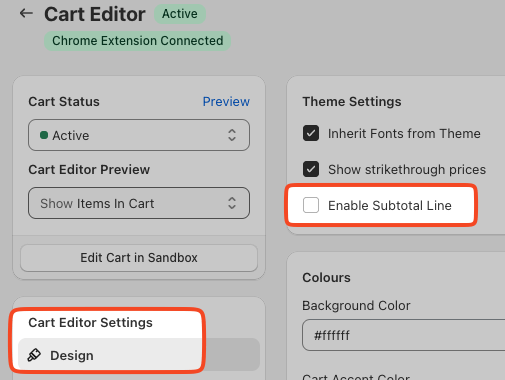
你可以在购物车 Design 设置中轻松启用小计（Subtotal）行。

该设置的位置如下：

**Cart Editor > Design > General > Enable subtotal line**
<img src="https://mintcdn.com/aftersell/uVGuDiyXpd6WOLO4/images/upcart/subtotal-line-cart-editor-design-settings.png?fit=max&auto=format&n=uVGuDiyXpd6WOLO4&q=85&s=a1c15c581fe49f32c8144e25c23f5d5b" alt="Cart Editor Design 设置中突出显示 Enable Subtotal Line 复选框" width="505" height="380" data-path="images/upcart/subtotal-line-cart-editor-design-settings.png" />

<div id="inserting-subtotal-via-code">
  # 通过代码插入小计
</div>

<div id="accessing-custom-css-and-html-settings">
  ## 访问自定义 CSS 和 HTML 设置
</div>

要开始自定义 Upcart 的 CSS，请按以下步骤操作：

1. 在后台中打开 Upcart 应用。
2. 前往 Cart Editor。
3. 打开 **Settings**。这是一行标签页 — 选择 **Custom HTML** 或 **Custom CSS**（如果标签行放不下，它们会位于 **More settings** 之后）。

<div id="html">
  ## HTML
</div>

请务必选择一个 HTML 位置，以便针对你希望在 Upcart 中看到的更改。在我们的例子中，我们希望小计行显示在"checkout 按钮上方"。你可以随意修改下面的"Subtotal"文本，使其符合你偏好的语言。

```
<div   
  class="cart-subtotal-section"   
  style="display: flex; justify-content: space-between;"  
>  
  <span class="cart-subtotal-title">Subtotal</span>  
  <span class="cart-subtotal-value">{{UPCART_SUBTOTAL}}</span>  
</div>
```

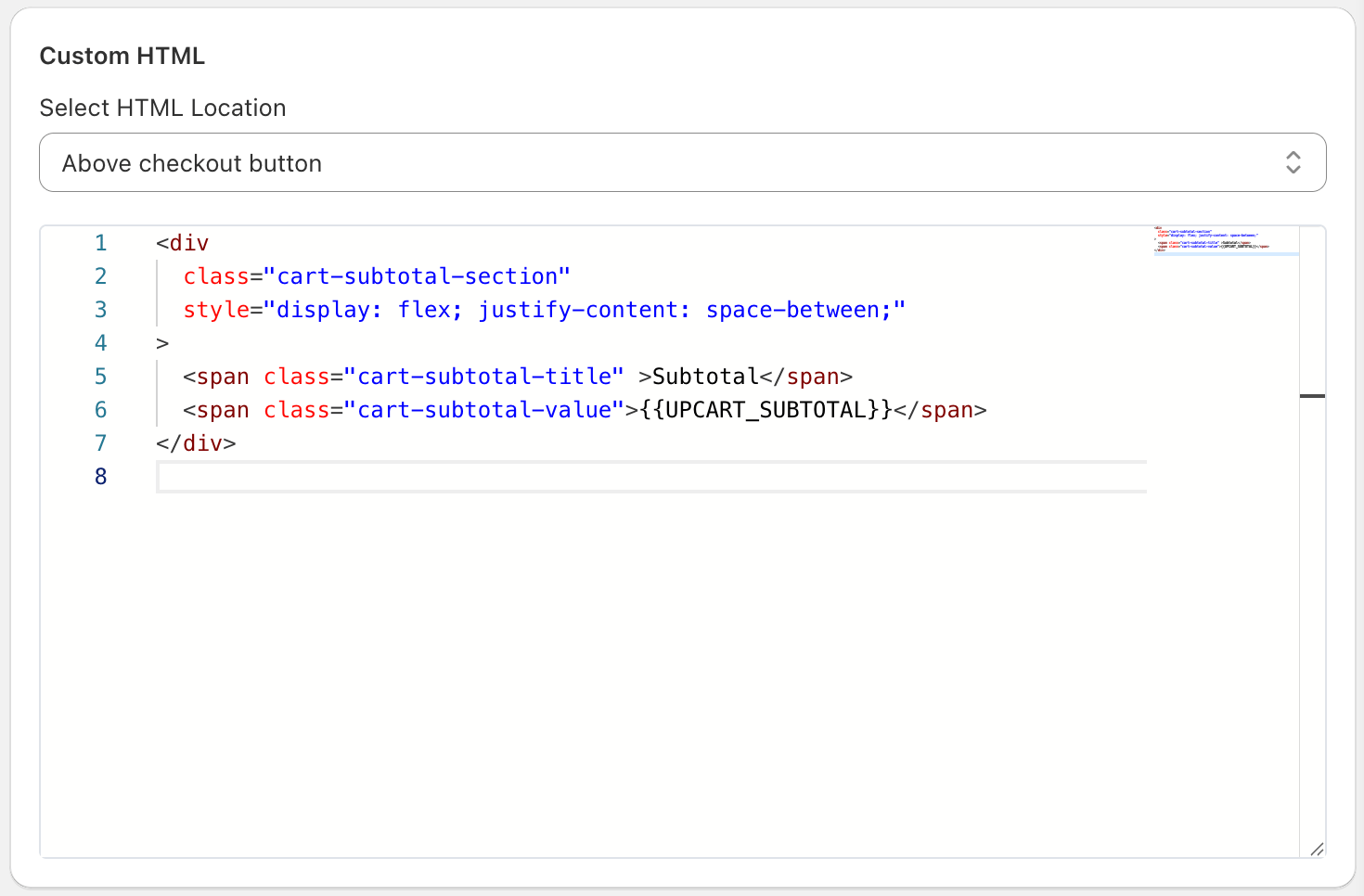
你在 Upcart 中的自定义 HTML 设置应如下所示：

<img src="https://mintcdn.com/aftersell/uVGuDiyXpd6WOLO4/images/upcart/subtotal-line-custom-html-settings-above.png?fit=max&auto=format&n=uVGuDiyXpd6WOLO4&q=85&s=28c3da390eca8817499ed35864f7f381" alt="自定义 HTML 设置选择了 Above checkout button 并填入小计行代码" width="1470" height="966" data-path="images/upcart/subtotal-line-custom-html-settings-above.png" />

<div id="css">
  ## CSS
</div>

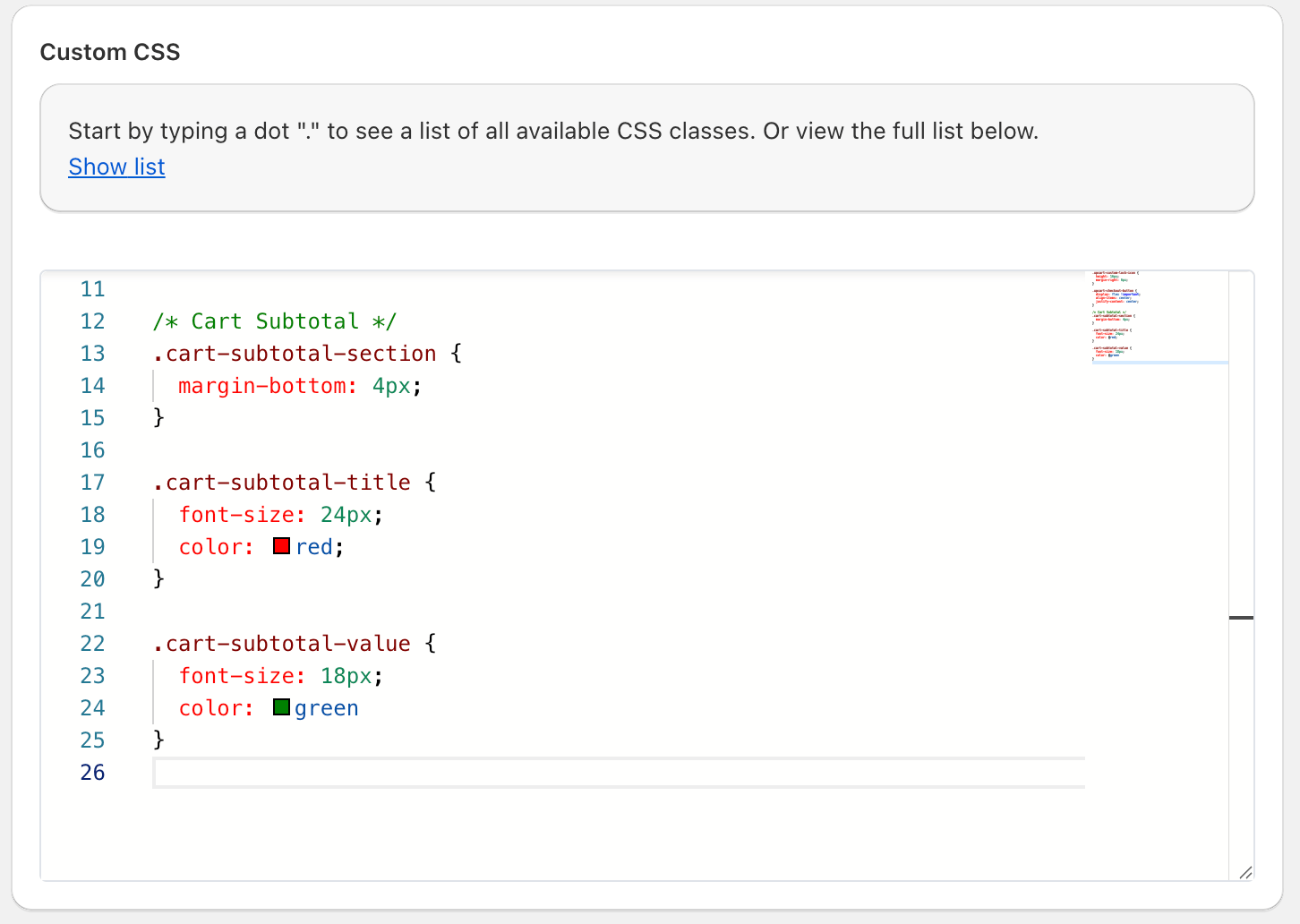
在 **Settings =>Custom CSS** 中，按需在自定义 CSS 中更改字体大小和颜色。完成后别忘了点击"Save"！

```
.cart-subtotal-section {  
  margin-bottom: 4px;  
}  
  
.cart-subtotal-title {  
  font-size: 24px;  
  color: red;  
}  
  
.cart-subtotal-value {  
  font-size: 18px;  
  color: green  
}
```
<img src="https://mintcdn.com/aftersell/uVGuDiyXpd6WOLO4/images/upcart/subtotal-line-custom-css-settings-cart.png?fit=max&auto=format&n=uVGuDiyXpd6WOLO4&q=85&s=2b4bd1b5ee98bc6eb5bb8f507a91ba31" alt="自定义 CSS 设置显示购物车小计的样式规则" width="1452" height="1032" data-path="images/upcart/subtotal-line-custom-css-settings-cart.png" />

***

<div id="support-for-customizations">
  ## 🚧 定制内容的支持
</div>

Upcart 的支持团队无法协助在你的购物车中实现自定义 CSS 或 HTML 方案。

如果你需要帮助设计或美化自定义内容，我们建议[咨询 Shopify 专家](https://www.shopify.com/partners/directory)，或[按照我们的 AI 提示词指南](https://docs.aftersell.com/upcart/ai_prompt_suggestions_for_adding_custom_code_to_your_upcart_settings#ai-prompt-suggestions-for-adding-custom-code-to-your-upcart-settings)与 LLM 交流。