> ## Documentation Index
> Fetch the complete documentation index at: https://docs.aftersell.com/llms.txt
> Use this file to discover all available pages before exploring further.
# 备注区块
> Aftersell Cart 的备注区块:一个可折叠的订单备注字段,将购物者的说明保存到购物车和订单中。
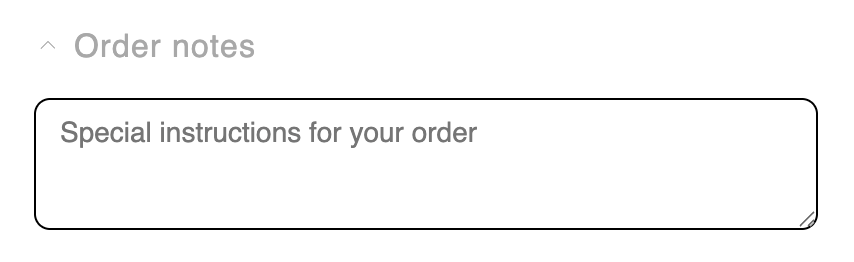
> **Notes** 区块是一个可折叠字段,购物者无需离开购物车即可添加订单备注或特殊说明(礼品留言、配送说明等)。备注会保存到购物车并一直带到订单中。
## 行为
* 该字段是一个**可折叠的展开控件**,默认折叠。折叠仅是视觉效果——已保存的备注仍然生效。当已保存备注且处于折叠状态时,会显示一个对勾,让购物者知道备注已存储。
* 备注**在购物者点击别处时保存**(失焦时),并提供保存中/已保存/错误的状态反馈。
* 如果购物车备注在别处被更改——`/cart` 页面或另一个标签页——该字段会同步过来,除非购物者已经开始输入,这样他们正在编写的备注永远不会被覆盖。
## 设置
| 设置 | 控制内容 | 默认值 |
| --------------- | -------------- | ------------------------------------- |
| **Title** | 字段的标签。富文本,可翻译。 | `Order notes` |
| **Placeholder** | 输入框的占位文本。可翻译。 | `Special instructions for your order` |
## 位置和限制
* \*\*区域:\*\*主体或底部。
* \*\*数量上限:\*\*每个购物车状态 1 个。
* \*\*状态:\*\*仅限已装满购物车。
* 默认不添加。未锁定——你可以删除或隐藏它。
## 自定义模板
支持从其 Code 标签页使用[自定义模板](/zh/aftersell/cart/custom-templates),用你的 JSX 替换此区块的内置标记。以下是它接收的 props。
| Prop | 类型 | 用途 |
| --------------- | ------------------------------------------ | ----------------------------------------------- |
| `titleHtml` | `string` | 已消毒的富文本标题 HTML。商家将标题留空时为空。 |
| `titleText` | `string` | 纯文本标题。用于 textarea 的 `aria-label`,以及在没有富文本时作为标题。 |
| `hasTitle` | `boolean` | 是否存在任一形式的标题。控制标题和切换控件的 `aria-label` 的显示。 |
| `placeholder` | `string` | 空备注字段中显示的占位文本。 |
| `noteInput` | `string` | 当前备注文本。 |
| `status` | `'idle' \| 'saving' \| 'saved' \| 'error'` | 保存生命周期。驱动朗读状态的 live region。 |
| `statusLabel` | `string` | `status` 对应的已解析 live region 播报文本。空闲时为空。 |
| `displayStatus` | `'idle' \| 'saving' \| 'saved' \| 'error'` | 图标使用的状态。与 `status` 相同,但含有文本的折叠备注会读作 `saved`。 |
| `isExpanded` | `boolean` | 备注字段是否展开。折叠仅是视觉效果;备注始终会持久保存。 |
| `onNoteChange` | `(value: string) => void` | 更新备注文本。用新值调用,例如从 textarea 的 `onInput` 调用。 |
| `onNoteBlur` | `(event: unknown) => void` | 保存备注。直接绑定到 textarea 的 `onBlur`;它从事件中读取值。 |
| `onToggle` | `() => void` | 切换展开和折叠状态。 |
**备注在 `onNoteBlur` 时保存,而不是每次按键时。**`onNoteChange` 和 `onNoteBlur` 都要接线,否则备注会静默地永远无法持久保存。将状态文本放在 live region 中,让屏幕阅读器播报保存中和已保存。
## 设计
使用设置面板中的 **Design** 部分为此区块设置样式。这些是按区块的覆盖,叠加在你的全局设计之上,留空时回退到全局设计。
### Text(文字)
Design 中的 **Text**(文字)部分让你控制两个元素的排版。使用 **Text element** 选择器在它们之间切换。
**Title**——备注字段上方的区域标题。加粗在上方的富文本编辑器(Settings 标签页)中设置。文字颜色在 Design 的 Toggle 部分设置。
| 设置 | 控制内容 | 默认值 |
| ------------------ | ----- | ------ |
| **Size** | 字体大小。 | `14px` |
| **Line height** | 行高倍数。 | `1.4` |
| **Letter spacing** | 字符间距。 | Normal |
**Note field**——购物者输入备注的 textarea 中的文字。
| 设置 | 控制内容 | 默认值 |
| ------------------ | ----------------------------------------- | ------------- |
| **Text color** | 备注文字的颜色。 | 继承自购物车文字颜色 |
| **Size** | 字体大小。 | `14px` |
| **Weight** | 字重——Light、Regular、Medium、Semibold 或 Bold。 | Regular (400) |
| **Line height** | 行高倍数。 | `1.5` |
| **Letter spacing** | 字符间距。 | Normal |
什么是设计设置?在这里了解更多:[设计设置](/zh/aftersell/cart/design-settings)。