> ## Documentation Index
> Fetch the complete documentation index at: https://docs.aftersell.com/llms.txt
> Use this file to discover all available pages before exploring further.

# Cart items 区块

> Cart items 区块：商品行列表、Product 行，以及嵌套子区块的宿主。

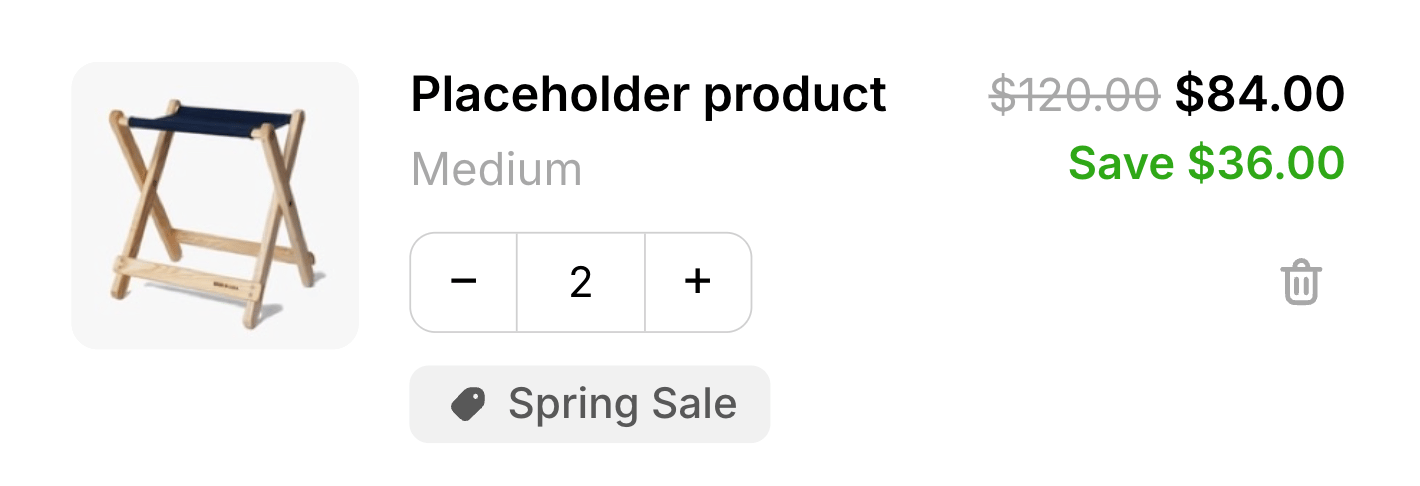
> **Cart items** 区块是购物车中的商品行列表，渲染顾客添加的每个产品，包括其图片、标题、变体、价格、数量步进器和移除控件。它是必需的区块，也是承载购物车子区块（**Product** 行、[**Subscription upgrade**](/zh/aftersell/cart/subscription-upgrade-block) 和 [**Custom code**](/zh/aftersell/cart/custom-code-blocks)）的容器，为按行显示的子区块提供了挂载结构。

<Frame>
  <img src="https://mintcdn.com/aftersell/1Y3gBpUfxv16VGSW/images/aftersell/cart-items-block-line-product-title-variant.png?fit=max&auto=format&n=1Y3gBpUfxv16VGSW&q=85&s=3c9f088b55cfd8450dcb8670dfe0728a" alt="Cart items 区块，显示带产品图片、标题、变体、价格、数量步进器和移除控件的商品行" width="1420" height="486" data-path="images/aftersell/cart-items-block-line-product-title-variant.png" />
</Frame>

<div id="the-product-row">
  ## Product 行
</div>

Cart items 内部有一个 **Product** 子区块：即实际的商品行。它是锁定的并自动添加，因此每个 Cart items 区块始终恰好有一个无法移除的 Product 行；你可以围绕它重新排列其他子区块。它的设置控制每行价格的显示方式：

| 设置                                                   | 控制内容                                                                                                                                              | 默认值                   |
| ---------------------------------------------------- | ------------------------------------------------------------------------------------------------------------------------------------------------- | --------------------- |
| **Strike-through price（划线价）**                        | 显示哪个价格为划线价：**Compare-at 或折扣前价格中较高者**、**Compare-at 价格**、**折扣前价格**或**不显示划线价**。                                                                      | Compare-at 或折扣前价格中较高者 |
| **Strike-through price for subscriptions（订阅商品的划线价）** | 订阅商品行的同类选项，有两点不同：多了一个 **Subscription compare-at price**（订阅划线价）选项，且 **Compare-at price** 更名为 **Product compare-at, then subscription compare-at**。 | Compare-at 或折扣前价格中较高者 |
| **Savings label（节省标签）**                              | 节省金额显示为**金额**、**百分比**还是**隐藏**。                                                                                                                    | 金额                    |
| **Bundle price（捆绑价格）**                               | 捆绑商品行显示价格的计算方式。**Automatic**（自动）显示捆绑中所有商品的总价（当其他商品免费时显示主商品价格）。**Main item price only**（仅主商品价格）只显示主（锚点）商品的价格。这仅是显示标签——Shopify 的购物车总额始终是权威数据。       | 自动                    |
| **Savings text（节省文字）**                               | 节省标签文字。支持 `{{value}}` 令牌。                                                                                                                         | `Save {{value}}`      |

该行本身渲染产品图片（可用时链接到产品页面）、标题、变体、价格及任何划线的 compare-at 价格、数量步进器和移除按钮。捆绑商品行会显示其组成部分的展开列表。

<div id="text-styling">
  ### 文字样式
</div>

Product 行的设计设置中包含 **Text**（文字）部分。使用它来控制每个商品行中各个文字元素的排版。从选择器中选择一个文字元素以调整其设置：

| 设置                      | 控制内容                                                                                   |
| ----------------------- | -------------------------------------------------------------------------------------- |
| **Text color**（文字颜色）    | 所选文字元素的颜色。                                                                             |
| **Font**（字体）            | **Theme font**（继承你主题的字体）或 **Custom font**（输入你的主题已加载的字体名称）。仅 **Product title**（产品标题）可用。 |
| **Size**（字号）            | 以像素为单位的字号。                                                                             |
| **Weight**（字重）          | 字重：Light、Regular、Medium、Semibold 或 Bold。                                               |
| **Line height**（行高）     | 行高，以字号的倍数表示（例如 `1.4`）。                                                                 |
| **Letter spacing**（字间距） | 以像素为单位的字间距。负值会收紧文字。                                                                    |

可设置样式的文字元素按类别分组：

**Product（产品）**

* **Product title**（产品标题）— 每行的产品名称。也支持自定义字体族。
* **Variant**（变体）— 变体标签（例如 *Size: Medium*）。
* **Subscription plan**（订阅计划）— 显示在订阅商品行上的只读计划标签。

**Pricing（价格）**

* **Price**（价格）— 该行的当前价格。
* **Compare-at price**（划线价）— 划线的原价。
* **Savings**（节省）— 节省标签（例如 *Save \$5.00*）。仅支持字号和行高——粗体和颜色在上方的富文本编辑器中设置。

**Bundle（捆绑）**

* **Bundle toggle**（捆绑切换）— 展开捆绑组成商品列表的展开标题。
* **Bundle item title**（捆绑商品标题）— 捆绑内每个组成商品的标题。
* **Bundle item variant**（捆绑商品变体）— 每个捆绑组成商品的变体标签。

任何字段留空都会保持该元素的默认值。

<Tip>
  直接点击购物车预览中的某个文字元素会高亮它，并自动在面板中打开其控件。
</Tip>

<div id="discount-tags-design">
  ### 折扣标签设计
</div>

Product 行的设计设置中包含 **Discount tags**（折扣标签）部分。使用它为每个商品行上显示的折扣标签胶囊设置样式：

| 设置                         | 控制内容          | 默认值       |
| -------------------------- | ------------- | --------- |
| **Background color（背景颜色）** | 折扣标签胶囊的填充颜色。  | `#F1F1F1` |
| **Text color（文字颜色）**       | 折扣标签胶囊内的文字颜色。 | `#585858` |
| **Border radius（圆角半径）**    | 折扣标签胶囊的圆角程度。  | `6px`     |

这些设置仅适用于 Cart items 区块中的商品行折扣标签。[Summary 区块](/zh/aftersell/cart/summary-block)中的折扣码标签单独设置样式。

<div id="sub-blocks-and-how-they-position">
  ## 子区块及其定位方式
</div>

Cart items 是唯一承载子区块的区块。**子区块在每行渲染一次，位于每个商品行内部**，相对于固定的 Product 行定位：

* 排在 Product 行**之前**的子区块出现在每行商品内容的**上方**。
* 排在 Product 行**之后**的子区块出现在每行商品内容的**下方**。

因此，放置在 Product 行之后的 [Subscription upgrade](/zh/aftersell/cart/subscription-upgrade-block) 会显示在每个符合条件的商品行下方，而不是在整个列表底部只显示一次。

<div id="behavior">
  ## 行为
</div>

* 当购物车中没有商品时，抽屉会切换到空状态，此区块不显示。
* **购物车更改一次只执行一个。** 当数量更新或移除操作正在进行时，该行的控件会被禁用以保持购物车一致性，更改完成后重新启用。
* 将某行数量降到 1 以下会将其移除。商店拒绝的数量（例如超出可用库存）会重新同步为最后一个有效值。
* **捆绑商品作为一个整体变化。** 调整捆绑锚点行的数量会一次性缩放整个捆绑——如果某个子商品按每个锚点 3 件包含，将锚点从 1 调到 2 会使该子商品变为 6 件。移除锚点会同时移除捆绑的所有成员。
* **有些捆绑无法调整数量。** 如果捆绑的任何子商品按小数比例包含（例如每个锚点 1.5 件），该捆绑的数量步进器会被锁定：+/− 按钮和数量字段都被禁用，且不接受输入的数量。该捆绑仍可移除。
* **订阅商品行显示其计划。** 当某行有销售计划，且 [Subscription upgrade](/zh/aftersell/cart/subscription-upgrade-block) 子区块被关闭或未添加时，Product 行会在变体下方显示只读的计划标签——例如 *Delivers every month (save 30%)*。当该子区块启用时，它会在自己的选择器中呈现计划，因此只读标签会被隐藏而不是重复显示。

<div id="placement-and-limits">
  ## 位置与限制
</div>

* **区域：** 主体。
* **最大数量：** 每种购物车状态 1 个。
* **状态：** 仅限有商品的购物车。
* **锁定且默认添加。** Cart items 无法移除或隐藏，只能重新定位。

<div id="custom-template">
  ## 自定义模板
</div>

支持通过其 Code 标签页使用[自定义模板](/zh/aftersell/cart/custom-templates)，用你的 JSX 替换此区块的内置标记。以下是它接收的 props。

**Cart items** 容器本身没有自定义模板。其内部的 **Product** 行有，而且它是购物车中最丰富的模板界面：你的模板每行渲染一次。

<div id="line-content">
  ### 行内容
</div>

| Prop               | 类型                          | 用途                                                                                                                                 |
| ------------------ | --------------------------- | ---------------------------------------------------------------------------------------------------------------------------------- |
| `title`            | `string`                    | 产品标题，纯文本。                                                                                                                          |
| `variantTitle`     | `string \| null`            | 变体标签。单变体产品和原生捆绑为 `null`。                                                                                                           |
| `url`              | `string \| null`            | 产品页面 URL。当该行不应外链时为 `null`。                                                                                                         |
| `imageUrl`         | `string \| null`            | 行图片。产品无图片时为 `null`。                                                                                                                |
| `quantity`         | `number`                    | 该行的当前数量。                                                                                                                           |
| `price`            | `string`                    | 行价格，**已格式化**。                                                                                                                      |
| `compareAtPrice`   | `string \| null`            | 划线的"原价"，已格式化。无可划线内容时为 `null`。                                                                                                      |
| `savingsHtml`      | `string \| null`            | 经过净化的 HTML 格式节省标签。隐藏或无节省时为 `null`。                                                                                                 |
| `discountTags`     | `string[]`                  | 该行折扣的名称，例如 `['Spring Sale']`。无折扣时为 `[]`。                                                                                           |
| `sellingPlanLabel` | `string \| null`            | 只读的订阅计划名称。当该行为一次性购买，或由 [Subscription upgrade](/zh/aftersell/cart/subscription-upgrade-block#custom-template) 子区块渲染计划 UI 时为 `null`。 |
| `bundle`           | `object \| null`            | 锚点行上的[捆绑](/zh/aftersell/cart/sdk-cart-object#bundles)视图模型。否则为 `null`。                                                              |
| `productId`        | `number`                    | Shopify 产品 ID。                                                                                                                     |
| `variantId`        | `number`                    | Shopify 变体 ID。                                                                                                                     |
| `line`             | `AftersellCartLine`         | 完整的[购物车行](/zh/aftersell/cart/sdk-cart-object#cart-lines)，用于上述 props 未覆盖的内容。                                                        |
| `formatMoney`      | `(cents: number) => string` | 格式化以最小货币单位表示的金额。用于你从 `line` 读取的价格。                                                                                                 |

<Warning>
  **`price` 和 `compareAtPrice` 是格式化后的字符串；`line` 上的所有内容都以分为单位。** 不要对 `price` 做算术运算。请基于 `line.finalLinePrice` 等字段计算，然后将结果传给 `formatMoney`。
</Warning>

<div id="quantity-and-removal">
  ### 数量与移除
</div>

| Prop                | 类型                                               | 用途                                                                     |
| ------------------- | ------------------------------------------------ | ---------------------------------------------------------------------- |
| `increment`         | `() => void`                                     | 该行数量加一。                                                                |
| `decrement`         | `() => void`                                     | 该行数量减一。                                                                |
| `remove`            | `() => void`                                     | 完全移除该行。                                                                |
| `quantityInput`     | `string`                                         | 受控数量 `<input>` 的当前值。为字符串，以便保留输入中间状态。                                   |
| `onQuantityInput`   | `(event: Event) => void`                         | 该字段的 `onInput` 处理函数。                                                   |
| `commitQuantity`    | `() => void`                                     | 应用输入的数量。绑定到 `onBlur`。                                                  |
| `onQuantityKeyDown` | `(event: KeyboardEvent) => void`                 | `onKeyDown` 处理函数，使按 Enter 键提交。                                         |
| `busy`              | `boolean`                                        | 任何购物车变更进行中时为 `true`。据此禁用你的控件。                                          |
| `pending`           | `'increment' \| 'decrement' \| 'remove' \| null` | 当前正在执行的操作，用于显示针对性的加载动画。                                                |
| `stepperLocked`     | `boolean`                                        | 数量无法更改时为 `true`，原因是该行是捆绑锚点且某个子商品以小数比例包含。请隐藏或禁用步进器——设置此值时，内置处理函数已会拒绝更改。 |

```jsx theme={"theme":{"light":"snazzy-light","dark":"github-dark"}}
function CustomTemplate(props) {
  return (
    <div className="cart-external-cart-items__row" style={{ display: 'flex', gap: '12px', opacity: props.busy ? 0.6 : 1 }}>
      {props.imageUrl && <img src={props.imageUrl} alt="" width={64} height={64} />}

      <div style={{ flex: 1 }}>
        {props.url ? <a href={props.url}>{props.title}</a> : <span>{props.title}</span>}
        {props.variantTitle && <div style={{ opacity: 0.6 }}>{props.variantTitle}</div>}
        {props.sellingPlanLabel && <div style={{ opacity: 0.6 }}>{props.sellingPlanLabel}</div>}

        {props.discountTags.map((tag) => (
          <span key={tag} style={{ fontSize: '11px', border: '1px solid', borderRadius: '4px', padding: '1px 5px' }}>
            {tag}
          </span>
        ))}

        {!props.stepperLocked && (
          <div style={{ display: 'flex', alignItems: 'center', gap: '6px', marginTop: '6px' }}>
            <button type="button" onClick={props.decrement} disabled={props.busy}>&minus;</button>
            <input
              value={props.quantityInput}
              onInput={props.onQuantityInput}
              onBlur={props.commitQuantity}
              onKeyDown={props.onQuantityKeyDown}
              size={2}
            />
            <button type="button" onClick={props.increment} disabled={props.busy}>+</button>
            <button type="button" onClick={props.remove} disabled={props.busy}>
              {props.pending === 'remove' ? 'Removing…' : 'Remove'}
            </button>
          </div>
        )}
      </div>

      <div style={{ textAlign: 'right' }}>
        <div>{props.price}</div>
        {props.compareAtPrice && <s style={{ opacity: 0.5 }}>{props.compareAtPrice}</s>}
        {props.savingsHtml && <div dangerouslySetInnerHTML={{ __html: props.savingsHtml }} />}
      </div>
    </div>
  );
}
```

<div id="rendering-a-bundle">
  ### 渲染捆绑商品
</div>

在捆绑的锚点行上，`bundle.children` 保存其内容。子商品永远不会作为独立行出现，因此如果你不渲染它们，顾客将看不到捆绑中包含什么：

```jsx theme={"theme":{"light":"snazzy-light","dark":"github-dark"}}
function CustomTemplate(props) {
  return (
    <div>
      <div>{props.title} {props.price}</div>

      {props.bundle && (
        <ul style={{ margin: '4px 0 0 12px', fontSize: '12px', opacity: 0.7 }}>
          {props.bundle.children.map((child, i) => (
            <li key={child.key ?? i}>{child.quantity} × {child.title}</li>
          ))}
        </ul>
      )}
    </div>
  );
}
```

对于 Shopify 原生捆绑的组成商品，子商品的 `key` 为 `null`，因此请如上所示回退到索引。

<div id="design">
  ## 设计
</div>

通过设置面板中的 **Design**（设计）部分为此区块设置样式。这些是按区块的覆盖设置，叠加在你的全局设计之上，留空时回退到全局设计。

什么是设计设置？在此了解更多：[设计设置](/zh/aftersell/cart/design-settings)。
