> ## Documentation Index
> Fetch the complete documentation index at: https://docs.aftersell.com/llms.txt
> Use this file to discover all available pages before exploring further.
# Why isn't my upsell showing?
> This article explains how to troubleshoot when your upsell products aren’t appearing in the cart drawer.
# Overview
Upsells in Upcart rely on multiple Shopify and app-specific conditions to display correctly. If your upsell isn’t appearing on the storefront, this guide walks you through every step to identify and resolve the issue.
***
## Common Causes of Missing Upsells
The most frequent reasons an upsell might not appear include:
* Inventory issues or product status in Shopify
* Incorrect product or channel configuration
* Upsell module settings in Upcart (such as triggers or limits)
* Missing collection relationships for AI-recommended upsells
Let’s look at each of these in more detail.
***
## Shopify Product Configuration
## Inventory Settings
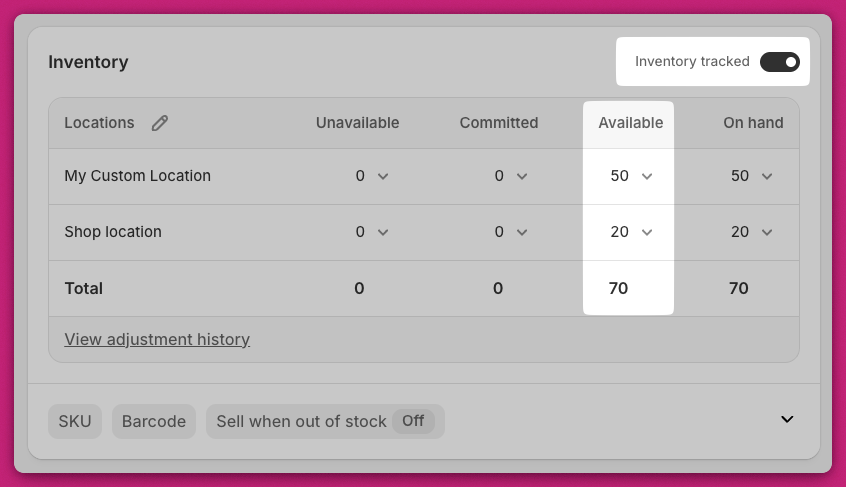
There are two inventory settings that affect product visibility:
* **Track quantity:** If enabled, the product must have available inventory to appear.
* If **Track quantity** is disabled, the product won’t sell out and the upsell will display regardless of stock level.
💡 **To verify:**
1. Go to **Shopify Admin > Products > Inventory**.
2. For single-variant products, scroll to the **Inventory** section.
3. For multi-variant products, scroll to **Variants** and check stock for each one.
 📘 Learn more: Shopify Inventory Management Docs
***
## Product Status: Active vs Draft
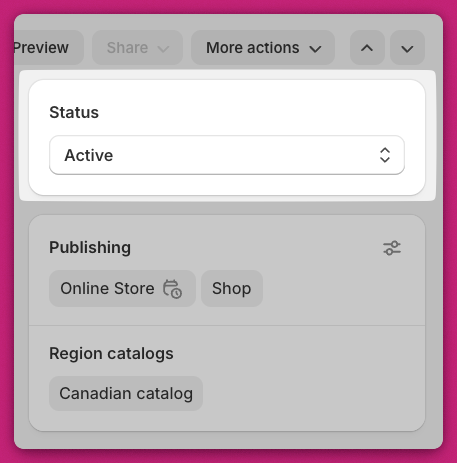
Ensure the upsell product is marked as **Active**, not **Draft**.\
Draft products will not appear in the cart drawer.
💡 **To check:**
* Go to **Shopify Admin > Products** or open the product and check the status badge in the top right.
📘 Learn more: Shopify Inventory Management Docs
***
## Product Status: Active vs Draft
Ensure the upsell product is marked as **Active**, not **Draft**.\
Draft products will not appear in the cart drawer.
💡 **To check:**
* Go to **Shopify Admin > Products** or open the product and check the status badge in the top right.
 📘 More info: Shopify Product Status Docs
***
## Sales Channels: Online Store
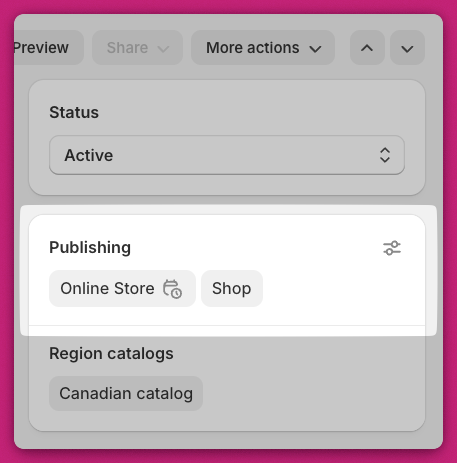
Upsell products must be published to the **Online Store** sales channel.
💡 **To verify:**
1. Open the product in Shopify.
2. Look for the **Publishing** section and confirm **Online Store** is selected.
3. If missing, click the **three-dot menu > Manage sales channels** and check **Online Store**, then save.
📘 More info: Shopify Product Status Docs
***
## Sales Channels: Online Store
Upsell products must be published to the **Online Store** sales channel.
💡 **To verify:**
1. Open the product in Shopify.
2. Look for the **Publishing** section and confirm **Online Store** is selected.
3. If missing, click the **three-dot menu > Manage sales channels** and check **Online Store**, then save.
 ## Product Type Limitations
Upcart doesn’t support certain product types for upsells:
* ❌ Subscription-only products
* ❌ Bundle products (unless built as standard Shopify products)
***
## Upcart Module Settings
## “Show Upsell If Item Already in Cart”
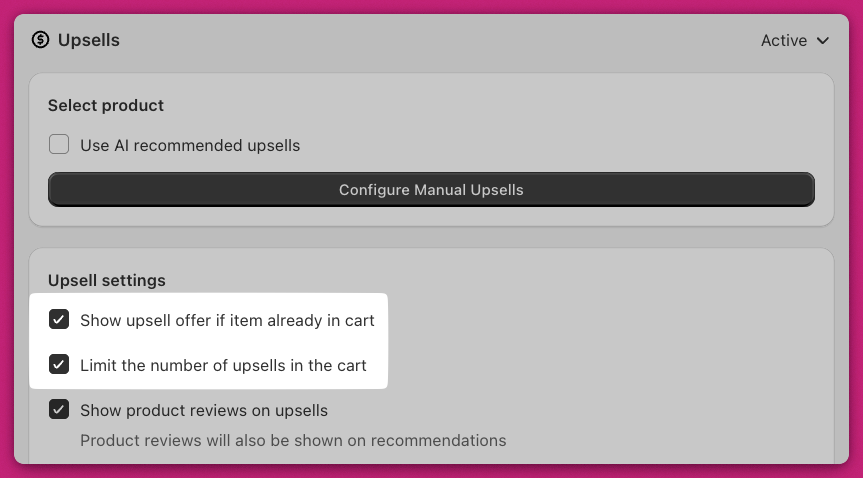
This setting determines whether upsells appear when the product is already in the cart.
* ✅ **Checked:** The upsell always displays.
* ❌ **Unchecked:** The upsell hides if the product is already in the cart.
***
## “Limit Number of Upsells”
If this setting is enabled, only a limited number of upsells will appear.
The Upsells module reads from **top to bottom** in your list.\
If the cart already includes the maximum number of upsells, any lower-priority ones won’t display.
🧠 **Example:**\
If the maximum number of upsells is set to **2**, and the first two upsells are triggered, any additional upsells (even if valid) will not appear.
## Product Type Limitations
Upcart doesn’t support certain product types for upsells:
* ❌ Subscription-only products
* ❌ Bundle products (unless built as standard Shopify products)
***
## Upcart Module Settings
## “Show Upsell If Item Already in Cart”
This setting determines whether upsells appear when the product is already in the cart.
* ✅ **Checked:** The upsell always displays.
* ❌ **Unchecked:** The upsell hides if the product is already in the cart.
***
## “Limit Number of Upsells”
If this setting is enabled, only a limited number of upsells will appear.
The Upsells module reads from **top to bottom** in your list.\
If the cart already includes the maximum number of upsells, any lower-priority ones won’t display.
🧠 **Example:**\
If the maximum number of upsells is set to **2**, and the first two upsells are triggered, any additional upsells (even if valid) will not appear.
 ***
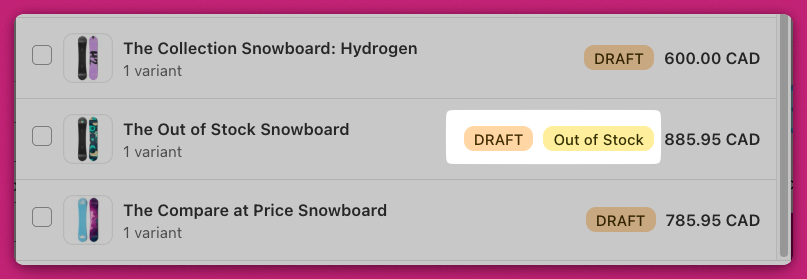
## Upsell Triggers
Manual upsells require a **trigger product** to function.
✅ The trigger product must be:
* In stock
* Active
* Published to the **Online Store** channel
✅ If the trigger product has variants, at least one variant must be selected in the **Upsell settings**.
⚠️ If no variant is selected, the upsell will not appear, even if all other conditions are met.
Also, make sure the upsell product itself meets the same criteria.
***
## Upsell Triggers
Manual upsells require a **trigger product** to function.
✅ The trigger product must be:
* In stock
* Active
* Published to the **Online Store** channel
✅ If the trigger product has variants, at least one variant must be selected in the **Upsell settings**.
⚠️ If no variant is selected, the upsell will not appear, even if all other conditions are met.
Also, make sure the upsell product itself meets the same criteria.
 ***
# AI-Recommended Upsells
If you’re using **AI-recommended upsells**, there are specific conditions to check:
## Related Algorithm
Upsells only appear if the cart item shares a **collection** with other products in the store.
✅ **Solution:** Add both products to the same Shopify collection.
## Complementary Algorithm
These upsells are based on **Shopify’s purchase behavior data**.
* Shopify must have sufficient data to identify product pairings.
* Ensure your store’s data settings allow for AI-based recommendations.
📘 Learn how to set up complementary upsells:\
[Shopify Complementary Products Guide](https://help.shopify.com/en/manual/online-store/themes/customizing-themes/common-customizations/add-product-recommendations#complementary-products)
***
## Summary
If your upsells aren’t showing, review the following:
* The upsell product is **Active**, **in stock**, and **published** to the **Online Store** channel.
* Your **Upsell Module settings** are correctly configured (no limiting conditions preventing display).
* Your **trigger product** and upsell product meet Shopify visibility requirements.
* Collections and AI configurations are correctly set for AI-based upsells.
***
## Need Help?
If your upsell still isn’t appearing after reviewing these steps, contact **Upcart Support** through in-app chat. Please include:
* The upsell product name
* A screenshot of your module settings
* A short description of the issue
Our team will help identify and resolve the problem quickly.
***
## Need Help Setting Up Upsells?
For full setup instructions and best practices, visit our [Upsells Module Guide](/upcart/upsells_module).
***
# AI-Recommended Upsells
If you’re using **AI-recommended upsells**, there are specific conditions to check:
## Related Algorithm
Upsells only appear if the cart item shares a **collection** with other products in the store.
✅ **Solution:** Add both products to the same Shopify collection.
## Complementary Algorithm
These upsells are based on **Shopify’s purchase behavior data**.
* Shopify must have sufficient data to identify product pairings.
* Ensure your store’s data settings allow for AI-based recommendations.
📘 Learn how to set up complementary upsells:\
[Shopify Complementary Products Guide](https://help.shopify.com/en/manual/online-store/themes/customizing-themes/common-customizations/add-product-recommendations#complementary-products)
***
## Summary
If your upsells aren’t showing, review the following:
* The upsell product is **Active**, **in stock**, and **published** to the **Online Store** channel.
* Your **Upsell Module settings** are correctly configured (no limiting conditions preventing display).
* Your **trigger product** and upsell product meet Shopify visibility requirements.
* Collections and AI configurations are correctly set for AI-based upsells.
***
## Need Help?
If your upsell still isn’t appearing after reviewing these steps, contact **Upcart Support** through in-app chat. Please include:
* The upsell product name
* A screenshot of your module settings
* A short description of the issue
Our team will help identify and resolve the problem quickly.
***
## Need Help Setting Up Upsells?
For full setup instructions and best practices, visit our [Upsells Module Guide](/upcart/upsells_module).