> ## Documentation Index
> Fetch the complete documentation index at: https://docs.aftersell.com/llms.txt
> Use this file to discover all available pages before exploring further.
# Upcart HTML location library
> Learn where custom HTML and JavaScript will appear in the cart drawer.
# Overview
Upcart allows you to insert HTML or JavaScript into specific locations throughout the cart using the **Custom HTML** editor. This gives you full control over layout, visibility, and conditional content inside the cart experience.
Use this guide to understand how each location behaves and where your content will appear.
## Available HTML locations
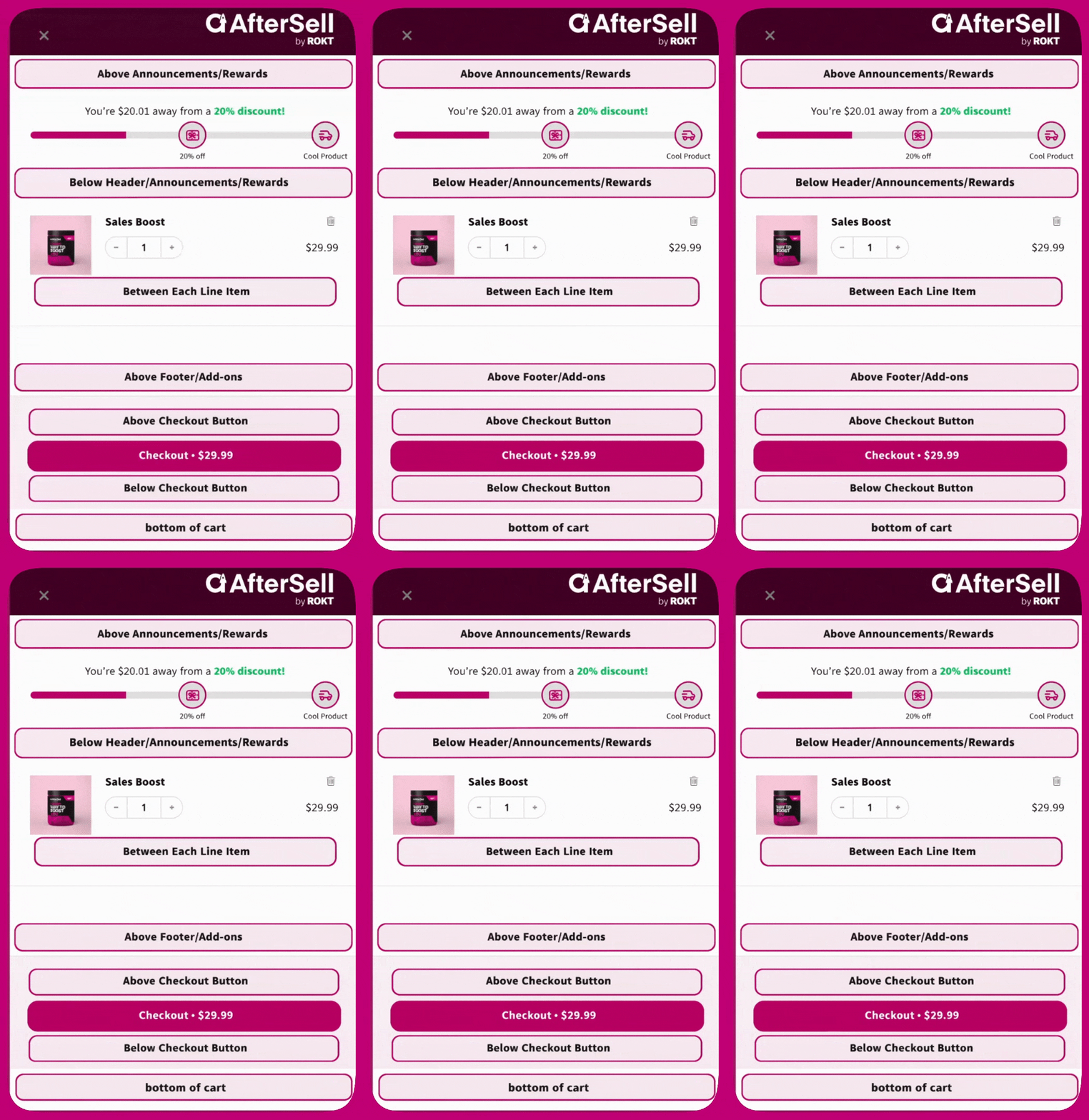
#### **Above announcements/rewards**
Renders directly below the cart header, before any modules.\
Use this to add site-wide messages, flags, or dynamic banners.
#### **Below header/announcements/rewards**
Displays directly after the Announcements and Rewards modules, and just before the product list.
#### **Between each line item**
Repeats your HTML after every product in the cart.\
Ideal for showing disclaimers or additional product-specific info.
#### **Below cart items**
Renders below the product list, after all cart line items. Use this for messaging, banners, or custom content that should appear under the products but above upsells and add-ons.
#### **Above footer/add-ons**
Appears below the product list and upsells, but above the Add-ons section.\
Great for messaging that leads into warranty or shipping protection offers.
#### **Above checkout button**
Displays within the footer area, just above the checkout button and subtotal.\
Often used to show price breakdowns, shipping notices, or terms.
#### **Below checkout button**
Also in the footer, but positioned after the checkout button and just before add-ons.\
Helpful for secondary CTAs or legal notices.
#### **Bottom of cart**
Displays outside the footer area at the very bottom of the cart drawer.\
Does not inherit the footer's background color.
#### **On empty cart screen**
Only shows when the cart is empty.\
Displays above the “Your cart is empty” message, useful for showing featured products or recommendations.
#### **Scripts (Before Load)**
Invisible placement used to run JavaScript **before** the cart loads.\
Use this for defining variables, setting conditions, or modifying Upcart behavior.
* All custom HTML placements are managed under:\
**Upcart > Cart Editor > Settings > Custom HTML**
## Visual reference
For a clear understanding of where each location renders inside the cart, refer to the labeled layout below