> ## Documentation Index
> Fetch the complete documentation index at: https://docs.aftersell.com/llms.txt
> Use this file to discover all available pages before exploring further.
# Tiered rewards module - rewards settings
> Display multiple offer tiers using Upcart's rewards bar to encourage higher cart value.
This guide covers how to configure and manage reward tiers, set up different reward types, and customize the customer-facing messaging.
📘 *This is the second of three guides on configuring the Rewards Module.*\
See also:\
[General Settings](/upcart/tiered_rewards_module_general_settings) | [Advanced Settings](/upcart/tiered_rewards_module_advanced_settings)
# Managing Reward Tiers
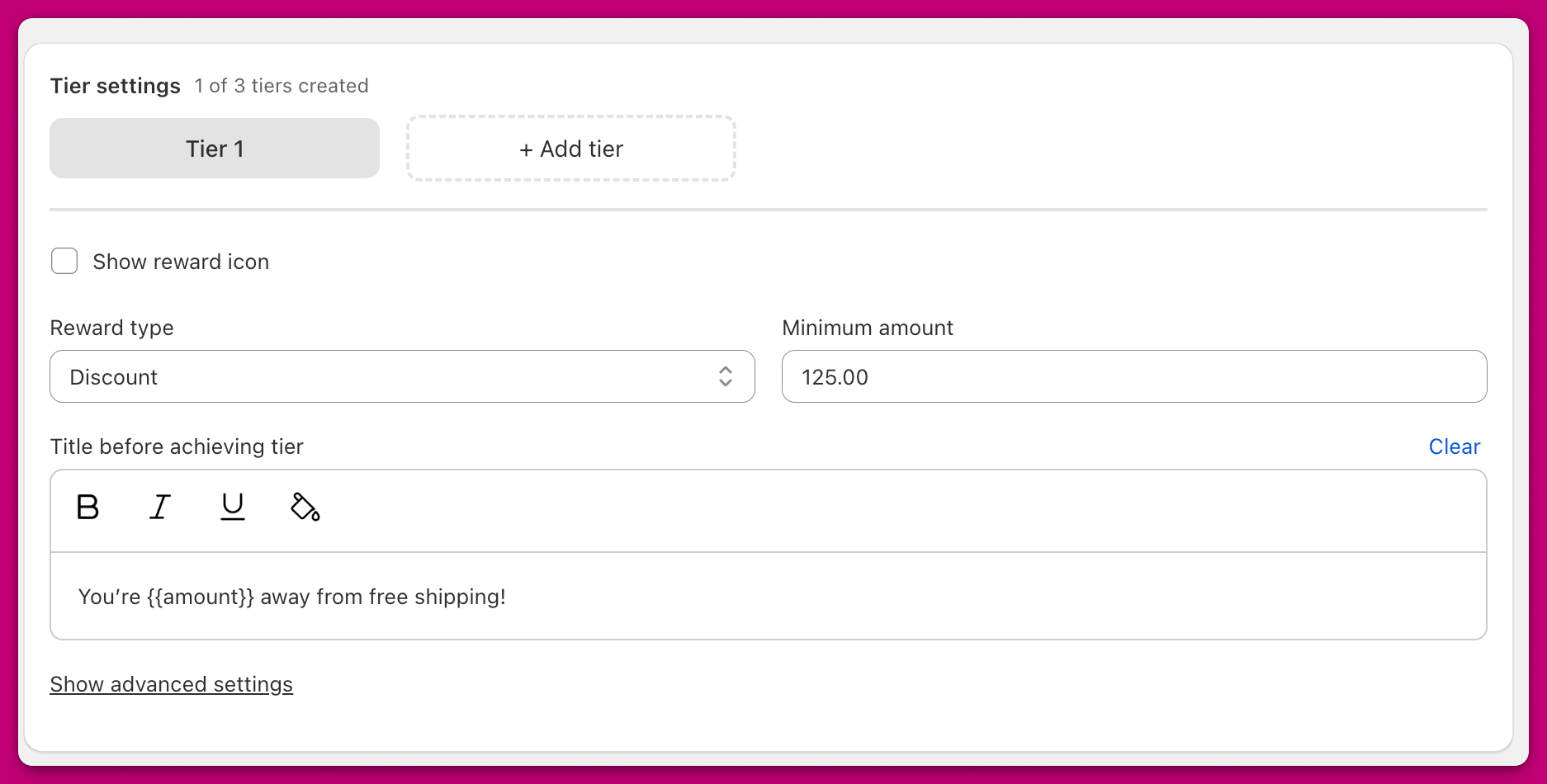 You can configure **up to four reward tiers** in Upcart's reward bar. The tier settings section displays a tabbed interface where you can manage each tier individually.
The header shows how many tiers you've created (e.g., "2 of 4 tiers created"). By default, one tier appears. Click the **+ Add tier** button to create additional tiers (up to your maximum limit).
To switch between tiers, click on the tier tabs at the top of the settings panel. To delete a tier, click the **X** icon on the active tier's tab.
### Show Reward Icons
Enable this toggle to display an icon alongside your reward tier. Icons are shown automatically if you have **more than one tier.**
# **Reward Types**
The **Reward Type** dropdown determines what kind of reward you're offering. The Tiered Rewards module is a visual progress bar and does not apply the underlying discount or shipping on its own. To activate the actual reward when a customer reaches a tier, create a matching rule in the Discounts module inside Upcart (the simplest option), set up an automatic discount in Shopify Admin, or use a discount management app like Abra.
## Shipping
You can configure **up to four reward tiers** in Upcart's reward bar. The tier settings section displays a tabbed interface where you can manage each tier individually.
The header shows how many tiers you've created (e.g., "2 of 4 tiers created"). By default, one tier appears. Click the **+ Add tier** button to create additional tiers (up to your maximum limit).
To switch between tiers, click on the tier tabs at the top of the settings panel. To delete a tier, click the **X** icon on the active tier's tab.
### Show Reward Icons
Enable this toggle to display an icon alongside your reward tier. Icons are shown automatically if you have **more than one tier.**
# **Reward Types**
The **Reward Type** dropdown determines what kind of reward you're offering. The Tiered Rewards module is a visual progress bar and does not apply the underlying discount or shipping on its own. To activate the actual reward when a customer reaches a tier, create a matching rule in the Discounts module inside Upcart (the simplest option), set up an automatic discount in Shopify Admin, or use a discount management app like Abra.
## Shipping
 Shows a **truck icon** in the cart drawer. Requires a matching free shipping rule, either in the Discounts module (Free Shipping reward type, Cart Total Threshold trigger), in Shopify Admin as an automatic discount, or via a discount management app like Abra.
## Discount
Shows a **truck icon** in the cart drawer. Requires a matching free shipping rule, either in the Discounts module (Free Shipping reward type, Cart Total Threshold trigger), in Shopify Admin as an automatic discount, or via a discount management app like Abra.
## Discount
 Shows a **discount tag icon**. Requires a matching discount rule, either in the Discounts module (Cart Discount reward type, Cart Total Threshold trigger), in Shopify Admin as an automatic discount, or via a discount management app like Abra.
### Advanced Discount Code Option
With the **Discount** reward type, you can optionally assign a **manual discount code** that automatically applies when the tier is reached.
* This overrides any manually applied code
* The code stays applied even if the tier is no longer met
* This behaves like a standard Shopify discount once triggered
**Manual discount code stops working when tiered rewards are active**
If your manual discount code stops applying at checkout while tiered rewards are active, this is typically a Shopify discount combination issue. Free product and free shipping reward tiers use Shopify discounts under the hood, if the manual code isn't set to combine with other discounts, Shopify will block it.
**Fix:** In Shopify Admin, open the discount code and enable **"Combine with other discounts."** The manual code should then apply alongside active reward tiers as expected.
## Product
Shows a **discount tag icon**. Requires a matching discount rule, either in the Discounts module (Cart Discount reward type, Cart Total Threshold trigger), in Shopify Admin as an automatic discount, or via a discount management app like Abra.
### Advanced Discount Code Option
With the **Discount** reward type, you can optionally assign a **manual discount code** that automatically applies when the tier is reached.
* This overrides any manually applied code
* The code stays applied even if the tier is no longer met
* This behaves like a standard Shopify discount once triggered
**Manual discount code stops working when tiered rewards are active**
If your manual discount code stops applying at checkout while tiered rewards are active, this is typically a Shopify discount combination issue. Free product and free shipping reward tiers use Shopify discounts under the hood, if the manual code isn't set to combine with other discounts, Shopify will block it.
**Fix:** In Shopify Admin, open the discount code and enable **"Combine with other discounts."** The manual code should then apply alongside active reward tiers as expected.
## Product
 Shows a **gift box icon**
### *Duplicate Product Setup*
1. [**Duplicate the product**](https://help.shopify.com/en/manual/sell-in-person/shopify-pos/inventory-management/products/duplicate-product) in Shopify
2. Set the duplicated version's price to **\$0**
3. Add "Free" to the title to differentiate it
4. Use that product as the reward in Upcart
### ***Discount Method***
You can also create an **automatic discount** in Shopify to apply a **100% discount** to the reward product.
This approach supports inventory tracking, but note that **only one automatic discount** can be applied per checkout. If another is already active, it may override the product reward discount. For more info, refer to [Shopify Discount Documentation](https://help.shopify.com/en/manual/discounts/discount-combinations#considerations-for-discount-combinations).
🛍️ **Multiple Product Reward**:\
You can add up to **four products** to a single reward tier.\
When the tier is reached, **all products are added to the cart**, customers cannot choose just one.
# **Reward Configuration Fields**
### **Reward Description**
Set the display title shown below the reward icon in the cart drawer.
### **Minimum Amount**
(Shown if *Reward Basis = Cart Total*)\
The cart's total (in your store's primary currency) required to unlock the reward.
### **Item Count**
(Shown if *Reward Basis = Item Count*)\
The number of cart items required to unlock the reward.
### **Title before achieving tier**
Customize the message shown above the reward bar when the customer hasn't yet reached the reward.
* Format text using **bold**, *italics*, underline, or color
* Use the variable `{AMOUNT}` to dynamically insert how much more the customer needs to spend if you are using the Cart Total rewards calculation
* Use the variable `{COUNT}` to dynamically display how many more items the customer needs to add if you are using the Cart Quantity reward calculation
Shows a **gift box icon**
### *Duplicate Product Setup*
1. [**Duplicate the product**](https://help.shopify.com/en/manual/sell-in-person/shopify-pos/inventory-management/products/duplicate-product) in Shopify
2. Set the duplicated version's price to **\$0**
3. Add "Free" to the title to differentiate it
4. Use that product as the reward in Upcart
### ***Discount Method***
You can also create an **automatic discount** in Shopify to apply a **100% discount** to the reward product.
This approach supports inventory tracking, but note that **only one automatic discount** can be applied per checkout. If another is already active, it may override the product reward discount. For more info, refer to [Shopify Discount Documentation](https://help.shopify.com/en/manual/discounts/discount-combinations#considerations-for-discount-combinations).
🛍️ **Multiple Product Reward**:\
You can add up to **four products** to a single reward tier.\
When the tier is reached, **all products are added to the cart**, customers cannot choose just one.
# **Reward Configuration Fields**
### **Reward Description**
Set the display title shown below the reward icon in the cart drawer.
### **Minimum Amount**
(Shown if *Reward Basis = Cart Total*)\
The cart's total (in your store's primary currency) required to unlock the reward.
### **Item Count**
(Shown if *Reward Basis = Item Count*)\
The number of cart items required to unlock the reward.
### **Title before achieving tier**
Customize the message shown above the reward bar when the customer hasn't yet reached the reward.
* Format text using **bold**, *italics*, underline, or color
* Use the variable `{AMOUNT}` to dynamically insert how much more the customer needs to spend if you are using the Cart Total rewards calculation
* Use the variable `{COUNT}` to dynamically display how many more items the customer needs to add if you are using the Cart Quantity reward calculation