> ## Documentation Index
> Fetch the complete documentation index at: https://docs.aftersell.com/llms.txt
> Use this file to discover all available pages before exploring further.
# An introduction to cart drawer modules
> This article explains how to use the cart module menu in Upcart.
# Overview
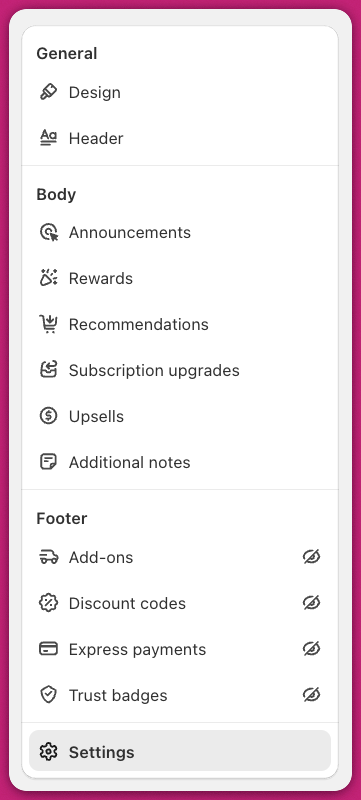
You can view a list of available modules by opening the Cart Editor tab in your Upcart dashboard.
The cart drawer in Upcart is built from several modules. Each module offers unique functionality and has its own customizable settings.
If a module is disabled, a crossed-out eye icon will appear next to it. To access all available modules, go to the Cart Editor tab in your Upcart dashboard.
 For a quick and easy introduction to Upcart modules, check out our **[Quickstart Guide to Upcart](/upcart/quickstart_guide_to_upcart)**
***
Need help getting started with Upcart or navigating the app? Contact our 24/7 support team anytime.
For a quick and easy introduction to Upcart modules, check out our **[Quickstart Guide to Upcart](/upcart/quickstart_guide_to_upcart)**
***
Need help getting started with Upcart or navigating the app? Contact our 24/7 support team anytime.