> ## Documentation Index
> Fetch the complete documentation index at: https://docs.aftersell.com/llms.txt
> Use this file to discover all available pages before exploring further.
# 카트 드로어 모듈 소개
> 이 문서는 Upcart에서 카트 모듈 메뉴를 사용하는 방법을 설명해요.
# 개요
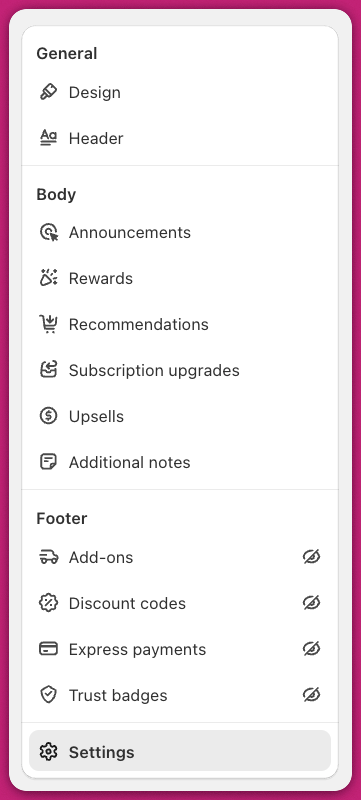
Upcart 대시보드에서 Cart Editor 탭을 열면 사용 가능한 모듈 목록을 볼 수 있어요.
Upcart의 카트 드로어는 여러 모듈로 구성되어 있어요. 각 모듈은 고유한 기능을 제공하고 자체적으로 커스터마이징할 수 있는 설정을 가지고 있어요.
모듈이 비활성화되어 있으면 옆에 줄이 그어진 눈 아이콘이 표시돼요. 사용 가능한 모든 모듈에 접근하려면 Upcart 대시보드의 Cart Editor 탭으로 이동하세요.
 Upcart 모듈에 대한 빠르고 쉬운 소개는 \*\*[Upcart 퀵스타트 가이드](/ko/upcart/quickstart_guide_to_upcart)\*\*를 확인해 보세요
***
Upcart를 시작하거나 앱을 사용하는 데 도움이 필요하신가요? 언제든지 24시간 연중무휴 지원팀에 문의해 주세요.
Upcart 모듈에 대한 빠르고 쉬운 소개는 \*\*[Upcart 퀵스타트 가이드](/ko/upcart/quickstart_guide_to_upcart)\*\*를 확인해 보세요
***
Upcart를 시작하거나 앱을 사용하는 데 도움이 필요하신가요? 언제든지 24시간 연중무휴 지원팀에 문의해 주세요.