> ## Documentation Index
> Fetch the complete documentation index at: https://docs.aftersell.com/llms.txt
> Use this file to discover all available pages before exploring further.

# 커스텀 통합

> Strategies API를 직접 호출하여 커스텀 스토어프런트 경험을 구현하세요 - PDP 캐러셀, 커스텀 카트 업셀 등 Aftersell의 기본 노출 영역이 닿지 않는 모든 곳에서 활용할 수 있어요.

<div id="overview">
  ## 개요
</div>

Aftersell의 기본 노출 영역(구매 후, 체크아웃, Upcart)이나 패키지형 통합이 모두 맞지 않을 때는, Shopify 테마에서 Strategies API를 직접 호출하고 반환된 상품을 원하는 방식으로 렌더링할 수 있어요.

패턴은 모든 경우에 동일해요: Liquid로 컨텍스트 페이로드를 구성하고(현재 상품, 카트 내용, 고객 필드 같은 Shopify 속성이 렌더링 시점에 채워지도록), `/api/public/strategy/evaluate`에 `POST`한 뒤 응답을 렌더링해요.

이 페이지에서는 두 가지 구현 패턴을 다뤄요:

* **PDP 컨텍스트** - 상품 페이지에 섹션을 배치하여 **현재 보고 있는 상품**으로 API를 호출하고 반환된 추천 상품의 캐러셀을 렌더링해요.
* **카트 컨텍스트** - 커스텀 카트 안에 업셀 블록을 렌더링하여 **현재 카트의 모든 라인 아이템**으로 API를 호출하고 반환된 상품을 렌더링해요.

두 패턴의 차이는 **상품 컨텍스트**의 형태예요: PDP에서는 단일 상품, 카트에서는 모든 라인 아이템의 배열이에요.

***

<div id="what-youll-need">
  ## 필요한 것
</div>

1. **Strategy API 키.** Aftersell에서 **Settings → Product Strategy**로 이동한 뒤 **Security Token** 카드에서 토큰을 복사하세요 (이것이 Strategy API 키예요).
2. **Strategy ID.** Aftersell Strategy 편집기에서 실행할 Strategy를 열고 ID를 복사하세요.
3. **테마 코드 접근 권한.** Shopify 테마에 Liquid 섹션(PDP) 또는 블록(커스텀 카트)을 추가하게 돼요 - Online Store → Themes → ... → Edit code.

<Warning>
  Strategy API 키는 클라이언트 측 테마 코드에 포함되므로 페이지 소스를 보는 누구에게나 노출돼요. 공개 스토어프런트 자격 증명으로 취급하고, 의도치 않게 노출된 경우 Aftersell **Settings → Product Strategy**에서 교체하세요.
</Warning>

***

<div id="pdp-context-section-snippet">
  ## PDP 컨텍스트: 섹션 스니펫
</div>

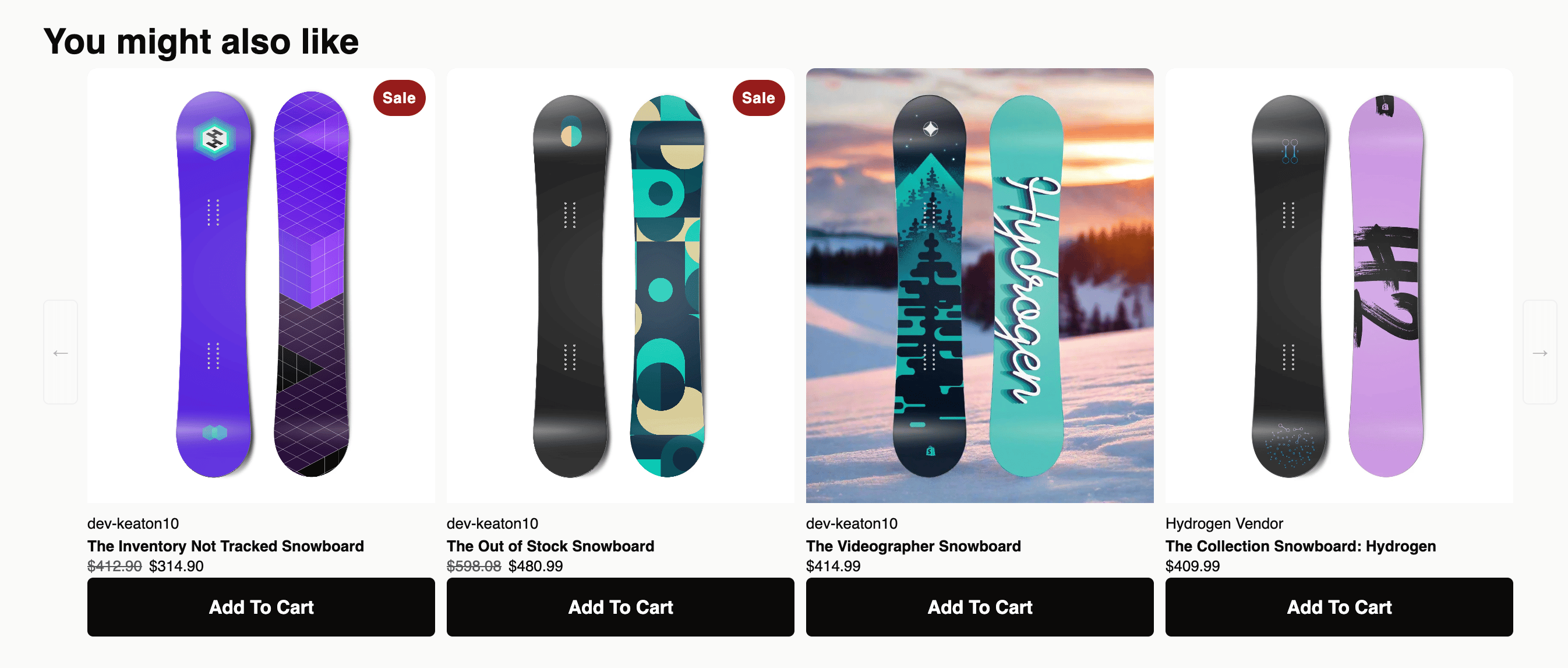
이 패턴은 상품 페이지에 Shopify 섹션을 추가해요. 페이지가 렌더링될 때 Liquid가 현재 상품, 카트, 고객 속성을 페이로드에 삽입하고, JavaScript가 Strategies API에 요청을 보내 반환된 상품을 Splide 캐러셀로 렌더링해요.

<div id="installing">
  ### 설치하기
</div>

1. Shopify 관리자에서 **Online Store → Themes**로 이동하고, 테마에서 \*\*...\*\*를 클릭한 다음 **Edit code**를 선택하세요.
2. **Sections** 폴더 아래에 `aftersell-upsell-carousel.liquid`라는 새 파일을 만드세요.
3. 아래 스니펫을 새 파일에 붙여넣고 `YOUR_STRATEGY_API_KEY`를 Aftersell의 API 키로 교체하세요.
4. 저장하세요.
5. 상품 템플릿(일반적으로 `templates/product.json` 또는 `sections/main-product.liquid`)을 열고 캐러셀을 표시할 위치에 **Aftersell Carousel** 섹션을 추가하세요. 테마 편집기에서 상품 페이지로 직접 드래그할 수도 있어요.
6. 섹션 설정에 **Strategy ID**를 붙여넣으세요.

<div id="what-the-section-sends">
  ### 섹션이 전송하는 것
</div>

각 PDP 조회마다 페이로드에는 다음이 포함돼요:

* **products** - 현재 보고 있는 상품이 담긴 단일 요소 배열 (productId, variantId, quantity, price, handle, title, vendor, productType, tags, collections, sellingPlan).
* **cart** - 쇼핑객의 현재 카트의 소계, 아이템 수, 라인 수 (카트가 비어 있으면 생략).
* **cartToken** - API가 이 평가를 동일한 세션에 연결할 수 있도록.
* **customer** - 태그, 국가, 지역, 로케일, 주문 수, 총 지출액, 마케팅 수신 동의 플래그, 단 **쇼핑객이 로그인한 경우에만**.
* **session** - `shop.currency`의 통화 코드.

이 섹션은 기본적으로 UTM 매개변수를 전송하지 않아요. PDP에서 UTM 기반 타기팅을 원한다면 클라이언트 측에서 캡처하여 fetch 전에 `session` 객체에 추가하세요.

<div id="the-snippet">
  ### 스니펫
</div>

```liquid theme={"theme":{"light":"snazzy-light","dark":"github-dark"}}
{% comment %}
  Aftersell Carousel (Splide)
  Type: Section — save to sections/aftersell-upsell-carousel.liquid
{% endcomment %}

{% if product %}

<link rel="stylesheet" href="https://cdn.jsdelivr.net/npm/@splidejs/splide@4.1.4/dist/css/splide-core.min.css">
<script src="https://cdn.jsdelivr.net/npm/@splidejs/splide@4.1.4/dist/js/splide.min.js" defer></script>

<div id="aftersell-upsell-{{ section.id }}" class="aftersell-upsell-carousel" style="display:none" {{ section.shopify_attributes }}>
  <h2 class="aftersell-heading">{{ section.settings.heading | default: 'You might also like' }}</h2>
  <div class="aftersell-carousel-wrapper">
    <button class="aftersell-arrow aftersell-arrow--prev" aria-label="Previous" disabled>&#8592;</button>
    <div class="aftersell-track-container">
      <div class="splide" id="aftersell-splide-{{ section.id }}">
        <div class="splide__track">
          <ul class="splide__list">
            <li class="splide__slide"><div class="aftersell-skeleton"></div></li>
            <li class="splide__slide"><div class="aftersell-skeleton"></div></li>
            <li class="splide__slide"><div class="aftersell-skeleton"></div></li>
            <li class="splide__slide"><div class="aftersell-skeleton"></div></li>
          </ul>
        </div>
      </div>
    </div>
    <button class="aftersell-arrow aftersell-arrow--next" aria-label="Next" disabled>&#8594;</button>
  </div>
</div>

<style>
.aftersell-upsell-carousel { font-family: Modernist, sans-serif; max-width: 1300px; margin: 0 auto; padding: 24px 0 0; box-sizing: border-box; }
.aftersell-heading { font-family: Modernist, sans-serif; font-size: 30px; font-weight: 700; line-height: 45px; color: #0C0A09; margin: 0; }
.aftersell-carousel-wrapper { display: flex; align-items: center; gap: 8px; }
.aftersell-track-container { overflow: hidden; flex: 1; min-width: 0; }
.aftersell-card { display: flex; flex-direction: column; box-sizing: border-box; height: 100%; }
.aftersell-card-link { text-decoration: none; color: inherit; display: block; flex: 1; }
.aftersell-card-image { aspect-ratio: 1; overflow: hidden; background: #f5f5f5; border-radius: 8px 8px 0 0; position: relative; }
.aftersell-card-image img { width: 100%; height: 100%; object-fit: cover; display: block; transition: transform 0.3s ease; }
.aftersell-card-image:hover img { transform: scale(1.04); }
.aftersell-card-badge { position: absolute; top: 10px; left: 8px; background: #c60006; color: #fff; font-size: 11px; font-weight: 500; padding: 4px 8px; border-radius: 16px; z-index: 1; }
.aftersell-card-body { padding: 6px 0 0; display: flex; flex-direction: column; }
.aftersell-card-vendor { font-size: 13px; font-weight: 550; text-transform: uppercase; color: #1d4481; margin: 0; }
.aftersell-card-title { font-size: 13px; font-weight: 700; color: #0C0A09; margin: 0; white-space: nowrap; overflow: hidden; text-overflow: ellipsis; }
.aftersell-card-price { font-size: 13px; color: #0C0A09; margin: 0; display: flex; gap: 6px; align-items: center; flex-wrap: wrap; }
.aftersell-card-price--compare { text-decoration: line-through; color: #595959; }
.aftersell-card-price--sale { font-weight: 700; color: #c60006; }
.aftersell-card-actions { padding: 6px 0 0; display: flex; flex-direction: column; margin-top: auto; }
.aftersell-variant-select { width: 100%; font-size: 13px; padding: 0.35rem 0.5rem; border: 1px solid #DBDBDB; border-radius: 4px; background: #fff; color: #0C0A09; cursor: pointer; }
.aftersell-cta { padding: 16px 12px; background: #c50007; color: #FFFFFF; border: none; border-radius: 5px; font-size: 16px; font-weight: 700; cursor: pointer; width: 100%; display: flex; align-items: center; justify-content: center; transition: background 0.2s, opacity 0.2s; }
.aftersell-cta:hover:not(:disabled) { opacity: 0.85; }
.aftersell-cta:disabled { opacity: 0.5; cursor: default; }
.aftersell-cta--added { background: #1d4481; }
.aftersell-cta--unavailable { background: #999; cursor: default; }
.aftersell-arrow { width: 30px; height: 90px; background: rgba(255,255,255,0.6); border: 1px solid #DBDBDB; border-radius: 5px; cursor: pointer; display: flex; align-items: center; justify-content: center; flex-shrink: 0; padding: 0; }
.aftersell-arrow:disabled { opacity: 0.3; cursor: default; }
.aftersell-skeleton { border-radius: 8px; background: linear-gradient(90deg, #f0f0f0 25%, #e0e0e0 50%, #f0f0f0 75%); background-size: 200% 100%; animation: aftersell-shimmer 1.4s infinite; aspect-ratio: 0.75; width: 100%; }
@keyframes aftersell-shimmer { 0% { background-position: 200% 0; } 100% { background-position: -200% 0; } }

#aftersell-splide-{{ section.id }} .splide__arrows,
#aftersell-splide-{{ section.id }} .splide__pagination { display: none !important; }

@media (max-width: 768px) {
  .aftersell-upsell-carousel { padding: 16px 16px 0; }
  .aftersell-arrow { display: none; }
  .aftersell-carousel-wrapper { gap: 0; }
}
</style>

<script>
(function() {
  var BACKEND_URL  = 'https://start.aftersell.app';
  var API_KEY      = 'YOUR_STRATEGY_API_KEY';
  var STRATEGY_ID  = {{ section.settings.strategy_id | json }};
  var SHOP_DOMAIN  = {{ shop.permanent_domain | json }};
  var CTA_LABEL    = '{{ section.settings.cta_label | default: "Add to cart" }}';
  var MAX_PRODUCTS = {{ section.settings.max_products | default: 8 }};
  var CURRENCY     = {{ shop.currency | default: "USD" | json }};
  var SECTION_ID   = {{ section.id | json }};
  if (!SHOP_DOMAIN || !STRATEGY_ID) return;

  var fmt;
  try {
    fmt = new Intl.NumberFormat('en-US', { style: 'currency', currency: CURRENCY });
  } catch(e) {
    fmt = { format: function(n) { return '$' + parseFloat(n).toFixed(2); } };
  }
  function money(str) { return fmt.format(parseFloat(str) || 0); }

  function gidToNumeric(gid) {
    return gid ? String(gid).split('/').pop() : null;
  }

  function priceHtml(price, compareAt) {
    var hasSale = compareAt && parseFloat(compareAt) > parseFloat(price);
    return hasSale
      ? '<span class="aftersell-card-price--compare">' + money(compareAt) + '</span>'
        + '<span class="aftersell-card-price--sale">' + money(price) + '</span>'
      : '<span class="aftersell-card-price--current">' + money(price) + '</span>';
  }

  var productContext = {
    productId:   'gid://shopify/Product/{{ product.id }}',
    variantId:   'gid://shopify/ProductVariant/{{ product.selected_or_first_available_variant.id }}',
    quantity:    1,
    price:       {{ product.price | divided_by: 100.0 }},
    handle:      {{ product.handle | json }},
    title:       {{ product.title | json }},
    vendor:      {{ product.vendor | json }},
    productType: {{ product.type | json }},
    tags:        {{ product.tags | json }},
    collections: [{% for col in product.collections %}'gid://shopify/Collection/{{ col.id }}'{% unless forloop.last %},{% endunless %}{% endfor %}],
    sellingPlan: {% if product.selected_selling_plan %}'subscription'{% else %}'one-time'{% endif %}
  };

  var cartContext = {
    subtotal:  {{ cart.total_price | divided_by: 100.0 }},
    itemCount: {{ cart.item_count }},
    lineCount: {{ cart.items.size }}
  };

  {% if customer %}
  var customerContext = {
    customerId:       'gid://shopify/Customer/{{ customer.id }}',
    tags:             {{ customer.tags | json }},
    {% if customer.default_address.country_code %}countryCode: {{ customer.default_address.country_code | json }},{% endif %}
    {% if customer.default_address.province_code %}provinceCode: {{ customer.default_address.province_code | json }},{% endif %}
    locale:           {{ request.locale.iso_code | json }},
    orderCount:       {{ customer.orders_count }},
    totalSpent:       {{ customer.total_spent | times: 1.0 }},
    acceptsMarketing: {{ customer.accepts_marketing }}
  };
  {% endif %}

  var blockEl  = document.getElementById('aftersell-upsell-' + SECTION_ID);
  var splideEl = document.getElementById('aftersell-splide-' + SECTION_ID);
  var list     = splideEl.querySelector('.splide__list');
  var prevBtn  = blockEl.querySelector('.aftersell-arrow--prev');
  var nextBtn  = blockEl.querySelector('.aftersell-arrow--next');
  var splideInstance = null;

  function getCartToken() {
    var t = {{ cart.token | json }};
    if (t) return Promise.resolve(t);
    return fetch('/cart.js').then(function(r){ return r.json(); }).then(function(c){ return c.token || null; }).catch(function(){ return null; });
  }

  function evaluate() {
    getCartToken().then(function(cartToken) {
      if (!cartToken) return;
      return fetch(BACKEND_URL + '/api/public/strategy/evaluate', {
        method: 'POST',
        headers: { 'Content-Type': 'application/json', 'X-Strategy-Api-Key': API_KEY },
        body: JSON.stringify({
          shopDomain:  SHOP_DOMAIN,
          strategyId:  STRATEGY_ID,
          context: {
            products:  [productContext],
            cartToken: cartToken,
            cart:      cartContext.itemCount > 0 ? cartContext : undefined,
            {% if customer %}customer: customerContext,{% endif %}
            session:   { currencyCode: CURRENCY }
          }
        })
      });
    }).then(function(res) { if (!res) return; return res.json(); })
    .then(function(data) {
      if (!data || !data.success || !data.products || !data.products.length) {
        clearSkeletons(); return;
      }
      renderCards(data.products.slice(0, MAX_PRODUCTS));
    }).catch(function(err) {
      console.error('[AfterSell carousel] Error:', err);
      clearSkeletons();
    });
  }

  function renderCards(products) {
    if (!products || !products.length) {
      blockEl.style.display = 'none'; return;
    }

    blockEl.style.display = '';

    list.innerHTML = products.map(function(p, i) {
      var img      = p.images && p.images[0] ? p.images[0].src : '';
      var alt      = (p.images && p.images[0] && p.images[0].altText) || p.title;
      var variants = p.variants || [];
      var availableVariants = variants.filter(function(v) {
        return v.availableForSale !== false;
      });
      var isDefaultVariant = variants.length === 1 && variants[0].title === 'Default Title';
      var showSelect       = !isDefaultVariant && availableVariants.length >= 1;
      var firstVariant     = availableVariants.length ? availableVariants[0] : null;
      var firstVariantId   = firstVariant ? gidToNumeric(firstVariant.variantId) : null;
      var anyAvailable     = availableVariants.length > 0;

      var onSale = p.compareAtPrice && parseFloat(p.compareAtPrice) > parseFloat(p.price);
      var badge  = '';
      if (onSale) {
        var pct = Math.round((1 - parseFloat(p.price) / parseFloat(p.compareAtPrice)) * 100);
        badge = '<span class="aftersell-card-badge">Save ' + pct + '%</span>';
      }
      var vendor = p.vendor ? '<p class="aftersell-card-vendor">' + p.vendor + '</p>' : '';

      var selectHtml = '';
      if (showSelect) {
        var options = availableVariants.map(function(v) {
          return '<option value="' + gidToNumeric(v.variantId) + '"'
            + ' data-price="'   + (v.price         || p.price) + '"'
            + ' data-compare="' + (v.compareAtPrice || '')     + '"'
            + '>' + v.title + '</option>';
        }).join('');
        selectHtml = '<select class="aftersell-variant-select" aria-label="Select variant">' + options + '</select>';
      }

      var atcLabel = anyAvailable ? CTA_LABEL : 'Sold Out';
      var atcClass = anyAvailable ? 'aftersell-cta' : 'aftersell-cta aftersell-cta--unavailable';
      var atcBtn   = '<button class="' + atcClass + '"'
        + (firstVariantId ? ' data-variant-id="' + firstVariantId + '"' : '')
        + (anyAvailable ? '' : ' disabled')
        + '>' + atcLabel + '</button>';

      var productUrl = p.url + (p.url.indexOf('?') > -1 ? '&' : '?') + 'ref=aftersell';

      return '<li class="splide__slide">'
        + '<div class="aftersell-card" data-idx="' + i + '">'
        + '<a class="aftersell-card-link" href="' + productUrl + '">'
        + '<div class="aftersell-card-image">' + badge
        + (img ? '<img src="' + img + '" alt="' + alt + '" loading="lazy">' : '')
        + '</div>'
        + '<div class="aftersell-card-body">'
        + vendor
        + '<p class="aftersell-card-title">' + p.title + '</p>'
        + '<p class="aftersell-card-price" data-price-el>' + priceHtml(p.price, p.compareAtPrice) + '</p>'
        + '</div></a>'
        + '<div class="aftersell-card-actions">'
        + selectHtml
        + atcBtn
        + '</div></div></li>';
    }).join('');

    attachCardEvents();
    initSplide();
  }

  function attachCardEvents() {
    list.addEventListener('change', function(e) {
      if (!e.target.classList.contains('aftersell-variant-select')) return;
      var select  = e.target;
      var card    = select.closest('.aftersell-card');
      var opt     = select.options[select.selectedIndex];
      var priceEl = card.querySelector('[data-price-el]');
      var btn     = card.querySelector('.aftersell-cta');
      priceEl.innerHTML     = priceHtml(opt.getAttribute('data-price'), opt.getAttribute('data-compare'));
      btn.dataset.variantId = opt.value;
      btn.disabled          = false;
      btn.textContent       = CTA_LABEL;
      btn.className         = 'aftersell-cta';
    });

    list.addEventListener('click', function(e) {
      var btn = e.target.closest('.aftersell-cta');
      if (!btn || btn.disabled) return;
      var variantId = btn.dataset.variantId;
      if (!variantId) return;

      e.preventDefault();
      btn.disabled    = true;
      btn.textContent = 'Adding…';

      fetch('/cart/add.js', {
        method: 'POST',
        credentials: 'same-origin',
        headers: { 'Content-Type': 'application/json' },
        body: JSON.stringify({
          id: parseInt(variantId, 10),
          quantity: 1,
          properties: {
            "_source": "Aftersell",
            "_attribution": "CTA"
          }
        })
      })
      .then(function(r) {
        if (!r.ok) throw new Error('Cart add failed: ' + r.status);
        return r.json();
      })
      .then(function() {
        btn.textContent = 'Added!';
        btn.classList.add('aftersell-cta--added');
        if (typeof window.theme !== 'undefined' && window.theme.cart && window.theme.cart.open) {
          window.theme.cart.open();
        }
        setTimeout(function() {
          btn.textContent = CTA_LABEL;
          btn.classList.remove('aftersell-cta--added');
          btn.disabled = false;
        }, 2500);
      })
      .catch(function(err) {
        console.error('[AfterSell carousel] Add to cart error:', err);
        btn.textContent = 'Try Again';
        btn.disabled    = false;
      });
    });
  }

  function initSplide() {
    function mount() {
      if (typeof window.Splide === 'undefined') {
        setTimeout(mount, 50);
        return;
      }

      splideInstance = new Splide('#aftersell-splide-' + SECTION_ID, {
        type:       'slide',
        perPage:    4,
        perMove:    4,
        gap:        '10px',
        pagination: false,
        arrows:     false,
        speed:      350,
        drag:       false,
        breakpoints: {
          768: { perPage: 2, perMove: 2, drag: 'free', snap: true },
          480: { perPage: 1, perMove: 1, drag: 'free', snap: true, padding: { right: '25%' } }
        }
      }).mount();

      function updateArrows() {
        var idx = splideInstance.index;
        var end = splideInstance.length - splideInstance.options.perPage;
        prevBtn.disabled = idx <= 0;
        nextBtn.disabled = idx >= end;
      }

      prevBtn.addEventListener('click', function() { splideInstance.go('<'); });
      nextBtn.addEventListener('click', function() { splideInstance.go('>'); });
      splideInstance.on('moved', updateArrows);
      updateArrows();
    }
    mount();
  }

  function clearSkeletons() { list.innerHTML = ''; }

  evaluate();
})();
</script>

{% endif %}

{% schema %}
{
  "name": "Aftersell Carousel",
  "settings": [
    { "type": "text",  "id": "strategy_id",  "label": "AfterSell Strategy ID", "default": "ADD_ID_HERE" },
    { "type": "text",  "id": "heading",      "label": "Heading",               "default": "You might also like" },
    { "type": "text",  "id": "cta_label",    "label": "CTA Button Label",      "default": "Add to cart" },
    { "type": "range", "id": "max_products", "label": "Max Products to Show",  "default": 8, "min": 1, "max": 20, "step": 1 }
  ],
  "presets": [{ "name": "Aftersell Carousel" }]
}
{% endschema %}
```

<Frame>
  <img src="https://mintcdn.com/aftersell/SnVX3h-PpMMxQMDU/images/aftersell/strategy-carousel-example.png?fit=max&auto=format&n=SnVX3h-PpMMxQMDU&q=85&s=8fb7ac08c2ae0c430b5bc4f810c59e40" alt="Shopify 상품 페이지에 렌더링된 Strategy 기반 상품 캐러셀" width="2692" height="1146" data-path="images/aftersell/strategy-carousel-example.png" />
</Frame>

<div id="customizing">
  ### 커스터마이징하기
</div>

섹션 스키마는 판매자가 편집할 수 있는 네 가지 설정을 제공해요: **Strategy ID**, **Heading**, **CTA Button Label**, **Max Products to Show**. 테마 편집기에 더 많은 옵션을 노출하려면 `{% schema %}` 블록에서 설정을 추가하거나 제거하세요.

CSS는 `.aftersell-*` 클래스 이름 아래로 범위가 지정되어 있으며, 768px에서 2개, 480px에서 1개로 줄어드는 Splide 기반 4개 표시 캐러셀을 포함해요. 테마에 맞게 자유롭게 편집하세요 - API 호출이 작동하는 데 필수적인 부분은 없어요.

***

<div id="cart-context-custom-cart-upsell-block">
  ## 카트 컨텍스트: 커스텀 카트 업셀 블록
</div>

이 패턴은 구조적으로 PDP 패턴과 동일하지만 한 가지 중요한 차이가 있어요: **상품 컨텍스트 배열**이 현재 보고 있는 상품 대신 카트의 라인 아이템으로 구성돼요. 그러면 Strategy는 쇼핑객이 추가한 모든 상품을 받아서 카트 전체를 기반으로 추천을 반환해요.

구현 위치는 커스텀 카트 코드가 있는 곳이에요 - 카트 드로어를 렌더링하는 Liquid 섹션, 헤드리스 스토어프런트의 커스텀 블록, 또는 `cart.liquid` 같은 테마 템플릿. API 호출의 형태와 응답 처리는 PDP 예제와 동일하며, `products` 배열만 달라요.

구조는 다음과 같아요:

```js theme={"theme":{"light":"snazzy-light","dark":"github-dark"}}
var products = {{ cart.items | json }}.map(function(item) {
  return {
    productId: 'gid://shopify/Product/' + item.product_id,
    variantId: 'gid://shopify/ProductVariant/' + item.variant_id,
    quantity:  item.quantity,
    price:     item.price / 100
    // ...other fields as needed
  };
});
```

페이로드의 나머지(cart, customer, session, cartToken)와 `/api/public/strategy/evaluate`에 대한 `fetch` 호출은 위 PDP 패턴과 동일해요 - `products` 배열만 `[productContext]`에서 카트 기반 배열로 바뀌어요.

***

<div id="what-happens-when-the-strategy-returns">
  ## Strategy가 반환할 때 일어나는 일
</div>

어떤 컨텍스트를 보냈든 응답 형태는 동일해요:

```json theme={"theme":{"light":"snazzy-light","dark":"github-dark"}}
{
  "success": true,
  "products": [ /* enriched recommended products */ ],
  "evaluationId": "f3a1c2e0-...",
  "resolution": { "strategyId": "...", "matchedRuleIds": [...], "fallbackUsed": false },
  "meta": { "servedFromCache": false, "processingTimeMs": 12, "data": {} }
}
```

`evaluationId`는 이 평가의 고유 ID예요. 이를 캡처하여 렌더링하는 상품에 첨부하면, 이후 발생하는 주문을 해당 추천을 생성한 정확한 평가로 어트리뷰션할 수 있어요 - 아래 [어트리뷰션](#attribution)을 참고하세요.

`products` 배열을 렌더링하는 방법은 전적으로 테마 코드에 달려 있어요. 위 PDP 스니펫은 변형 선택기와 장바구니 담기 버튼이 있는 카드 캐러셀로 렌더링하고, 커스텀 카트 블록은 드로어 안에 세로 목록으로 렌더링할 수 있어요.

전체 요청 및 응답 스키마는 [Strategy 평가 API 레퍼런스](/ko/aftersell/strategies_api_reference_evaluate_strategy)를 참고하세요.

***

<div id="when-no-product-is-returned">
  ## 상품이 반환되지 않을 때
</div>

Strategy가 상품을 반환하지 않으면(`products: []`) 처리 방법은 여러분의 코드에 달려 있어요. 위 PDP 스니펫은 캐러셀을 완전히 숨겨요. 커스텀 카트 블록은 카트의 기본 업셀 목록으로 폴백하거나, 아무것도 렌더링하지 않을 수도 있어요.

빈 응답을 피하려면 Strategy에 **Catch all**을 구성하여 항상 반환할 폴백 상품이 있도록 하세요. Catch all 설정 방법은 [Strategy 만들기](/ko/aftersell/strategies_building_in_app) 페이지를 참고하세요.

***

<div id="tips-for-custom-integrations">
  ## 커스텀 통합을 위한 팁
</div>

* **컨텍스트는 Liquid로 구성하세요.** Liquid는 렌더링 시점에 실행되며 상품, 카트, 고객, 상점, 요청 등 전체 Shopify 객체 그래프에 접근할 수 있어요. 클라이언트 측 호출에 의존하기보다 서버 측에서 페이로드를 채우는 데 사용하세요.
* **API 키를 공개 저장소에 노출하지 마세요.** API 키는 브라우저로 전달되는 테마 코드에 포함되는데, 그건 괜찮아요. 하지만 동일한 테마를 공개 저장소에 붙여넣거나 번들을 외부에 공유하지 마세요.
* **Catch all을 사용하세요.** 슬롯이 사라지면 스토어프런트 경험이 망가져 보여요. 안전한 기본 상품 몇 개로 구성된 Catch all이 UI를 일관되게 유지해요.
* **필요한 곳에 캐싱하세요.** Strategies API는 서버 측에서 가벼운 캐싱을 수행하지만(`meta.servedFromCache`), 트래픽이 많은 PDP에서는 클라이언트에서도 호출을 디바운스하거나 메모이즈하는 것이 좋아요 (예: 같은 세션에서 같은 상품이 두 번 렌더링될 때 다시 호출하지 않기).

***

<div id="attribution">
  ## 어트리뷰션
</div>

쇼핑객이 스니펫의 장바구니 담기 버튼을 클릭하면 `/cart/add.js` 호출이 카트 아이템에 **라인 아이템 속성**을 첨부해요:

```js theme={"theme":{"light":"snazzy-light","dark":"github-dark"}}
properties: {
  "_source": "Aftersell",
  "_attribution": "CTA"
}
```

이 속성은 라인 아이템과 함께 Shopify 주문까지 전달되어 라인 아이템 레코드에 표시돼요. 이후 수익 어트리뷰션, 주문 필터링, 또는 라인 아이템 속성을 읽는 분석 도구에 활용할 수 있어요.

키와 값은 관례일 뿐 필수 사항이 아니에요 - 여기에 무엇을 넣든 API 호출은 동일하게 작동해요. 자신의 어트리뷰션 모델에 맞게 변경하세요. 예를 들어:

```js theme={"theme":{"light":"snazzy-light","dark":"github-dark"}}
properties: {
  "_source": "PDP Carousel",
  "_strategy_id": "{{ section.settings.strategy_id }}",
  "_campaign": "summer-2026"
}
```

<Tip>
  밑줄(`_`)로 시작하는 속성 키는 카트와 체크아웃 UI에서 숨겨지지만 주문에는 여전히 첨부돼요. 쇼핑객에게 보이지 않아야 하는 어트리뷰션 전용 메타데이터에는 밑줄 접두사를 사용하세요.
</Tip>

카트 컨텍스트 구현에도 같은 패턴을 적용하세요 - 커스텀 업셀 블록에서 실행하는 모든 장바구니 담기 호출에 필요한 속성을 자유롭게 담을 수 있어요.

<div id="attributing-back-to-the-evaluation">
  ### 평가로 어트리뷰션 연결하기
</div>

주문을 단순히 "Strategy에서 왔다"가 아니라 상품을 추천한 **정확한 평가**로 연결하려면, 응답에서 `evaluationId`를 캡처하여 `__as_offer_id` 속성으로 라인 아이템에 첨부하세요. AfterSell이 이 키를 읽으므로, 이 키가 태그된 주문은 보고서에서 특정 평가로 어트리뷰션돼요.

`evaluate()` 핸들러에서 응답의 ID를 보관하세요:

```js theme={"theme":{"light":"snazzy-light","dark":"github-dark"}}
.then(function(data) {
  if (!data || !data.success || !data.products || !data.products.length) {
    clearSkeletons(); return;
  }
  evaluationId = data.evaluationId; // declare `var evaluationId;` alongside your other state
  renderCards(data.products.slice(0, MAX_PRODUCTS));
})
```

그런 다음 장바구니 담기 속성에 포함하세요:

```js theme={"theme":{"light":"snazzy-light","dark":"github-dark"}}
properties: Object.assign(
  { "_source": "Aftersell", "_attribution": "CTA" },
  evaluationId ? { "__as_offer_id": evaluationId } : {}
)
```

`__as_offer_id`의 이중 밑줄을 유지하세요 - AfterSell이 찾는 키이며, 밑줄 접두사가 쇼핑객에게 보이지 않도록 해줘요. `evaluationId`가 없는 경우(예: 반환된 상품이 없는 경우)에는 빈 값을 보내지 말고 속성을 생략하세요.