> ## Documentation Index
> Fetch the complete documentation index at: https://docs.aftersell.com/llms.txt
> Use this file to discover all available pages before exploring further.

# カスタム統合

> Strategies APIを直接呼び出して、PDPカルーセル、カスタムカートアップセルなど、Aftersellのネイティブサーフェスが届かない場所でカスタムストアフロント体験を実現します。

<div id="overview">
  ## 概要
</div>

Aftersellのネイティブサーフェス（購入後、チェックアウト、Upcart）もパッケージ化された統合も要件に合わない場合は、ShopifyテーマからStrategies APIを自分で呼び出し、返された商品を自由な方法でレンダリングできます。

パターンはどのケースでも同じです。Liquidからコンテキストペイロードを構築し（現在の商品、カート内容、顧客フィールドなどのShopify属性がレンダリング時に埋め込まれるように）、それを `/api/public/strategy/evaluate` に `POST` して、レスポンスをレンダリングします。

このページでは2つの実装パターンを解説します。

* **PDPコンテキスト** - 商品ページにセクションを配置し、**現在表示中の商品**を使ってAPIを呼び出し、返されたレコメンデーションのカルーセルをレンダリングします。
* **カートコンテキスト** - カスタムカート内にアップセルブロックをレンダリングし、**現在のカート内のすべてのラインアイテム**を使ってAPIを呼び出し、返された商品をレンダリングします。

両者の違いは**商品コンテキスト**の形です。PDPでは単一の商品、カートではすべてのラインアイテムの配列になります。

***

<div id="what-youll-need">
  ## 必要なもの
</div>

1. **Strategy APIキー。** Aftersellで **Settings → Product Strategy** に移動し、**Security Token** カード内のトークンをコピーします（これがStrategy APIキーです）。
2. **Strategy ID。** AftersellのStrategyエディタで実行したいStrategyを開き、そのIDをコピーします。
3. **テーマコードへのアクセス。** ShopifyテーマにLiquidセクション（PDP）またはブロック（カスタムカート）を追加します - Online Store → Themes → ... → Edit code。

<Warning>
  Strategy APIキーはクライアントサイドのテーマコードに置かれるため、ページのソースを表示する誰からも見えます。ストアフロント向けの公開クレデンシャルとして扱い、意図しない形で露出した場合はAftersellの **Settings → Product Strategy** からローテーションしてください。
</Warning>

***

<div id="pdp-context-section-snippet">
  ## PDPコンテキスト：セクションスニペット
</div>

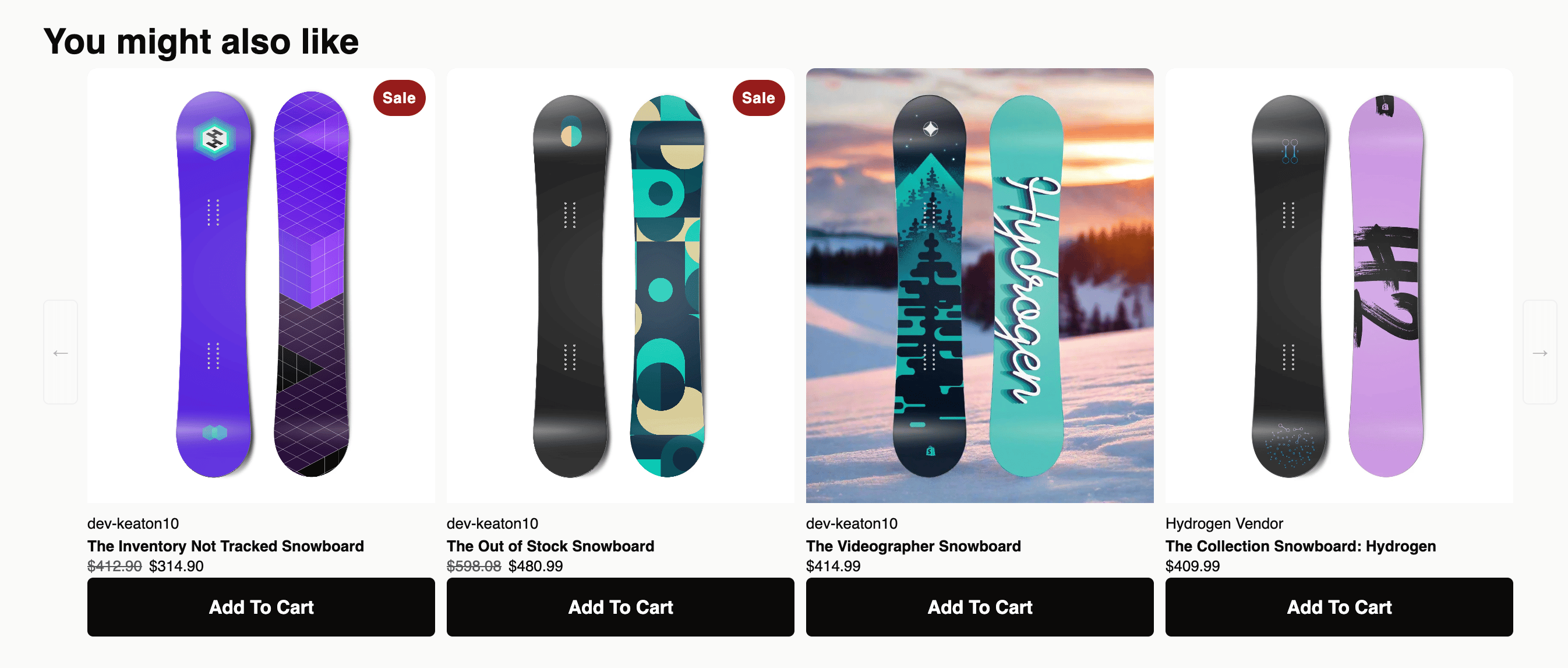
このパターンでは、商品ページにShopifyセクションを追加します。ページのレンダリング時に、Liquidが現在の商品、カート、顧客属性をペイロードに埋め込み、JavaScriptがStrategies APIにPOSTして、返された商品をSplideカルーセルでレンダリングします。

<div id="installing">
  ### インストール
</div>

1. Shopify管理画面で **Online Store → Themes** に移動し、テーマの **...** をクリックして **Edit code** を選択します。
2. **Sections** フォルダの下に `aftersell-upsell-carousel.liquid` という名前の新しいファイルを作成します。
3. 下のスニペットを新しいファイルに貼り付け、`YOUR_STRATEGY_API_KEY` をAftersellのAPIキーに置き換えます。
4. 保存します。
5. 商品テンプレート（通常は `templates/product.json` または `sections/main-product.liquid`）を開き、カルーセルを表示したい位置に **Aftersell Carousel** セクションを追加します。テーマエディタから商品ページに直接ドラッグすることもできます。
6. セクションの設定に **Strategy ID** を貼り付けます。

<div id="what-the-section-sends">
  ### セクションが送信する内容
</div>

各PDPビューごとに、ペイロードには以下が含まれます。

* **products** - 現在表示中の商品を含む単一要素の配列（productId、variantId、quantity、price、handle、title、vendor、productType、tags、collections、sellingPlan）。
* **cart** - 買い物客の現在のカートの小計、アイテム数、ライン数（カートが空の場合は省略）。
* **cartToken** - APIがこの評価を同一セッションに紐付けられるようにします。
* **customer** - タグ、国、州、ロケール、注文数、累計購入金額、マーケティング許諾フラグ。ただし**買い物客がログインしている場合のみ**。
* **session** - `shop.currency` からの通貨コード。

このセクションはデフォルトではUTMパラメータを送信しません。PDPでUTMベースのターゲティングを行いたい場合は、クライアントサイドで取得してfetchの前に `session` オブジェクトに追加してください。

<div id="the-snippet">
  ### スニペット
</div>

```liquid theme={"theme":{"light":"snazzy-light","dark":"github-dark"}}
{% comment %}
  Aftersell Carousel (Splide)
  Type: Section — save to sections/aftersell-upsell-carousel.liquid
{% endcomment %}

{% if product %}

<link rel="stylesheet" href="https://cdn.jsdelivr.net/npm/@splidejs/splide@4.1.4/dist/css/splide-core.min.css">
<script src="https://cdn.jsdelivr.net/npm/@splidejs/splide@4.1.4/dist/js/splide.min.js" defer></script>

<div id="aftersell-upsell-{{ section.id }}" class="aftersell-upsell-carousel" style="display:none" {{ section.shopify_attributes }}>
  <h2 class="aftersell-heading">{{ section.settings.heading | default: 'You might also like' }}</h2>
  <div class="aftersell-carousel-wrapper">
    <button class="aftersell-arrow aftersell-arrow--prev" aria-label="Previous" disabled>&#8592;</button>
    <div class="aftersell-track-container">
      <div class="splide" id="aftersell-splide-{{ section.id }}">
        <div class="splide__track">
          <ul class="splide__list">
            <li class="splide__slide"><div class="aftersell-skeleton"></div></li>
            <li class="splide__slide"><div class="aftersell-skeleton"></div></li>
            <li class="splide__slide"><div class="aftersell-skeleton"></div></li>
            <li class="splide__slide"><div class="aftersell-skeleton"></div></li>
          </ul>
        </div>
      </div>
    </div>
    <button class="aftersell-arrow aftersell-arrow--next" aria-label="Next" disabled>&#8594;</button>
  </div>
</div>

<style>
.aftersell-upsell-carousel { font-family: Modernist, sans-serif; max-width: 1300px; margin: 0 auto; padding: 24px 0 0; box-sizing: border-box; }
.aftersell-heading { font-family: Modernist, sans-serif; font-size: 30px; font-weight: 700; line-height: 45px; color: #0C0A09; margin: 0; }
.aftersell-carousel-wrapper { display: flex; align-items: center; gap: 8px; }
.aftersell-track-container { overflow: hidden; flex: 1; min-width: 0; }
.aftersell-card { display: flex; flex-direction: column; box-sizing: border-box; height: 100%; }
.aftersell-card-link { text-decoration: none; color: inherit; display: block; flex: 1; }
.aftersell-card-image { aspect-ratio: 1; overflow: hidden; background: #f5f5f5; border-radius: 8px 8px 0 0; position: relative; }
.aftersell-card-image img { width: 100%; height: 100%; object-fit: cover; display: block; transition: transform 0.3s ease; }
.aftersell-card-image:hover img { transform: scale(1.04); }
.aftersell-card-badge { position: absolute; top: 10px; left: 8px; background: #c60006; color: #fff; font-size: 11px; font-weight: 500; padding: 4px 8px; border-radius: 16px; z-index: 1; }
.aftersell-card-body { padding: 6px 0 0; display: flex; flex-direction: column; }
.aftersell-card-vendor { font-size: 13px; font-weight: 550; text-transform: uppercase; color: #1d4481; margin: 0; }
.aftersell-card-title { font-size: 13px; font-weight: 700; color: #0C0A09; margin: 0; white-space: nowrap; overflow: hidden; text-overflow: ellipsis; }
.aftersell-card-price { font-size: 13px; color: #0C0A09; margin: 0; display: flex; gap: 6px; align-items: center; flex-wrap: wrap; }
.aftersell-card-price--compare { text-decoration: line-through; color: #595959; }
.aftersell-card-price--sale { font-weight: 700; color: #c60006; }
.aftersell-card-actions { padding: 6px 0 0; display: flex; flex-direction: column; margin-top: auto; }
.aftersell-variant-select { width: 100%; font-size: 13px; padding: 0.35rem 0.5rem; border: 1px solid #DBDBDB; border-radius: 4px; background: #fff; color: #0C0A09; cursor: pointer; }
.aftersell-cta { padding: 16px 12px; background: #c50007; color: #FFFFFF; border: none; border-radius: 5px; font-size: 16px; font-weight: 700; cursor: pointer; width: 100%; display: flex; align-items: center; justify-content: center; transition: background 0.2s, opacity 0.2s; }
.aftersell-cta:hover:not(:disabled) { opacity: 0.85; }
.aftersell-cta:disabled { opacity: 0.5; cursor: default; }
.aftersell-cta--added { background: #1d4481; }
.aftersell-cta--unavailable { background: #999; cursor: default; }
.aftersell-arrow { width: 30px; height: 90px; background: rgba(255,255,255,0.6); border: 1px solid #DBDBDB; border-radius: 5px; cursor: pointer; display: flex; align-items: center; justify-content: center; flex-shrink: 0; padding: 0; }
.aftersell-arrow:disabled { opacity: 0.3; cursor: default; }
.aftersell-skeleton { border-radius: 8px; background: linear-gradient(90deg, #f0f0f0 25%, #e0e0e0 50%, #f0f0f0 75%); background-size: 200% 100%; animation: aftersell-shimmer 1.4s infinite; aspect-ratio: 0.75; width: 100%; }
@keyframes aftersell-shimmer { 0% { background-position: 200% 0; } 100% { background-position: -200% 0; } }

#aftersell-splide-{{ section.id }} .splide__arrows,
#aftersell-splide-{{ section.id }} .splide__pagination { display: none !important; }

@media (max-width: 768px) {
  .aftersell-upsell-carousel { padding: 16px 16px 0; }
  .aftersell-arrow { display: none; }
  .aftersell-carousel-wrapper { gap: 0; }
}
</style>

<script>
(function() {
  var BACKEND_URL  = 'https://start.aftersell.app';
  var API_KEY      = 'YOUR_STRATEGY_API_KEY';
  var STRATEGY_ID  = {{ section.settings.strategy_id | json }};
  var SHOP_DOMAIN  = {{ shop.permanent_domain | json }};
  var CTA_LABEL    = '{{ section.settings.cta_label | default: "Add to cart" }}';
  var MAX_PRODUCTS = {{ section.settings.max_products | default: 8 }};
  var CURRENCY     = {{ shop.currency | default: "USD" | json }};
  var SECTION_ID   = {{ section.id | json }};
  if (!SHOP_DOMAIN || !STRATEGY_ID) return;

  var fmt;
  try {
    fmt = new Intl.NumberFormat('en-US', { style: 'currency', currency: CURRENCY });
  } catch(e) {
    fmt = { format: function(n) { return '$' + parseFloat(n).toFixed(2); } };
  }
  function money(str) { return fmt.format(parseFloat(str) || 0); }

  function gidToNumeric(gid) {
    return gid ? String(gid).split('/').pop() : null;
  }

  function priceHtml(price, compareAt) {
    var hasSale = compareAt && parseFloat(compareAt) > parseFloat(price);
    return hasSale
      ? '<span class="aftersell-card-price--compare">' + money(compareAt) + '</span>'
        + '<span class="aftersell-card-price--sale">' + money(price) + '</span>'
      : '<span class="aftersell-card-price--current">' + money(price) + '</span>';
  }

  var productContext = {
    productId:   'gid://shopify/Product/{{ product.id }}',
    variantId:   'gid://shopify/ProductVariant/{{ product.selected_or_first_available_variant.id }}',
    quantity:    1,
    price:       {{ product.price | divided_by: 100.0 }},
    handle:      {{ product.handle | json }},
    title:       {{ product.title | json }},
    vendor:      {{ product.vendor | json }},
    productType: {{ product.type | json }},
    tags:        {{ product.tags | json }},
    collections: [{% for col in product.collections %}'gid://shopify/Collection/{{ col.id }}'{% unless forloop.last %},{% endunless %}{% endfor %}],
    sellingPlan: {% if product.selected_selling_plan %}'subscription'{% else %}'one-time'{% endif %}
  };

  var cartContext = {
    subtotal:  {{ cart.total_price | divided_by: 100.0 }},
    itemCount: {{ cart.item_count }},
    lineCount: {{ cart.items.size }}
  };

  {% if customer %}
  var customerContext = {
    customerId:       'gid://shopify/Customer/{{ customer.id }}',
    tags:             {{ customer.tags | json }},
    {% if customer.default_address.country_code %}countryCode: {{ customer.default_address.country_code | json }},{% endif %}
    {% if customer.default_address.province_code %}provinceCode: {{ customer.default_address.province_code | json }},{% endif %}
    locale:           {{ request.locale.iso_code | json }},
    orderCount:       {{ customer.orders_count }},
    totalSpent:       {{ customer.total_spent | times: 1.0 }},
    acceptsMarketing: {{ customer.accepts_marketing }}
  };
  {% endif %}

  var blockEl  = document.getElementById('aftersell-upsell-' + SECTION_ID);
  var splideEl = document.getElementById('aftersell-splide-' + SECTION_ID);
  var list     = splideEl.querySelector('.splide__list');
  var prevBtn  = blockEl.querySelector('.aftersell-arrow--prev');
  var nextBtn  = blockEl.querySelector('.aftersell-arrow--next');
  var splideInstance = null;

  function getCartToken() {
    var t = {{ cart.token | json }};
    if (t) return Promise.resolve(t);
    return fetch('/cart.js').then(function(r){ return r.json(); }).then(function(c){ return c.token || null; }).catch(function(){ return null; });
  }

  function evaluate() {
    getCartToken().then(function(cartToken) {
      if (!cartToken) return;
      return fetch(BACKEND_URL + '/api/public/strategy/evaluate', {
        method: 'POST',
        headers: { 'Content-Type': 'application/json', 'X-Strategy-Api-Key': API_KEY },
        body: JSON.stringify({
          shopDomain:  SHOP_DOMAIN,
          strategyId:  STRATEGY_ID,
          context: {
            products:  [productContext],
            cartToken: cartToken,
            cart:      cartContext.itemCount > 0 ? cartContext : undefined,
            {% if customer %}customer: customerContext,{% endif %}
            session:   { currencyCode: CURRENCY }
          }
        })
      });
    }).then(function(res) { if (!res) return; return res.json(); })
    .then(function(data) {
      if (!data || !data.success || !data.products || !data.products.length) {
        clearSkeletons(); return;
      }
      renderCards(data.products.slice(0, MAX_PRODUCTS));
    }).catch(function(err) {
      console.error('[AfterSell carousel] Error:', err);
      clearSkeletons();
    });
  }

  function renderCards(products) {
    if (!products || !products.length) {
      blockEl.style.display = 'none'; return;
    }

    blockEl.style.display = '';

    list.innerHTML = products.map(function(p, i) {
      var img      = p.images && p.images[0] ? p.images[0].src : '';
      var alt      = (p.images && p.images[0] && p.images[0].altText) || p.title;
      var variants = p.variants || [];
      var availableVariants = variants.filter(function(v) {
        return v.availableForSale !== false;
      });
      var isDefaultVariant = variants.length === 1 && variants[0].title === 'Default Title';
      var showSelect       = !isDefaultVariant && availableVariants.length >= 1;
      var firstVariant     = availableVariants.length ? availableVariants[0] : null;
      var firstVariantId   = firstVariant ? gidToNumeric(firstVariant.variantId) : null;
      var anyAvailable     = availableVariants.length > 0;

      var onSale = p.compareAtPrice && parseFloat(p.compareAtPrice) > parseFloat(p.price);
      var badge  = '';
      if (onSale) {
        var pct = Math.round((1 - parseFloat(p.price) / parseFloat(p.compareAtPrice)) * 100);
        badge = '<span class="aftersell-card-badge">Save ' + pct + '%</span>';
      }
      var vendor = p.vendor ? '<p class="aftersell-card-vendor">' + p.vendor + '</p>' : '';

      var selectHtml = '';
      if (showSelect) {
        var options = availableVariants.map(function(v) {
          return '<option value="' + gidToNumeric(v.variantId) + '"'
            + ' data-price="'   + (v.price         || p.price) + '"'
            + ' data-compare="' + (v.compareAtPrice || '')     + '"'
            + '>' + v.title + '</option>';
        }).join('');
        selectHtml = '<select class="aftersell-variant-select" aria-label="Select variant">' + options + '</select>';
      }

      var atcLabel = anyAvailable ? CTA_LABEL : 'Sold Out';
      var atcClass = anyAvailable ? 'aftersell-cta' : 'aftersell-cta aftersell-cta--unavailable';
      var atcBtn   = '<button class="' + atcClass + '"'
        + (firstVariantId ? ' data-variant-id="' + firstVariantId + '"' : '')
        + (anyAvailable ? '' : ' disabled')
        + '>' + atcLabel + '</button>';

      var productUrl = p.url + (p.url.indexOf('?') > -1 ? '&' : '?') + 'ref=aftersell';

      return '<li class="splide__slide">'
        + '<div class="aftersell-card" data-idx="' + i + '">'
        + '<a class="aftersell-card-link" href="' + productUrl + '">'
        + '<div class="aftersell-card-image">' + badge
        + (img ? '<img src="' + img + '" alt="' + alt + '" loading="lazy">' : '')
        + '</div>'
        + '<div class="aftersell-card-body">'
        + vendor
        + '<p class="aftersell-card-title">' + p.title + '</p>'
        + '<p class="aftersell-card-price" data-price-el>' + priceHtml(p.price, p.compareAtPrice) + '</p>'
        + '</div></a>'
        + '<div class="aftersell-card-actions">'
        + selectHtml
        + atcBtn
        + '</div></div></li>';
    }).join('');

    attachCardEvents();
    initSplide();
  }

  function attachCardEvents() {
    list.addEventListener('change', function(e) {
      if (!e.target.classList.contains('aftersell-variant-select')) return;
      var select  = e.target;
      var card    = select.closest('.aftersell-card');
      var opt     = select.options[select.selectedIndex];
      var priceEl = card.querySelector('[data-price-el]');
      var btn     = card.querySelector('.aftersell-cta');
      priceEl.innerHTML     = priceHtml(opt.getAttribute('data-price'), opt.getAttribute('data-compare'));
      btn.dataset.variantId = opt.value;
      btn.disabled          = false;
      btn.textContent       = CTA_LABEL;
      btn.className         = 'aftersell-cta';
    });

    list.addEventListener('click', function(e) {
      var btn = e.target.closest('.aftersell-cta');
      if (!btn || btn.disabled) return;
      var variantId = btn.dataset.variantId;
      if (!variantId) return;

      e.preventDefault();
      btn.disabled    = true;
      btn.textContent = 'Adding…';

      fetch('/cart/add.js', {
        method: 'POST',
        credentials: 'same-origin',
        headers: { 'Content-Type': 'application/json' },
        body: JSON.stringify({
          id: parseInt(variantId, 10),
          quantity: 1,
          properties: {
            "_source": "Aftersell",
            "_attribution": "CTA"
          }
        })
      })
      .then(function(r) {
        if (!r.ok) throw new Error('Cart add failed: ' + r.status);
        return r.json();
      })
      .then(function() {
        btn.textContent = 'Added!';
        btn.classList.add('aftersell-cta--added');
        if (typeof window.theme !== 'undefined' && window.theme.cart && window.theme.cart.open) {
          window.theme.cart.open();
        }
        setTimeout(function() {
          btn.textContent = CTA_LABEL;
          btn.classList.remove('aftersell-cta--added');
          btn.disabled = false;
        }, 2500);
      })
      .catch(function(err) {
        console.error('[AfterSell carousel] Add to cart error:', err);
        btn.textContent = 'Try Again';
        btn.disabled    = false;
      });
    });
  }

  function initSplide() {
    function mount() {
      if (typeof window.Splide === 'undefined') {
        setTimeout(mount, 50);
        return;
      }

      splideInstance = new Splide('#aftersell-splide-' + SECTION_ID, {
        type:       'slide',
        perPage:    4,
        perMove:    4,
        gap:        '10px',
        pagination: false,
        arrows:     false,
        speed:      350,
        drag:       false,
        breakpoints: {
          768: { perPage: 2, perMove: 2, drag: 'free', snap: true },
          480: { perPage: 1, perMove: 1, drag: 'free', snap: true, padding: { right: '25%' } }
        }
      }).mount();

      function updateArrows() {
        var idx = splideInstance.index;
        var end = splideInstance.length - splideInstance.options.perPage;
        prevBtn.disabled = idx <= 0;
        nextBtn.disabled = idx >= end;
      }

      prevBtn.addEventListener('click', function() { splideInstance.go('<'); });
      nextBtn.addEventListener('click', function() { splideInstance.go('>'); });
      splideInstance.on('moved', updateArrows);
      updateArrows();
    }
    mount();
  }

  function clearSkeletons() { list.innerHTML = ''; }

  evaluate();
})();
</script>

{% endif %}

{% schema %}
{
  "name": "Aftersell Carousel",
  "settings": [
    { "type": "text",  "id": "strategy_id",  "label": "AfterSell Strategy ID", "default": "ADD_ID_HERE" },
    { "type": "text",  "id": "heading",      "label": "Heading",               "default": "You might also like" },
    { "type": "text",  "id": "cta_label",    "label": "CTA Button Label",      "default": "Add to cart" },
    { "type": "range", "id": "max_products", "label": "Max Products to Show",  "default": 8, "min": 1, "max": 20, "step": 1 }
  ],
  "presets": [{ "name": "Aftersell Carousel" }]
}
{% endschema %}
```

<Frame>
  <img src="https://mintcdn.com/aftersell/SnVX3h-PpMMxQMDU/images/aftersell/strategy-carousel-example.png?fit=max&auto=format&n=SnVX3h-PpMMxQMDU&q=85&s=8fb7ac08c2ae0c430b5bc4f810c59e40" alt="Shopifyの商品ページにレンダリングされたStrategy駆動の商品カルーセル" width="2692" height="1146" data-path="images/aftersell/strategy-carousel-example.png" />
</Frame>

<div id="customizing">
  ### カスタマイズ
</div>

セクションのスキーマは、マーチャントが編集可能な4つの設定を公開しています：**Strategy ID**、**Heading**、**CTA Button Label**、**Max Products to Show**。テーマエディタにさらに設定項目を公開したい場合は、`{% schema %}` ブロックで設定を追加・削除してください。

CSSは `.aftersell-*` クラス名の下にスコープされており、Splide駆動の4アップカルーセル（768pxで2アップ、480pxで1アップに切り替わる）を含んでいます。テーマに合わせて自由に編集してください - API呼び出しの動作にCSSは一切必要ありません。

***

<div id="cart-context-custom-cart-upsell-block">
  ## カートコンテキスト：カスタムカートアップセルブロック
</div>

このパターンは構造的にはPDPのものと同じですが、1つ重要な違いがあります。**商品コンテキストの配列**が、現在表示中の商品ではなくカートのラインアイテムから構築される点です。Strategyは買い物客が追加したすべてのアイテムを受け取り、カート全体に基づいたレコメンデーションを返します。

実装は、カスタムカートのコードがある場所に置きます - カートドロワーをレンダリングするLiquidセクション、ヘッドレスストアフロントのカスタムブロック、または `cart.liquid` のようなテーマテンプレートです。API呼び出しの形とレスポンス処理はPDPの例と同一で、`products` 配列だけが異なります。

構造は次のようになります。

```js theme={"theme":{"light":"snazzy-light","dark":"github-dark"}}
var products = {{ cart.items | json }}.map(function(item) {
  return {
    productId: 'gid://shopify/Product/' + item.product_id,
    variantId: 'gid://shopify/ProductVariant/' + item.variant_id,
    quantity:  item.quantity,
    price:     item.price / 100
    // ...other fields as needed
  };
});
```

ペイロードの残り（cart、customer、session、cartToken）と `/api/public/strategy/evaluate` への `fetch` 呼び出しは、上記のPDPパターンから変わりません - `products` 配列が `[productContext]` からカート由来の配列に置き換わるだけです。

***

<div id="what-happens-when-the-strategy-returns">
  ## Strategyがレスポンスを返したときの動作
</div>

レスポンスの形は、どちらのコンテキストを送信した場合でも同じです。

```json theme={"theme":{"light":"snazzy-light","dark":"github-dark"}}
{
  "success": true,
  "products": [ /* enriched recommended products */ ],
  "evaluationId": "f3a1c2e0-...",
  "resolution": { "strategyId": "...", "matchedRuleIds": [...], "fallbackUsed": false },
  "meta": { "servedFromCache": false, "processingTimeMs": 12, "data": {} }
}
```

`evaluationId` は、この評価の一意のIDです。これを取得してレンダリングする商品に添付すると、その結果生じた注文を、それを生んだレコメンデーションに正確にアトリビューションできます - 下記の[アトリビューション](#attribution)を参照してください。

`products` 配列をどのようにレンダリングするかは、完全にテーマコード次第です。上記のPDPスニペットは、バリアントピッカーとカート追加ボタンを備えたカードのカルーセルとしてレンダリングします。カスタムカートブロックなら、ドロワー内に縦のリストとしてレンダリングするかもしれません。

リクエストとレスポンスの完全なスキーマについては、[Evaluate Strategy APIリファレンス](/ja/aftersell/strategies_api_reference_evaluate_strategy)を参照してください。

***

<div id="when-no-product-is-returned">
  ## 商品が返されない場合
</div>

Strategyが商品を返さない場合（`products: []`）、その処理はあなたのコード次第です。上記のPDPスニペットはカルーセル全体を非表示にします。カスタムカートブロックであれば、カートのデフォルトのアップセルリストにフォールバックしたり、単に何もレンダリングしないという選択肢もあります。

空のレスポンスを避けるには、Strategyに **Catch all** を設定して、常に返せるフォールバック商品を用意してください。Catch allの設定方法については、[Strategyの構築](/ja/aftersell/strategies_building_in_app)ページを参照してください。

***

<div id="tips-for-custom-integrations">
  ## カスタム統合のヒント
</div>

* **コンテキストはLiquidで構築する。** Liquidはレンダリング時に実行され、Shopifyのオブジェクトグラフ全体（product、cart、customer、shop、request）にアクセスできます。クライアントサイドの呼び出しに頼らず、サーバーサイドでペイロードを埋めるのに活用してください。
* **APIキーを公開リポジトリに置かない。** キーはテーマコードに含まれてブラウザに配信されます - それ自体は問題ありません。ただし、同じテーマを公開リポジトリに貼り付けたり、バンドルを外部に共有したりしないでください。
* **Catch allを使う。** スロットが消えるとストアフロントの体験は壊れて見えます。安全なデフォルト商品を少数含めたCatch allがUIの一貫性を保ちます。
* **意味のある場所でキャッシュする。** Strategies APIはサーバーサイドで軽いキャッシュを行います（`meta.servedFromCache`）が、トラフィックの多いPDPでは、クライアント側でも呼び出しをデバウンスまたはメモ化するとよいでしょう（例：同一セッションで同じ商品が2回レンダリングされたときに再呼び出ししない）。

***

<div id="attribution">
  ## アトリビューション
</div>

買い物客がスニペットのカート追加ボタンをクリックすると、`/cart/add.js` 呼び出しがカートアイテムに**ラインアイテムプロパティ**を添付します。

```js theme={"theme":{"light":"snazzy-light","dark":"github-dark"}}
properties: {
  "_source": "Aftersell",
  "_attribution": "CTA"
}
```

これらのプロパティはラインアイテムとともにShopifyの注文まで引き継がれ、ラインアイテムのレコードに表示されます。下流で収益のアトリビューション、注文のフィルタリング、ラインアイテムプロパティを読み取る分析ツールへの入力などに利用できます。

これらのキーと値は慣例であって必須ではありません - ここに何を入れてもAPI呼び出しは同じように動作します。自身のアトリビューションモデルに合わせて変更してください。例：

```js theme={"theme":{"light":"snazzy-light","dark":"github-dark"}}
properties: {
  "_source": "PDP Carousel",
  "_strategy_id": "{{ section.settings.strategy_id }}",
  "_campaign": "summer-2026"
}
```

<Tip>
  アンダースコア（`_`）で始まるプロパティキーは、カートとチェックアウトのUIには表示されませんが、注文には添付されます。買い物客に見せたくないアトリビューション専用のメタデータには、アンダースコアプレフィックスを使ってください。
</Tip>

カートコンテキストの実装でも同じパターンを適用してください - カスタムアップセルブロックから行うどのカート追加呼び出しにも、必要なプロパティを自由に持たせることができます。

<div id="attributing-back-to-the-evaluation">
  ### 評価へのアトリビューション
</div>

「Strategyから来た」というだけでなく、商品を推薦した**正確な評価**まで注文を紐付けるには、レスポンスから `evaluationId` を取得し、`__as_offer_id` プロパティとしてラインアイテムに添付します。AfterSellはこのキーを読み取るため、これでタグ付けされた注文はレポート上で特定の評価にアトリビューションされます。

`evaluate()` ハンドラで、レスポンスからIDを保持します。

```js theme={"theme":{"light":"snazzy-light","dark":"github-dark"}}
.then(function(data) {
  if (!data || !data.success || !data.products || !data.products.length) {
    clearSkeletons(); return;
  }
  evaluationId = data.evaluationId; // declare `var evaluationId;` alongside your other state
  renderCards(data.products.slice(0, MAX_PRODUCTS));
})
```

次に、カート追加のプロパティに含めます。

```js theme={"theme":{"light":"snazzy-light","dark":"github-dark"}}
properties: Object.assign(
  { "_source": "Aftersell", "_attribution": "CTA" },
  evaluationId ? { "__as_offer_id": evaluationId } : {}
)
```

`__as_offer_id` のダブルアンダースコアはそのまま残してください - これはAfterSellが探すキーであり、アンダースコアプレフィックスによって買い物客からは隠されます。`evaluationId` が存在しない場合（たとえば商品が返されなかった場合）は、空の値を送るのではなくプロパティ自体をスキップしてください。