> ## Documentation Index
> Fetch the complete documentation index at: https://docs.aftersell.com/llms.txt
> Use this file to discover all available pages before exploring further.
# Thank you page (extensions) overview
> This article explains how thank you page upsells (extensions) function, along with their various settings and features.
We will cover key widgets and important considerations for their use:
Customizing your Aftersell Thank You Page and Order Status Page with widgets enhances customer interaction and engagement. Using widgets like custom code or HTML, you can personalize these pages to add significant value to your customer's journey. This section highlights why customizing these pages is important and how it benefits business outcomes.
* [Product Recommendation](#product-recommendation)
* [FAQs](#faqs)
* [Text](#text)
* [Custom Code](#custom-code)
* [Important Information](#important-information)
# Product Recommendation
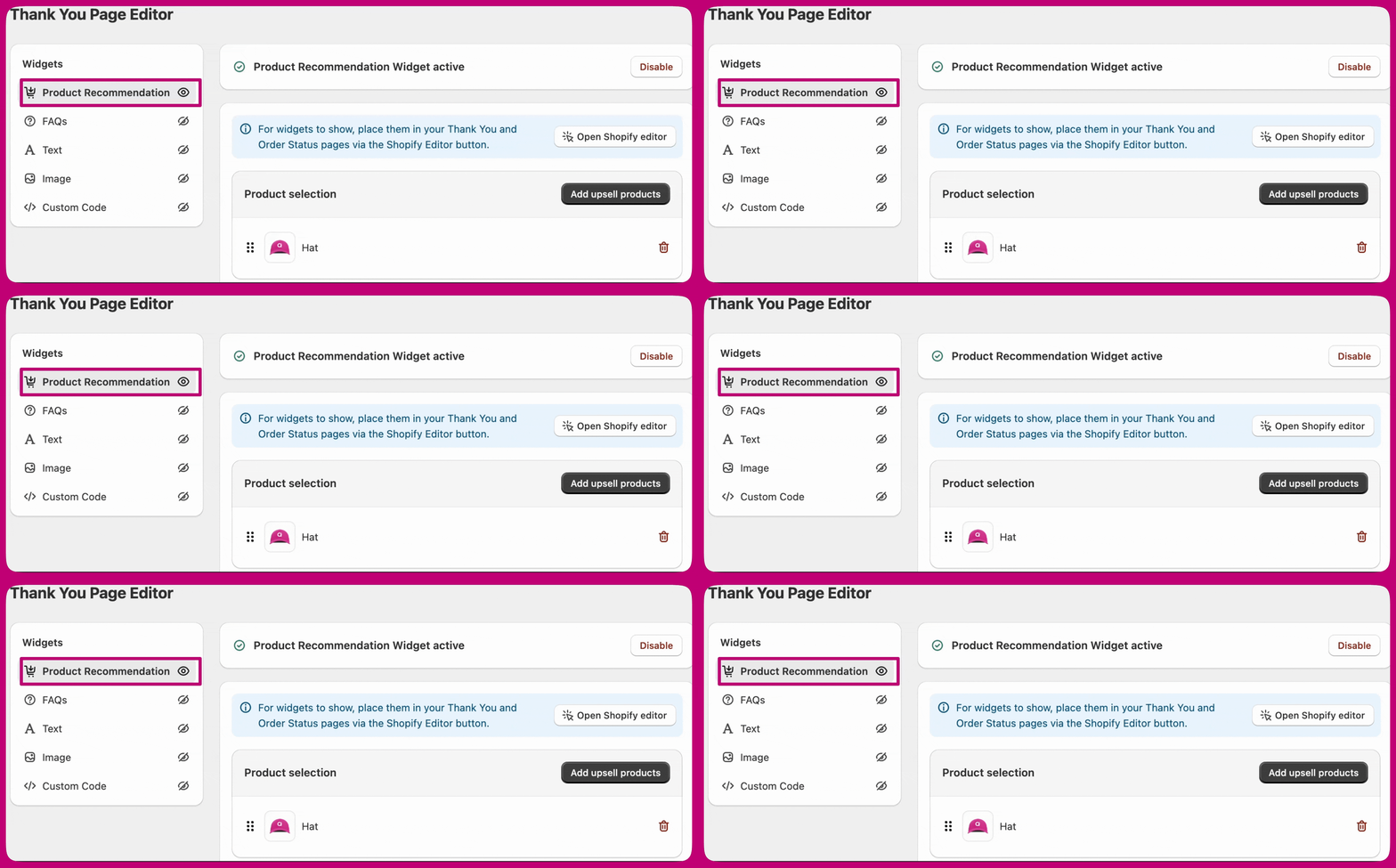 The product recommendation widget can display up to **10 upsell products** at a time on the Thank You page.
* Unlike post-purchase upsells, Thank You page product recommendations are compatible with **all payment gateways** and **multi-currency stores**. There are a few additional behaviours to be aware of.
* You can choose whether an accepted offer is **added to the original order** or **created as a separate new order**.
Customers will need to re-enter their payment details to complete the upsell purchase, but Aftersell automatically applies their saved shipping information to keep the checkout experience seamless.
## **Display on**
The **Display on** setting controls where your product recommendation widget appears after a customer completes their purchase. You can choose to show it on the **Thank You page**, the **Order Status page**, or **both**.
Use the **Max products to show** field to limit how many recommendations are displayed at one time, you can show anywhere from 1 to 10 products.
Two additional toggles give you control over what customers see:
* **Hide product if purchased** - Enabling this ensures customers won't be shown a product they've already bought in the same order, keeping recommendations relevant and avoiding repetition.
* **Hide out of stock variants** - Enabling this automatically filters out any product variants that are unavailable, so customers only see items they can actually purchase.
The product recommendation widget can display up to **10 upsell products** at a time on the Thank You page.
* Unlike post-purchase upsells, Thank You page product recommendations are compatible with **all payment gateways** and **multi-currency stores**. There are a few additional behaviours to be aware of.
* You can choose whether an accepted offer is **added to the original order** or **created as a separate new order**.
Customers will need to re-enter their payment details to complete the upsell purchase, but Aftersell automatically applies their saved shipping information to keep the checkout experience seamless.
## **Display on**
The **Display on** setting controls where your product recommendation widget appears after a customer completes their purchase. You can choose to show it on the **Thank You page**, the **Order Status page**, or **both**.
Use the **Max products to show** field to limit how many recommendations are displayed at one time, you can show anywhere from 1 to 10 products.
Two additional toggles give you control over what customers see:
* **Hide product if purchased** - Enabling this ensures customers won't be shown a product they've already bought in the same order, keeping recommendations relevant and avoiding repetition.
* **Hide out of stock variants** - Enabling this automatically filters out any product variants that are unavailable, so customers only see items they can actually purchase.
 ***
## Offer Design
The **Offer design** settings control how product recommendations are presented to customers.
You can choose whether products are displayed in a **horizontal** or **vertical** layout and adjust visual elements such as borders, button styles, and spacing to better match your checkout experience.
You can also include **banner text** to add a short description or message above the offer. This is useful for introducing the recommendation, highlighting an incentive, or providing additional context for the products being shown.
Within the **Offer Design** settings, you can translate the following:
Additional pricing options let you control whether the **compare-at price** is displayed and how sale prices appear using your selected colour scheme. The Compare, Discount, and Sale prices offer two color options:
You can apply colors from your Checkout branding, with the available options being:
* Accent
* Decorative
* Info
* Subdued
***
## Offer Design
The **Offer design** settings control how product recommendations are presented to customers.
You can choose whether products are displayed in a **horizontal** or **vertical** layout and adjust visual elements such as borders, button styles, and spacing to better match your checkout experience.
You can also include **banner text** to add a short description or message above the offer. This is useful for introducing the recommendation, highlighting an incentive, or providing additional context for the products being shown.
Within the **Offer Design** settings, you can translate the following:
Additional pricing options let you control whether the **compare-at price** is displayed and how sale prices appear using your selected colour scheme. The Compare, Discount, and Sale prices offer two color options:
You can apply colors from your Checkout branding, with the available options being:
* Accent
* Decorative
* Info
* Subdued
 Note: Some of these settings can be modified through your Shopify checkout editor or by using other apps that offer this functionality.
1. Or, you can apply a custom preset colors:
* Success- Green
* Warning- Yellow
* Critical- Red This section also includes two settings that complement the Automatic Discount feature.:
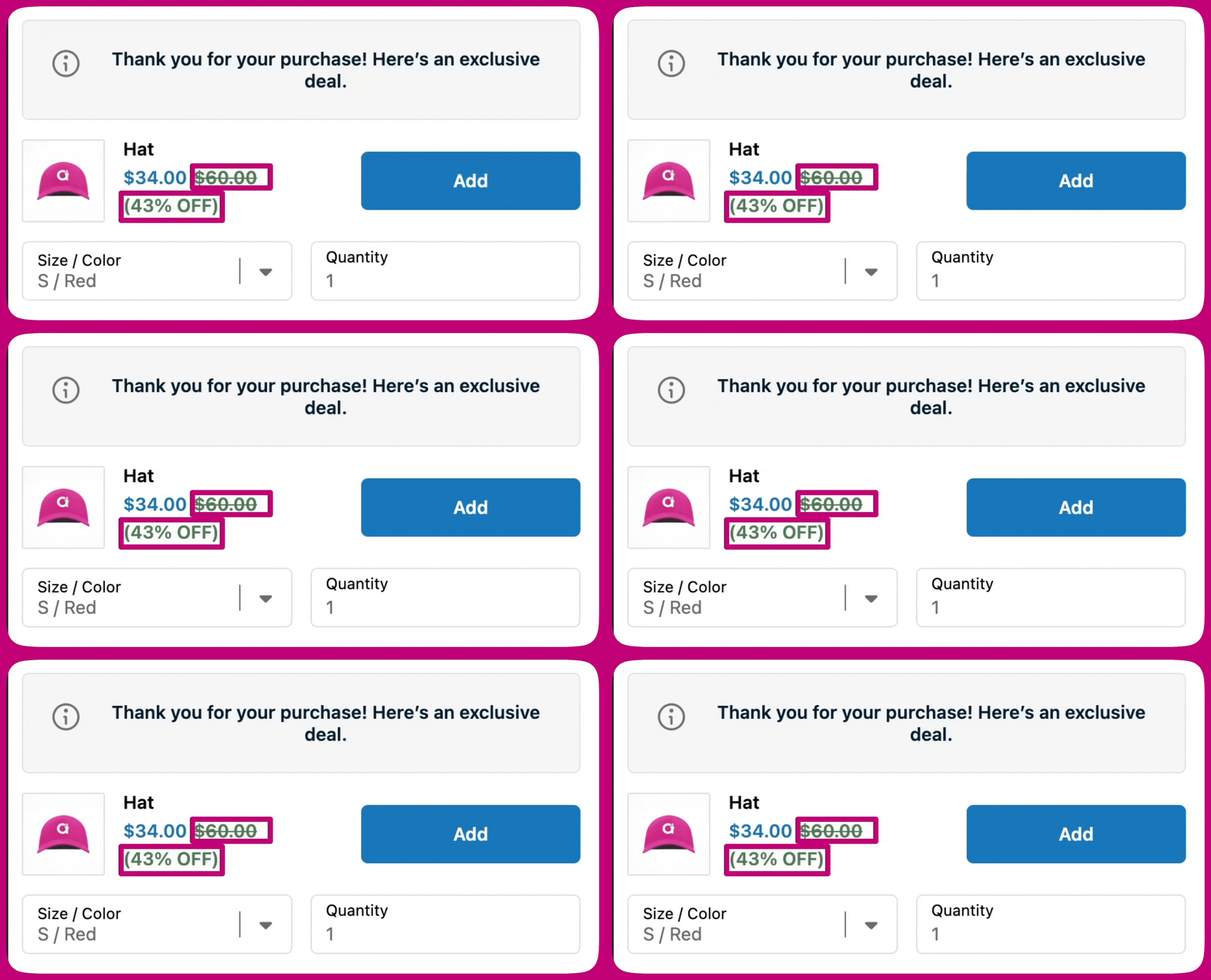
1. Show compare at price
* Enable this option to display the "Compare at" price with a strikethrough.
2. Show discount
* Enable this option to display the discount on the upsell.
If needed, you can enable a **quantity selector**, customize the quantity label, and set **minimum or maximum quantity limits** to control how many units a customer can add. These settings are helpful for managing inventory or encouraging specific purchase behaviors.
Together, these options give you flexibility to balance clarity and control while keeping the upsell aligned with your brand and checkout layout.
This section also includes two settings that complement the Automatic Discount feature.:
1. Show compare at price
* Enable this option to display the "Compare at" price with a strikethrough.
2. Show discount
* Enable this option to display the discount on the upsell.
If needed, you can enable a **quantity selector**, customize the quantity label, and set **minimum or maximum quantity limits** to control how many units a customer can add. These settings are helpful for managing inventory or encouraging specific purchase behaviors.
Together, these options give you flexibility to balance clarity and control while keeping the upsell aligned with your brand and checkout layout.
***
## Discounts & Order handling
### Discounts
You can apply a discount directly to the upsell by setting a **percentage** or **fixed amount** discount. This discount is applied automatically when the customer accepts the offer.
You can customize how the discount appears by setting the **discount text** and choosing a **discount price color**. Discount colors can use your checkout branding colors (Accent, Decorative, Info, or Subdued) or one of the preset options (Success, Warning, or Critical).
If enabled, the discount display can include the **compare-at price**, which will be shown with a strikethrough to highlight the savings.
Note: Some of these settings can be modified through your Shopify checkout editor or by using other apps that offer this functionality.
1. Or, you can apply a custom preset colors:
* Success- Green
* Warning- Yellow
* Critical- Red This section also includes two settings that complement the Automatic Discount feature.:
1. Show compare at price
* Enable this option to display the "Compare at" price with a strikethrough.
2. Show discount
* Enable this option to display the discount on the upsell.
If needed, you can enable a **quantity selector**, customize the quantity label, and set **minimum or maximum quantity limits** to control how many units a customer can add. These settings are helpful for managing inventory or encouraging specific purchase behaviors.
Together, these options give you flexibility to balance clarity and control while keeping the upsell aligned with your brand and checkout layout.
This section also includes two settings that complement the Automatic Discount feature.:
1. Show compare at price
* Enable this option to display the "Compare at" price with a strikethrough.
2. Show discount
* Enable this option to display the discount on the upsell.
If needed, you can enable a **quantity selector**, customize the quantity label, and set **minimum or maximum quantity limits** to control how many units a customer can add. These settings are helpful for managing inventory or encouraging specific purchase behaviors.
Together, these options give you flexibility to balance clarity and control while keeping the upsell aligned with your brand and checkout layout.
***
## Discounts & Order handling
### Discounts
You can apply a discount directly to the upsell by setting a **percentage** or **fixed amount** discount. This discount is applied automatically when the customer accepts the offer.
You can customize how the discount appears by setting the **discount text** and choosing a **discount price color**. Discount colors can use your checkout branding colors (Accent, Decorative, Info, or Subdued) or one of the preset options (Success, Warning, or Critical).
If enabled, the discount display can include the **compare-at price**, which will be shown with a strikethrough to highlight the savings.
 Discounts follow Shopify's standard checkout discount rules. Only one line-item discount can apply to a product at a time, and discounts will only combine if they're marked as **combinable** in Shopify Admin. In some cases, discounts may not apply if another app modifies the checkout.
We recommend testing your checkout after enabling discounts to confirm they appear as expected.
Order handling settings control how accepted upsells are added to the customer's order.
### Order handling
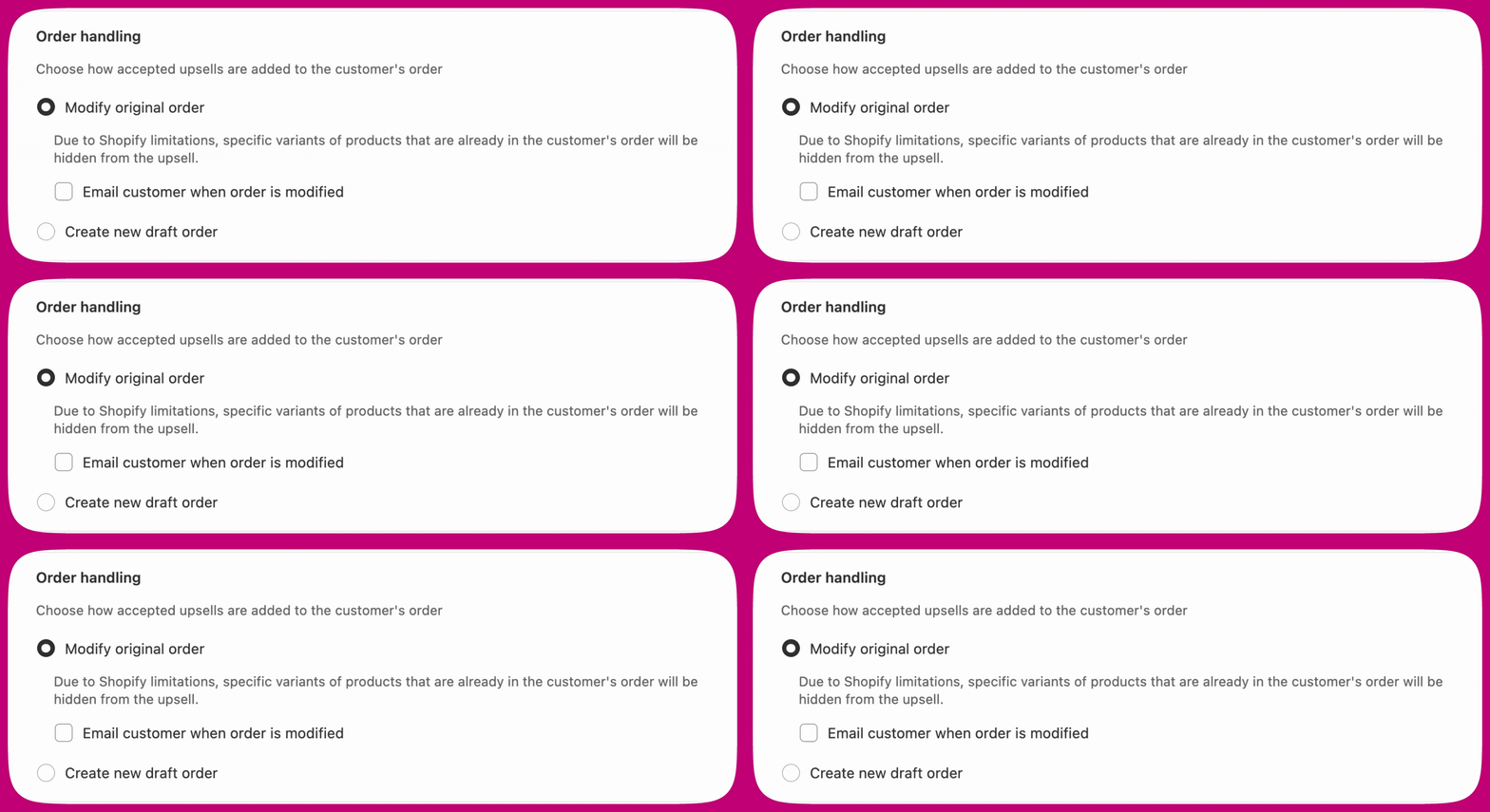
Order handling controls how an accepted upsell is added to the customer's order. There are two options, each with different trade-offs.
* **Modify original order** - Adds the upsell directly to the existing order. Free shipping is automatically applied. You can optionally email the customer when their order is modified.
* **Create new draft order** - Keeps the original order untouched and creates a separate order for the upsell.
Discounts follow Shopify's standard checkout discount rules. Only one line-item discount can apply to a product at a time, and discounts will only combine if they're marked as **combinable** in Shopify Admin. In some cases, discounts may not apply if another app modifies the checkout.
We recommend testing your checkout after enabling discounts to confirm they appear as expected.
Order handling settings control how accepted upsells are added to the customer's order.
### Order handling
Order handling controls how an accepted upsell is added to the customer's order. There are two options, each with different trade-offs.
* **Modify original order** - Adds the upsell directly to the existing order. Free shipping is automatically applied. You can optionally email the customer when their order is modified.
* **Create new draft order** - Keeps the original order untouched and creates a separate order for the upsell.
 #### When to choose each option
| Use **Modify original order** when... | Use **Create new draft order** when... |
| ---------------------------------------------------------------- | ------------------------------------------------------------------------------------------------------------------- |
| You want a single fulfillment for everything the customer bought | You want to re-offer a product the customer just purchased (for example, the same item at a post-purchase discount) |
| Your upsell catalog is distinct from your best-sellers | Your top-sellers are also your primary upsell candidates |
| Free shipping on the upsell is the priority | You need a separate order for fulfillment or reporting reasons |
**"Modify original order" hides same-variant upsells.** Shopify's order-edit API does not allow duplicate variants in an order. If the customer already has the upsell variant in their original order, the upsell is hidden from the Thank You page. When this mode is selected, a warning banner appears in the widget editor. If an upsell is hidden for this reason, the Order Browser flags the affected order with an "Upsell hidden due to order merging" banner. Switch to **Create new draft order** if you want the upsell to show regardless of what is already in the original order.
**Other things to know about "Modify original order":**
* Free shipping is automatically applied and cannot be disabled.
* The original order is marked as **partially paid** until the customer completes payment for the added upsell. Once payment is captured, Shopify updates the order automatically.
* Order modification is not supported with the **Local Delivery shipping method**.
***
### Free shipping
You can offer **free shipping** on accepted upsell products to help increase conversion. When enabled, customers won't be charged shipping for the upsell, while your existing Shopify shipping settings continue to apply to the original order.
If Modify original order is selected under Order handling, free shipping is automatically applied and can't be disabled.
You can also choose to display a **"Free Shipping" badge** on the offer and customize the badge text to highlight the benefit.
***
# FAQs
Adding a FAQ section to your thank you page provides immediate answers to common questions, improving the customer experience. Including a FAQ section enhances transparency, builds trust with future customers, and can help reduce post-purchase concerns. By addressing common questions, you provide clarity and reassurance, making potential buyers more confident in their decisions. A well-structured FAQ section can positively influence new visitors, leading to increased customer satisfaction and potentially higher sales.
***
# Text
You can a text widget to your thank you page to share key information with customers after their purchase. This can help improve communication, build trust, and offer helpful guidance or reassurance. A well-placed text widget can foster future engagement, boost customer satisfaction, and even drive additional sales.
***
# Custom Code
You can create your own custom widget in React using components and hooks from [Shopify's Checkout UI Extension library](https://shopify.dev/docs/api/checkout-ui-extensions/2023-10/components).
Important:
This is recommended for advanced users only. Please ensure that your code must:
* `export default` the component you want to render
* not use DOM elements (div, p, etc.), use UI extension components instead
* not import other code
If your custom code is not working, we recommend hiring a [Shopify Expert](https://www.shopify.com/partners/directory) to help implement this for you.
***
# Important Information
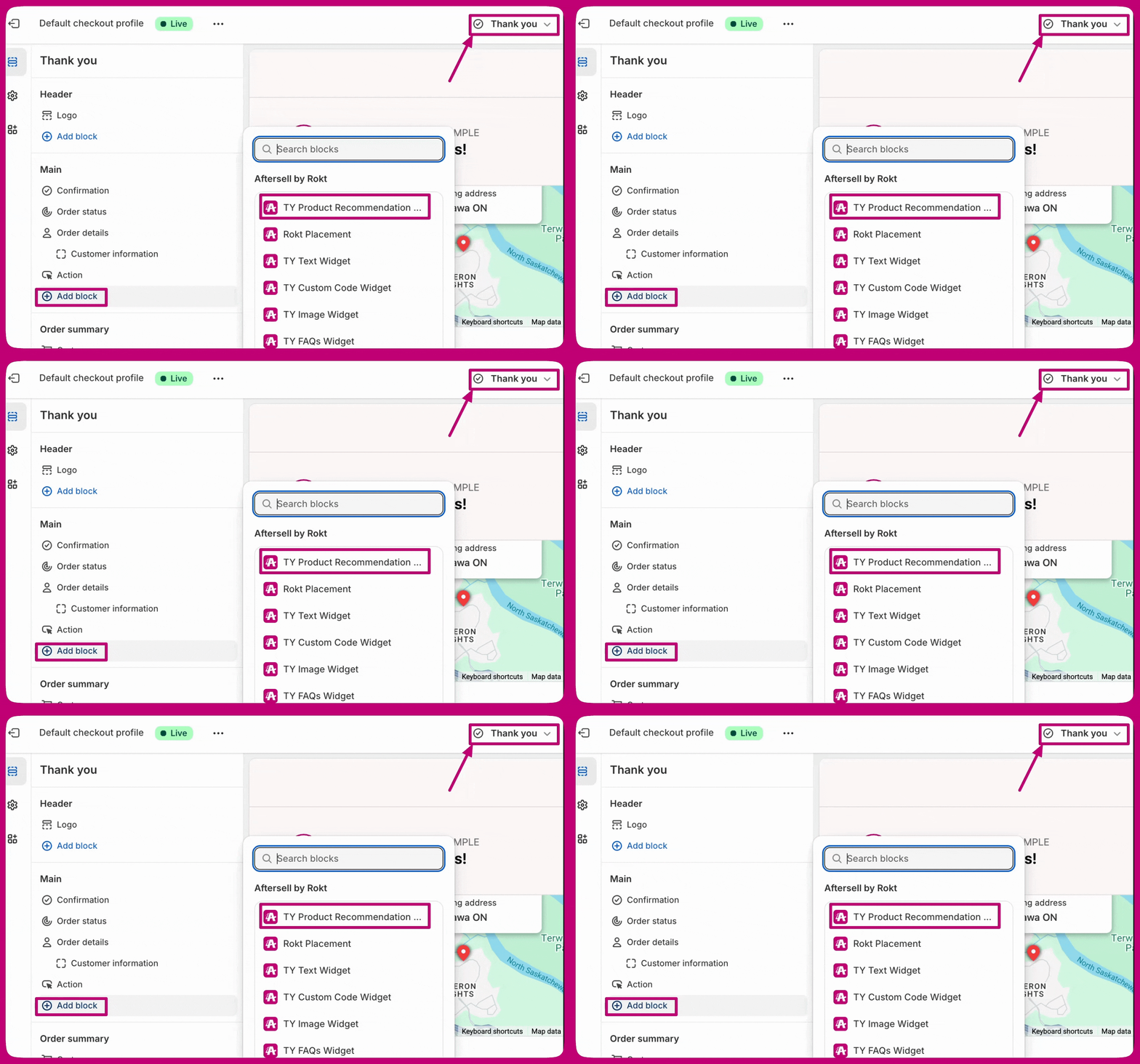
1. Any widgets created in Aftersell need to be added to your Thank you page or Order status page, or they will not load/show for your customers. Here are steps to add widgets to the required pages:
After creating the widgets, click on **"Open Shopify Editor"** to proceed.
#### When to choose each option
| Use **Modify original order** when... | Use **Create new draft order** when... |
| ---------------------------------------------------------------- | ------------------------------------------------------------------------------------------------------------------- |
| You want a single fulfillment for everything the customer bought | You want to re-offer a product the customer just purchased (for example, the same item at a post-purchase discount) |
| Your upsell catalog is distinct from your best-sellers | Your top-sellers are also your primary upsell candidates |
| Free shipping on the upsell is the priority | You need a separate order for fulfillment or reporting reasons |
**"Modify original order" hides same-variant upsells.** Shopify's order-edit API does not allow duplicate variants in an order. If the customer already has the upsell variant in their original order, the upsell is hidden from the Thank You page. When this mode is selected, a warning banner appears in the widget editor. If an upsell is hidden for this reason, the Order Browser flags the affected order with an "Upsell hidden due to order merging" banner. Switch to **Create new draft order** if you want the upsell to show regardless of what is already in the original order.
**Other things to know about "Modify original order":**
* Free shipping is automatically applied and cannot be disabled.
* The original order is marked as **partially paid** until the customer completes payment for the added upsell. Once payment is captured, Shopify updates the order automatically.
* Order modification is not supported with the **Local Delivery shipping method**.
***
### Free shipping
You can offer **free shipping** on accepted upsell products to help increase conversion. When enabled, customers won't be charged shipping for the upsell, while your existing Shopify shipping settings continue to apply to the original order.
If Modify original order is selected under Order handling, free shipping is automatically applied and can't be disabled.
You can also choose to display a **"Free Shipping" badge** on the offer and customize the badge text to highlight the benefit.
***
# FAQs
Adding a FAQ section to your thank you page provides immediate answers to common questions, improving the customer experience. Including a FAQ section enhances transparency, builds trust with future customers, and can help reduce post-purchase concerns. By addressing common questions, you provide clarity and reassurance, making potential buyers more confident in their decisions. A well-structured FAQ section can positively influence new visitors, leading to increased customer satisfaction and potentially higher sales.
***
# Text
You can a text widget to your thank you page to share key information with customers after their purchase. This can help improve communication, build trust, and offer helpful guidance or reassurance. A well-placed text widget can foster future engagement, boost customer satisfaction, and even drive additional sales.
***
# Custom Code
You can create your own custom widget in React using components and hooks from [Shopify's Checkout UI Extension library](https://shopify.dev/docs/api/checkout-ui-extensions/2023-10/components).
Important:
This is recommended for advanced users only. Please ensure that your code must:
* `export default` the component you want to render
* not use DOM elements (div, p, etc.), use UI extension components instead
* not import other code
If your custom code is not working, we recommend hiring a [Shopify Expert](https://www.shopify.com/partners/directory) to help implement this for you.
***
# Important Information
1. Any widgets created in Aftersell need to be added to your Thank you page or Order status page, or they will not load/show for your customers. Here are steps to add widgets to the required pages:
After creating the widgets, click on **"Open Shopify Editor"** to proceed.
 Add the Aftersell TY widgets in your Shopify Editor:
* Thank you page
Add the Aftersell TY widgets in your Shopify Editor:
* Thank you page
 * Order Status
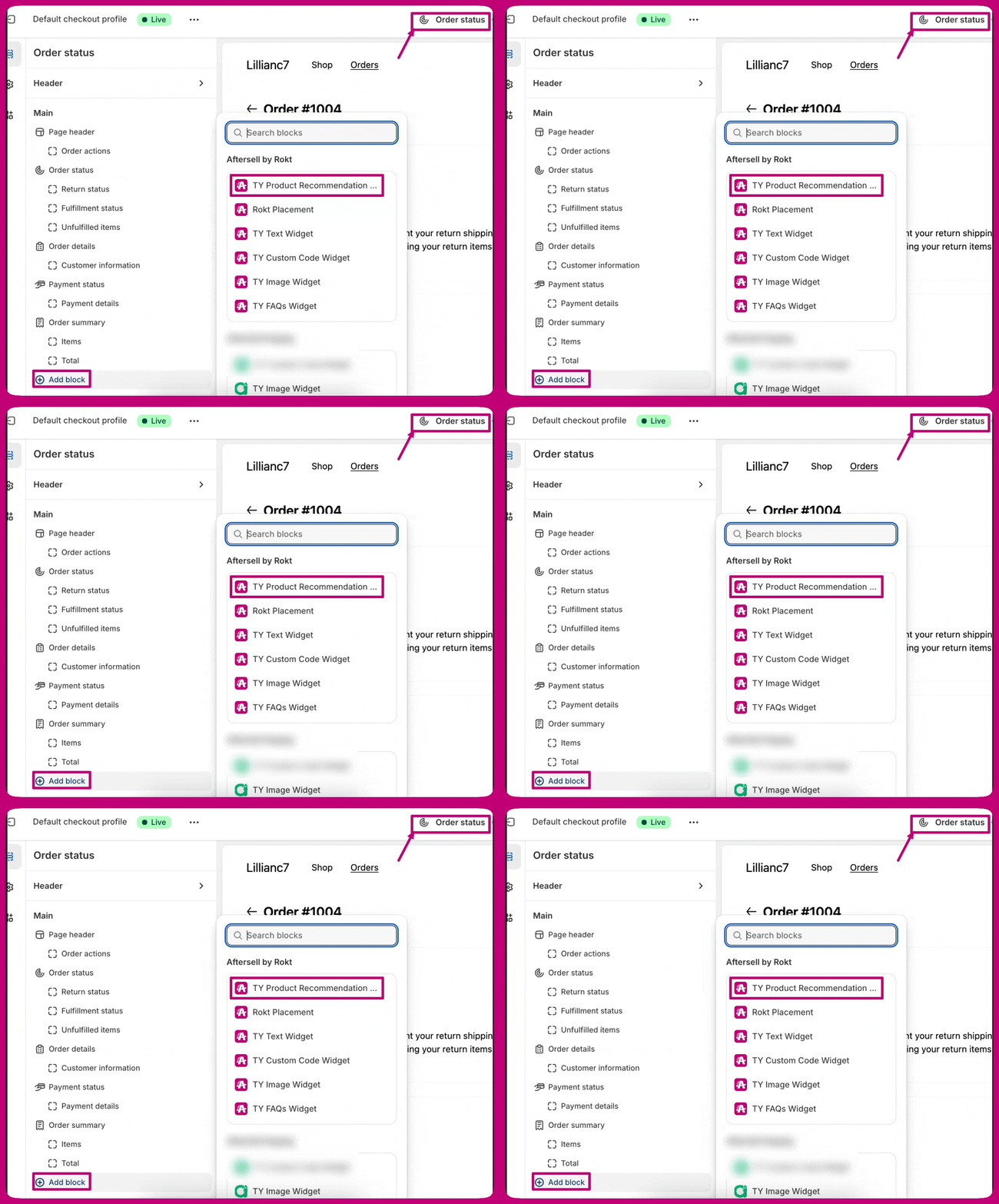 Note: We recommend placing the app blocks on both the Thank you and Order Status Pages
2. The branding settings automatically align with your Shopify checkout branding settings and cannot be customized within the Aftersell editor.
3. You can select whether these upsells are merged into the original order or created as a separate order under the **Other Settings** tab.
4. Shopify's checkout preview may not always display the widgets. We recommend placing a test order to confirm that your offers appear correctly on a live order. While testing, verify that widgets display correctly on the Thank You Page or Order Status Page. Use test orders (such as free orders) to validate functionality and check that no errors occur during these tests.
* Note that specific triggers will not also show in the preview, you have to set your trigger to show for all customers to be able to see it in the Shopify thank you page preview.
5. If you use **manual payment capture** in Shopify, Thank You page upsell revenue may **not appear immediately** in Aftersell analytics only the **Modify Original Order** setting is enabled.
* Upsell visits and acceptances will be recorded as usual. However, ***revenue will only appear after the order's payment status is manually changed to Paid*** in Shopify.
5. If you use **manual payment capture** in Shopify, Thank You page upsell revenue may **not appear immediately** in Aftersell analytics only the **Modify Original Order** setting is enabled.
* Upsell visits and acceptances will be recorded as usual. However, **revenue will only appear after the order's payment status is manually changed to *Paid*** in Shopify.
***
# Common Errors and Troubleshooting
* **Widget Not Displaying:** Ensure the widget is active and placed in the Shopify editor correctly. Verify that it is added to the correct sections (Thank You Page, Order Status Page or both pages) in Aftersell and Shopify.
Note: We recommend placing the app blocks on both the Thank you and Order Status Pages
Note: We recommend placing the app blocks on both the Thank you and Order Status Pages
2. The branding settings automatically align with your Shopify checkout branding settings and cannot be customized within the Aftersell editor.
3. You can select whether these upsells are merged into the original order or created as a separate order under the **Other Settings** tab.
4. Shopify's checkout preview may not always display the widgets. We recommend placing a test order to confirm that your offers appear correctly on a live order. While testing, verify that widgets display correctly on the Thank You Page or Order Status Page. Use test orders (such as free orders) to validate functionality and check that no errors occur during these tests.
* Note that specific triggers will not also show in the preview, you have to set your trigger to show for all customers to be able to see it in the Shopify thank you page preview.
5. If you use **manual payment capture** in Shopify, Thank You page upsell revenue may **not appear immediately** in Aftersell analytics only the **Modify Original Order** setting is enabled.
* Upsell visits and acceptances will be recorded as usual. However, ***revenue will only appear after the order's payment status is manually changed to Paid*** in Shopify.
5. If you use **manual payment capture** in Shopify, Thank You page upsell revenue may **not appear immediately** in Aftersell analytics only the **Modify Original Order** setting is enabled.
* Upsell visits and acceptances will be recorded as usual. However, **revenue will only appear after the order's payment status is manually changed to *Paid*** in Shopify.
***
# Common Errors and Troubleshooting
* **Widget Not Displaying:** Ensure the widget is active and placed in the Shopify editor correctly. Verify that it is added to the correct sections (Thank You Page, Order Status Page or both pages) in Aftersell and Shopify.
Note: We recommend placing the app blocks on both the Thank you and Order Status Pages