> ## Documentation Index
> Fetch the complete documentation index at: https://docs.aftersell.com/llms.txt
> Use this file to discover all available pages before exploring further.
# Post-purchase upsells
> Use a Strategy to dynamically choose the product shown in a post-purchase upsell offer.
## Overview
When configuring a post-purchase offer, you can fill the product slot in a few ways: hand-pick a specific product, let AI recommend one, or attach a **Strategy**. Each is a different tool for a different job.
Strategies are for **dynamic merchandising in real time** - pairing the right accessory with a parent product, suggesting the next step in a routine, or surfacing a complementary item. Where triggers initiate a funnel + layout; a Strategy then decides what products go inside it. Triggers are the gateway, Strategies are the brain behind the experience.
***
## Attaching a Strategy to a post-purchase offer
Strategies are attached **per offer step**, not to the funnel as a whole. You can mix strategy-driven steps and static-product steps in the same funnel.
1. Open the funnel you want to edit and go to the **Upsells** section.
2. On the upsell slot you want to configure, click **Create your first offer** (or **+** to add another offer).
3. Under **Select type**, choose **Single product upsell** or **Multi product upsell**.
4. Under **Select product type**, choose **Strategy**.
5. In the Strategy picker, search for and select the Strategy you want to use.
6. Click **Confirm**, then save the funnel.
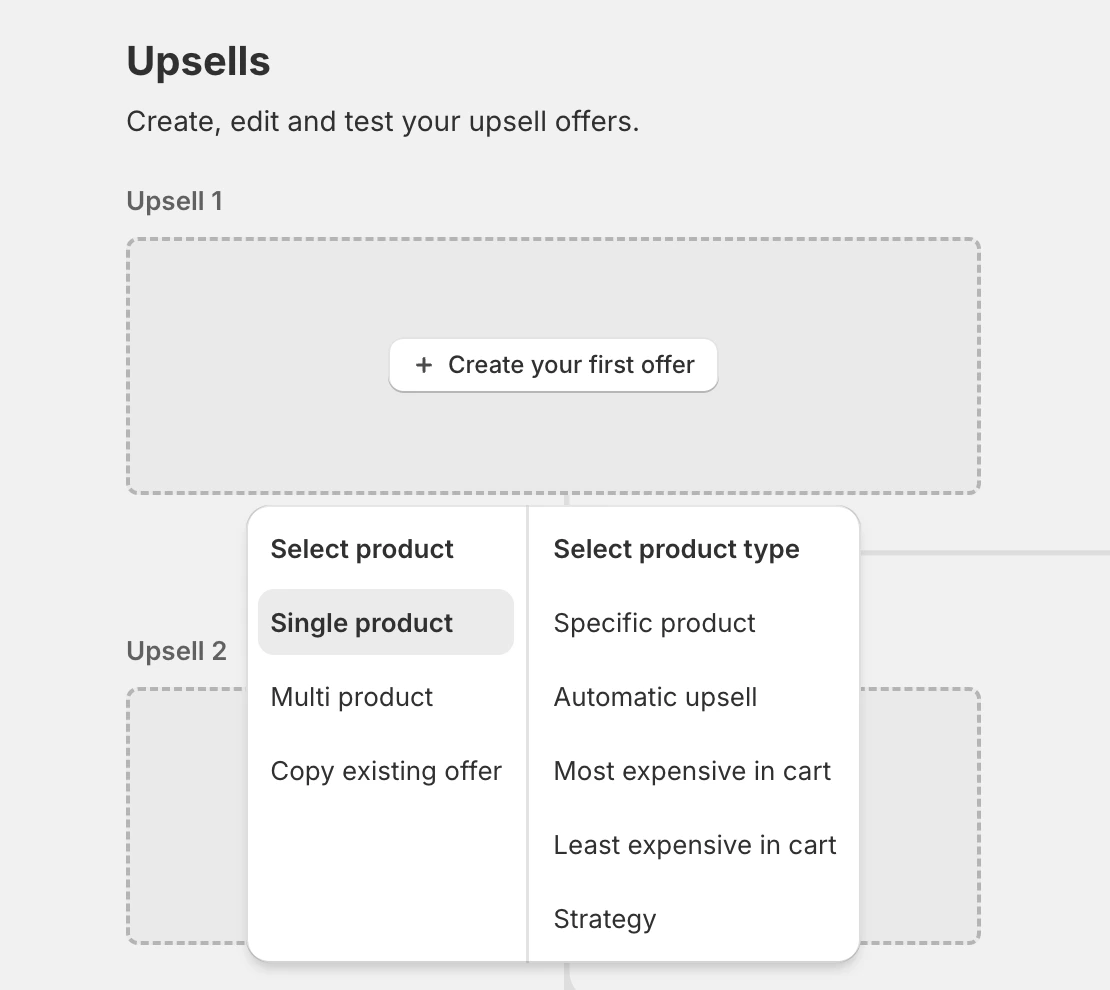 Once attached, the offer step displays the Strategy's name in place of a specific product. Each time the offer is shown, the Strategy is evaluated and the returned product is rendered.
Give your Strategies clear, descriptive names. The Strategy name is what shows up in the funnel editor once attached, and it's the easiest way to know at a glance which Strategy is driving which offer step.
***
## What the Strategy sees
When a post-purchase offer evaluates a Strategy, the following context is sent automatically. You don't need to configure any of it - it's pulled from the shopper's order and session as the offer is prepared.
#### Product context
The line items from the just-completed order are sent as the input products. Triggers like **product tags**, **product collections**, **product type**, **vendor**, **selling plan**, and **product metafields** all evaluate against these items.
#### Cart context
* **Subtotal** - the order subtotal.
* **Item count** - total quantity across all lines.
* **Line count** - number of distinct line items.
#### Customer context
* **Customer tags**
* **Order count** (lifetime orders for the customer)
* **Country / province**
* **Locale**
Country, province, and locale are read from the order itself and are available for every checkout. Customer tags and order count come from the Shopify customer record - they populate as soon as the checkout is linked to a customer (which Shopify does once a recognized email is entered, or when a new customer record is created).
#### Session context
UTM parameters captured when the shopper arrived at the store:
* **UTM source**
* **UTM medium**
* **UTM campaign**
* **UTM content**
* **UTM term**
This makes it possible to tailor post-purchase offers to the campaign or channel the shopper came from.
***
## What happens when the Strategy returns
The product(s) returned by the Strategy **replace** the placeholder in the offer step - they don't add to it. The shopper sees the offer as if you had hand-picked that product yourself.
A single-product offer uses the first returned product. A multi-product offer fills its slots from the returned products in priority order.
***
## When no product is returned
If no rules match and the Strategy returns no products, the post-purchase upsell is **not shown** to the shopper.
To keep your funnel firing, configure a **Catch all** in the Strategy so there is always a fallback product to return. See the [Building Strategies](/aftersell/strategies_building_in_app) page for how to set up a Catch all.
***
## Tips for post-purchase Strategies
* **Use Catch all as a safety net.** A Strategy without a Catch all will skip the offer step if nothing matches. A simple Catch all keeps the funnel showing *something*.
* **Mix dynamic and static steps.** Not every step has to be Strategy-driven. A common pattern is a Strategy on the first offer (most personalized) and a static fallback offer on the second offer (proven seller).
Once attached, the offer step displays the Strategy's name in place of a specific product. Each time the offer is shown, the Strategy is evaluated and the returned product is rendered.
Give your Strategies clear, descriptive names. The Strategy name is what shows up in the funnel editor once attached, and it's the easiest way to know at a glance which Strategy is driving which offer step.
***
## What the Strategy sees
When a post-purchase offer evaluates a Strategy, the following context is sent automatically. You don't need to configure any of it - it's pulled from the shopper's order and session as the offer is prepared.
#### Product context
The line items from the just-completed order are sent as the input products. Triggers like **product tags**, **product collections**, **product type**, **vendor**, **selling plan**, and **product metafields** all evaluate against these items.
#### Cart context
* **Subtotal** - the order subtotal.
* **Item count** - total quantity across all lines.
* **Line count** - number of distinct line items.
#### Customer context
* **Customer tags**
* **Order count** (lifetime orders for the customer)
* **Country / province**
* **Locale**
Country, province, and locale are read from the order itself and are available for every checkout. Customer tags and order count come from the Shopify customer record - they populate as soon as the checkout is linked to a customer (which Shopify does once a recognized email is entered, or when a new customer record is created).
#### Session context
UTM parameters captured when the shopper arrived at the store:
* **UTM source**
* **UTM medium**
* **UTM campaign**
* **UTM content**
* **UTM term**
This makes it possible to tailor post-purchase offers to the campaign or channel the shopper came from.
***
## What happens when the Strategy returns
The product(s) returned by the Strategy **replace** the placeholder in the offer step - they don't add to it. The shopper sees the offer as if you had hand-picked that product yourself.
A single-product offer uses the first returned product. A multi-product offer fills its slots from the returned products in priority order.
***
## When no product is returned
If no rules match and the Strategy returns no products, the post-purchase upsell is **not shown** to the shopper.
To keep your funnel firing, configure a **Catch all** in the Strategy so there is always a fallback product to return. See the [Building Strategies](/aftersell/strategies_building_in_app) page for how to set up a Catch all.
***
## Tips for post-purchase Strategies
* **Use Catch all as a safety net.** A Strategy without a Catch all will skip the offer step if nothing matches. A simple Catch all keeps the funnel showing *something*.
* **Mix dynamic and static steps.** Not every step has to be Strategy-driven. A common pattern is a Strategy on the first offer (most personalized) and a static fallback offer on the second offer (proven seller).