> ## Documentation Index
> Fetch the complete documentation index at: https://docs.aftersell.com/llms.txt
> Use this file to discover all available pages before exploring further.
# Upsells block
> The Aftersell Cart Upsells block — strategy-picked product offers shown in the drawer.
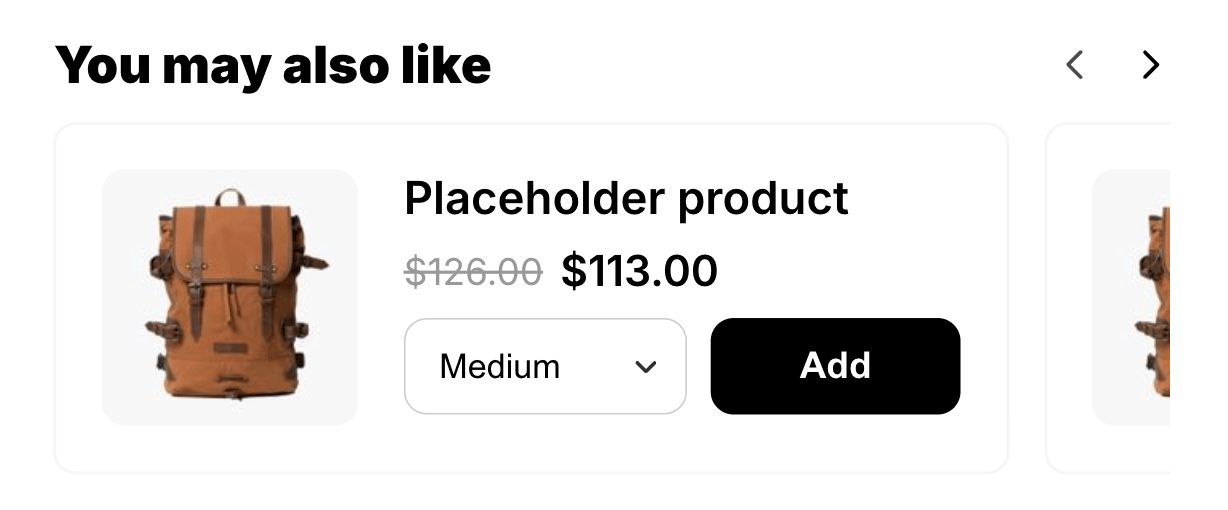
> The **Upsells** block shows product offers in the cart drawer, chosen by a **Strategy** you select. When a shopper opens the cart, the block surfaces the products your Strategy returns based on the current cart contents and any targeting rules you've configured.
Grow average order value by surfacing relevant product offers at the moment shoppers open their cart, using a Strategy that picks what to show based on cart contents and your targeting rules.
Unlike the [**Product add-on**](/aftersell/cart/product-add-on-block) block, which always shows one product you pick, Upsells is driven by a Strategy that decides what to show.
 ## Behavior
* Products are fetched live based on the shopper's current cart, so the offers reflect what's actually in the cart.
* **The whole section hides when no products resolve** — no Strategy attached, the Strategy returns nothing, or none of the returned products are purchasable. Shoppers never see an empty Upsells section.
* If a returned offer carries a discount, the shopper sees an honest strikethrough and a discount badge, and the discount is applied at checkout.
## Settings
| Setting | What it controls | Default |
| ------------------------- | -------------------------------------------------------------------------------------------------------------------------------------------------------------------------------- | --------------------------------------- |
| **Title** | Rich-text heading above the offers. Supports bold, italic, alignment, and color. | `You may also like` |
| **Add button text** | The label on each product's add button. | `Add` |
| **Strategy** | The Strategy that chooses which products to show. | A Shopify AI strategy, assigned for you |
| **Layout** | **Carousel** or **List**. | Carousel |
| **Maximum products** | How many products to show at most. Accepts `1`–`12`. | `4` |
| **Show compare-at price** | Whether to show a struck compare-at price. | On |
| **Show product reviews** | Whether to show star ratings and review counts on each upsell card. Ratings are sourced from your review app's product metafields and only appear when valid review data exists. | Off |
### Supported review apps
The following metafield-based review apps are supported: Shopify Product Reviews, Junip, Okendo, Growave, Fera, Stamped, Loox, REVIEWS.io, Automizely Reviews, Judge.me, Ali Reviews, Trustoo, Rivo, Rivyo, and Vitals. Yotpo is not supported because it uses a separate API rather than product metafields.
## Design
The Upsells block has per-block design overrides in its **Design** panel. These override the cart's global design settings for this block only. Leaving a value blank inherits the global setting.
### Text styling
The Upsells block includes a **Text** section in its Design settings. Use it to control the typography of individual text elements on each upsell card. Select a text element from the picker to adjust its settings:
| Setting | What it controls |
| ------------------ | --------------------------------------------------------------------------------------------------------------------------------------------------- |
| **Text color** | Color of the selected text element. |
| **Font** | **Theme font** (inherits your theme's font) or **Custom font** (enter the name of a font your theme already loads). Available for **Heading** only. |
| **Size** | Font size in pixels. |
| **Weight** | Font weight: Light, Regular, Medium, Semibold, or Bold. |
| **Line height** | Line height as a multiplier of the font size (for example, `1.4`). |
| **Letter spacing** | Letter spacing in pixels. Negative values tighten the text. |
The text elements you can style are grouped by category:
**Heading**
* **Heading** — the section heading above the upsell cards (for example, *You may also like*). Also supports a custom font family. Bold and color are set in the Rich Text Editor above.
**Product**
* **Product title** — the product name on each upsell card.
* **Review count** — the review count shown when **Show product reviews** is enabled.
**Pricing**
* **Price** — the current price on each card.
* **Compare-at price** — the struck-through original price.
* **Discount** — the discount label (for example, *20% off*).
Leaving any field blank keeps the element's default value.
Clicking a text element directly in the cart preview highlights it and opens its controls in the panel automatically.
### Tile colors
| Setting | What it controls | Default |
| ------------------------- | ------------------------------------------------ | ----------- |
| **Tile background color** | The background fill of each upsell product card. | Transparent |
| **Tile border color** | The border color of each upsell product card. | `#F6F6F7` |
### Reviews
When **Show product reviews** is enabled, you can customize the star colors from the **Reviews** section of the Design panel.
| Setting | What it controls | Default |
| -------------------- | ---------------------------------- | --------- |
| **Star color** | The filled portion of each star. | `#FDCC0D` |
| **Empty star color** | The unfilled portion of each star. | `#D1D5DB` |
## Placement and limits
* **Region:** body or bottom.
* **Maximum:** 1 per cart state — the filled cart and the empty cart each get their own.
* **State:** both filled and empty cart.
* Not added by default. Not locked — you can remove or hide it.
## Selecting a strategy
An Upsells block doesn't arrive empty: if no Strategy is set, Aftersell resolves your store's Shopify AI strategy — creating it if you don't have one yet — and fills it in, so the block works straight away. Open the **Strategy** picker to change it. The picker has two groups:
**Quick start**
* **Create strategy from selected products** — pick specific products directly and a Strategy is created for you automatically.
* **Create strategy from scratch** — opens the Strategy editor so you can build rules without leaving the cart editor.
**Strategies**
* **Shopify AI recommendations** — creates a Strategy backed by Shopify's own recommendations, named **Shopify AI recommended products** wherever it appears afterwards. This entry disappears once you have one, since a store only ever needs a single Shopify AI strategy.
* Your existing Strategies, listed by name. Type in the search field to filter them.
Once a Strategy is selected, its name appears on the strategy row inside the block.
## Managing a selected strategy
After a Strategy is attached, a **•••** (ellipsis) button appears on the strategy row. Click it to open the actions menu:
* **Edit strategy** — opens the Strategy editor in a new tab, so your cart editor session and any unsaved changes stay intact. This option isn't available for the Shopify AI-recommended strategy, which is managed automatically and has no editable rules.
* **Remove from upsell** — detaches the Strategy from this block. The Strategy itself isn't deleted; it stays available in your Strategies list.
Editing a Strategy in a new tab doesn't affect the cart editor session — you can return to the cart editor tab and continue configuring without losing your work.
## Custom template
Supports a [custom template](/aftersell/cart/custom-templates) from its Code tab, which replaces this block's built-in markup with your JSX. These are the props it receives.
### Block content
| Prop | Type | What it's for |
| --------------- | ---------------------- | ------------------------------------------------------------------------- |
| `title` | `string` | Section heading. |
| `addButtonText` | `string` | Add-to-cart button label. |
| `layout` | `'carousel' \| 'list'` | Horizontal scroll, or wrap. Branch your markup on this. |
| `upsells` | `UpsellCard[]` | The display-ready products. See [the card shape](#the-upsell-card) below. |
| `isLoading` | `boolean` | `true` while upsell products are still being fetched. |
### Adding to cart
| Prop | Type | What it's for |
| ----------------- | ------------------------------------------------ | ---------------------------------------------------------------------------------------- |
| `selectVariant` | `(productId: string, variantId: number) => void` | Selects a variant for a product. |
| `handleAdd` | `(productId: string) => void` | Adds that product's selected variant to the cart. |
| `addingProductId` | `string \| null` | The product currently being added, so you can disable just its button. `null` when idle. |
### Carousel controls
Only relevant when `layout` is `'carousel'`.
| Prop | Type | What it's for |
| -------------- | ------------------------------------- | -------------------------------------------------------------------------------- |
| `trackRef` | `{ current: HTMLDivElement \| null }` | Attach to your scroller with `ref={props.trackRef}` so the arrows can scroll it. |
| `atStart` | `boolean` | `true` when the track is at its start edge. Disable the left arrow. |
| `atEnd` | `boolean` | `true` when the track is at its end edge. Disable the right arrow. |
| `scrollByCard` | `(direction: 1 \| -1) => void` | Scrolls the track one card left (`-1`) or right (`1`). |
### The upsell card
Each entry in `upsells`:
| Field | Type | What it's for |
| ------------------------- | ------------------------- | ----------------------------------------------------------------------------------------------------------------------------------------------------------------------------------------------------------------------------------------------------------------------------------------------------------------------------- |
| `productId` | `string` | Product GID. Use it as the React key and as the add-to-cart target. |
| `title` | `string` | Product title. |
| `description` | `string` | Plain-text description. `''` when the product has none. |
| `url` | `string \| null` | Product page URL. `null` when unavailable. |
| `imageUrl` | `string \| null` | Featured image. `null` when the product has none. |
| `selectedVariantImageUrl` | `string \| null` | The selected variant's own image. `null` when the variant has none — fall back to `imageUrl`. |
| `variantTitle` | `string \| null` | The selected variant's option values (e.g. `Medium / Blue`), already resolved. `null` when the variant has no real title — blank or Shopify's `Default Title` placeholder. A product with one named variant still returns that name, so guard with `{upsell.variantTitle && …}` rather than keying off `hasMultipleVariants`. |
| `priceLabel` | `string` | Price to show, already formatted. The sale price when discounted, otherwise the variant price. |
| `compareAtLabel` | `string \| null` | Struck-through original, already formatted. `null` when there's nothing to strike. |
| `discountLabel` | `string \| null` | Inline discount label such as `(20% off)`. `null` when not discounted. |
| `review` | `object \| null` | `{ rating, count, stars }`, where `stars` is 5 pre-rendered image URLs with fractional fill baked in. Render each as an image element. `null` when reviews are off or the product has none. |
| `options` | `Array<{ name, values }>` | Option groups, for building pickers or swatches. |
| `variants` | `array` | The variant combinations. See below. |
| `selectedVariantId` | `number` | The currently selected variant. Pass it to `selectVariant`. |
| `hasMultipleVariants` | `boolean` | Whether to render a variant picker at all. |
| `vendor` | `string` | The product's vendor. |
| `selectedVariantImageUrl` | `string \| null` | The selected variant's own image. `null` when it has none — fall back to `imageUrl`. |
Each entry in `variants` carries `id`, `title`, `price` and `compareAtPrice` (raw, unformatted, in the currency's major unit as strings), `availableForSale`, `imageUrl`, `sku`, and `selectedOptions` (`[{ name, value }]`).
**Availability is per combination, not per option.** `options` gives you the groups to render, but whether a given selection is buyable lives on the matching entry in `variants`. Resolve the shopper's picked combination against `variants` and gate on that entry's `availableForSale`, rather than assuming every value in `options` is orderable.
`priceLabel` and `compareAtLabel` are already formatted for display, while `variants[].price` and `variants[].compareAtPrice` are raw strings in the currency's major unit. Don't mix the two: show the labels, and use the raw values only for comparisons.
## Design
Style this block with its **Design** section in the settings panel. These are per-block overrides that layer on top of your global design and fall back to it when blank.
What are design settings? Learn more here: [Design settings](/aftersell/cart/design-settings).
## Behavior
* Products are fetched live based on the shopper's current cart, so the offers reflect what's actually in the cart.
* **The whole section hides when no products resolve** — no Strategy attached, the Strategy returns nothing, or none of the returned products are purchasable. Shoppers never see an empty Upsells section.
* If a returned offer carries a discount, the shopper sees an honest strikethrough and a discount badge, and the discount is applied at checkout.
## Settings
| Setting | What it controls | Default |
| ------------------------- | -------------------------------------------------------------------------------------------------------------------------------------------------------------------------------- | --------------------------------------- |
| **Title** | Rich-text heading above the offers. Supports bold, italic, alignment, and color. | `You may also like` |
| **Add button text** | The label on each product's add button. | `Add` |
| **Strategy** | The Strategy that chooses which products to show. | A Shopify AI strategy, assigned for you |
| **Layout** | **Carousel** or **List**. | Carousel |
| **Maximum products** | How many products to show at most. Accepts `1`–`12`. | `4` |
| **Show compare-at price** | Whether to show a struck compare-at price. | On |
| **Show product reviews** | Whether to show star ratings and review counts on each upsell card. Ratings are sourced from your review app's product metafields and only appear when valid review data exists. | Off |
### Supported review apps
The following metafield-based review apps are supported: Shopify Product Reviews, Junip, Okendo, Growave, Fera, Stamped, Loox, REVIEWS.io, Automizely Reviews, Judge.me, Ali Reviews, Trustoo, Rivo, Rivyo, and Vitals. Yotpo is not supported because it uses a separate API rather than product metafields.
## Design
The Upsells block has per-block design overrides in its **Design** panel. These override the cart's global design settings for this block only. Leaving a value blank inherits the global setting.
### Text styling
The Upsells block includes a **Text** section in its Design settings. Use it to control the typography of individual text elements on each upsell card. Select a text element from the picker to adjust its settings:
| Setting | What it controls |
| ------------------ | --------------------------------------------------------------------------------------------------------------------------------------------------- |
| **Text color** | Color of the selected text element. |
| **Font** | **Theme font** (inherits your theme's font) or **Custom font** (enter the name of a font your theme already loads). Available for **Heading** only. |
| **Size** | Font size in pixels. |
| **Weight** | Font weight: Light, Regular, Medium, Semibold, or Bold. |
| **Line height** | Line height as a multiplier of the font size (for example, `1.4`). |
| **Letter spacing** | Letter spacing in pixels. Negative values tighten the text. |
The text elements you can style are grouped by category:
**Heading**
* **Heading** — the section heading above the upsell cards (for example, *You may also like*). Also supports a custom font family. Bold and color are set in the Rich Text Editor above.
**Product**
* **Product title** — the product name on each upsell card.
* **Review count** — the review count shown when **Show product reviews** is enabled.
**Pricing**
* **Price** — the current price on each card.
* **Compare-at price** — the struck-through original price.
* **Discount** — the discount label (for example, *20% off*).
Leaving any field blank keeps the element's default value.
Clicking a text element directly in the cart preview highlights it and opens its controls in the panel automatically.
### Tile colors
| Setting | What it controls | Default |
| ------------------------- | ------------------------------------------------ | ----------- |
| **Tile background color** | The background fill of each upsell product card. | Transparent |
| **Tile border color** | The border color of each upsell product card. | `#F6F6F7` |
### Reviews
When **Show product reviews** is enabled, you can customize the star colors from the **Reviews** section of the Design panel.
| Setting | What it controls | Default |
| -------------------- | ---------------------------------- | --------- |
| **Star color** | The filled portion of each star. | `#FDCC0D` |
| **Empty star color** | The unfilled portion of each star. | `#D1D5DB` |
## Placement and limits
* **Region:** body or bottom.
* **Maximum:** 1 per cart state — the filled cart and the empty cart each get their own.
* **State:** both filled and empty cart.
* Not added by default. Not locked — you can remove or hide it.
## Selecting a strategy
An Upsells block doesn't arrive empty: if no Strategy is set, Aftersell resolves your store's Shopify AI strategy — creating it if you don't have one yet — and fills it in, so the block works straight away. Open the **Strategy** picker to change it. The picker has two groups:
**Quick start**
* **Create strategy from selected products** — pick specific products directly and a Strategy is created for you automatically.
* **Create strategy from scratch** — opens the Strategy editor so you can build rules without leaving the cart editor.
**Strategies**
* **Shopify AI recommendations** — creates a Strategy backed by Shopify's own recommendations, named **Shopify AI recommended products** wherever it appears afterwards. This entry disappears once you have one, since a store only ever needs a single Shopify AI strategy.
* Your existing Strategies, listed by name. Type in the search field to filter them.
Once a Strategy is selected, its name appears on the strategy row inside the block.
## Managing a selected strategy
After a Strategy is attached, a **•••** (ellipsis) button appears on the strategy row. Click it to open the actions menu:
* **Edit strategy** — opens the Strategy editor in a new tab, so your cart editor session and any unsaved changes stay intact. This option isn't available for the Shopify AI-recommended strategy, which is managed automatically and has no editable rules.
* **Remove from upsell** — detaches the Strategy from this block. The Strategy itself isn't deleted; it stays available in your Strategies list.
Editing a Strategy in a new tab doesn't affect the cart editor session — you can return to the cart editor tab and continue configuring without losing your work.
## Custom template
Supports a [custom template](/aftersell/cart/custom-templates) from its Code tab, which replaces this block's built-in markup with your JSX. These are the props it receives.
### Block content
| Prop | Type | What it's for |
| --------------- | ---------------------- | ------------------------------------------------------------------------- |
| `title` | `string` | Section heading. |
| `addButtonText` | `string` | Add-to-cart button label. |
| `layout` | `'carousel' \| 'list'` | Horizontal scroll, or wrap. Branch your markup on this. |
| `upsells` | `UpsellCard[]` | The display-ready products. See [the card shape](#the-upsell-card) below. |
| `isLoading` | `boolean` | `true` while upsell products are still being fetched. |
### Adding to cart
| Prop | Type | What it's for |
| ----------------- | ------------------------------------------------ | ---------------------------------------------------------------------------------------- |
| `selectVariant` | `(productId: string, variantId: number) => void` | Selects a variant for a product. |
| `handleAdd` | `(productId: string) => void` | Adds that product's selected variant to the cart. |
| `addingProductId` | `string \| null` | The product currently being added, so you can disable just its button. `null` when idle. |
### Carousel controls
Only relevant when `layout` is `'carousel'`.
| Prop | Type | What it's for |
| -------------- | ------------------------------------- | -------------------------------------------------------------------------------- |
| `trackRef` | `{ current: HTMLDivElement \| null }` | Attach to your scroller with `ref={props.trackRef}` so the arrows can scroll it. |
| `atStart` | `boolean` | `true` when the track is at its start edge. Disable the left arrow. |
| `atEnd` | `boolean` | `true` when the track is at its end edge. Disable the right arrow. |
| `scrollByCard` | `(direction: 1 \| -1) => void` | Scrolls the track one card left (`-1`) or right (`1`). |
### The upsell card
Each entry in `upsells`:
| Field | Type | What it's for |
| ------------------------- | ------------------------- | ----------------------------------------------------------------------------------------------------------------------------------------------------------------------------------------------------------------------------------------------------------------------------------------------------------------------------- |
| `productId` | `string` | Product GID. Use it as the React key and as the add-to-cart target. |
| `title` | `string` | Product title. |
| `description` | `string` | Plain-text description. `''` when the product has none. |
| `url` | `string \| null` | Product page URL. `null` when unavailable. |
| `imageUrl` | `string \| null` | Featured image. `null` when the product has none. |
| `selectedVariantImageUrl` | `string \| null` | The selected variant's own image. `null` when the variant has none — fall back to `imageUrl`. |
| `variantTitle` | `string \| null` | The selected variant's option values (e.g. `Medium / Blue`), already resolved. `null` when the variant has no real title — blank or Shopify's `Default Title` placeholder. A product with one named variant still returns that name, so guard with `{upsell.variantTitle && …}` rather than keying off `hasMultipleVariants`. |
| `priceLabel` | `string` | Price to show, already formatted. The sale price when discounted, otherwise the variant price. |
| `compareAtLabel` | `string \| null` | Struck-through original, already formatted. `null` when there's nothing to strike. |
| `discountLabel` | `string \| null` | Inline discount label such as `(20% off)`. `null` when not discounted. |
| `review` | `object \| null` | `{ rating, count, stars }`, where `stars` is 5 pre-rendered image URLs with fractional fill baked in. Render each as an image element. `null` when reviews are off or the product has none. |
| `options` | `Array<{ name, values }>` | Option groups, for building pickers or swatches. |
| `variants` | `array` | The variant combinations. See below. |
| `selectedVariantId` | `number` | The currently selected variant. Pass it to `selectVariant`. |
| `hasMultipleVariants` | `boolean` | Whether to render a variant picker at all. |
| `vendor` | `string` | The product's vendor. |
| `selectedVariantImageUrl` | `string \| null` | The selected variant's own image. `null` when it has none — fall back to `imageUrl`. |
Each entry in `variants` carries `id`, `title`, `price` and `compareAtPrice` (raw, unformatted, in the currency's major unit as strings), `availableForSale`, `imageUrl`, `sku`, and `selectedOptions` (`[{ name, value }]`).
**Availability is per combination, not per option.** `options` gives you the groups to render, but whether a given selection is buyable lives on the matching entry in `variants`. Resolve the shopper's picked combination against `variants` and gate on that entry's `availableForSale`, rather than assuming every value in `options` is orderable.
`priceLabel` and `compareAtLabel` are already formatted for display, while `variants[].price` and `variants[].compareAtPrice` are raw strings in the currency's major unit. Don't mix the two: show the labels, and use the raw values only for comparisons.
## Design
Style this block with its **Design** section in the settings panel. These are per-block overrides that layer on top of your global design and fall back to it when blank.
What are design settings? Learn more here: [Design settings](/aftersell/cart/design-settings).