 ## Tier threshold validation
Each condition's tier list holds up to **4** tiers — a Rewards block with several market, country or currency conditions stores up to 4 per condition, and because the first matching condition is the one shown, any single shopper sees at most 4. Each tier's threshold must be strictly greater than the tier above it — thresholds must be in ascending order. If a tier's threshold is equal to or lower than the previous tier's threshold, an inline error appears on that tier's threshold field and the **Save** button is blocked until the issue is resolved. The affected tier automatically expands so the error is visible.
For example, if Tier 1 is set to \$100, Tier 2 must be set to \$101 or higher.
## Behavior
* Progress **excludes** reward-gift lines, product add-on lines, shipping-protection lines, and gift cards from the total, so those items don't inflate the shopper toward a reward.
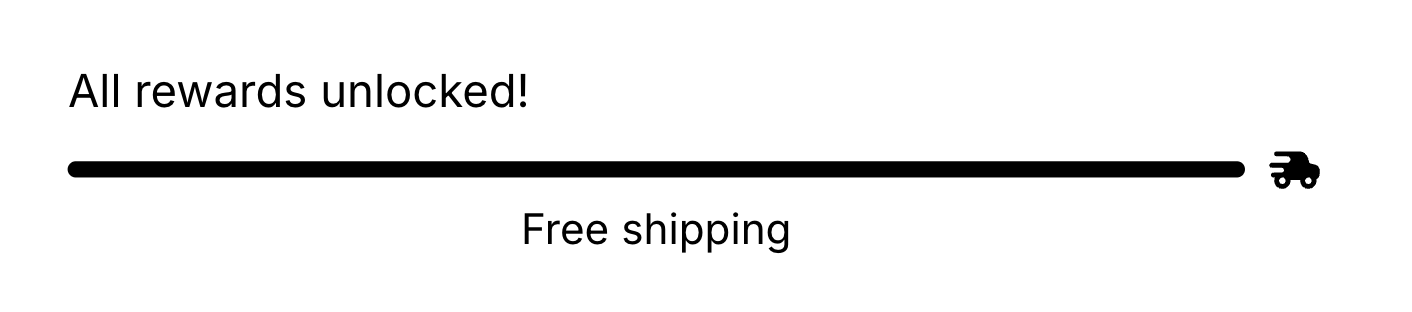
* The message shows the remaining amount or count to the next tier, or the completed message once all tiers are met.
* **Free gifts are granted automatically.** When a shopper reaches a gift tier, the gift is added to the cart; if they drop below it, the gift is removed. With stackable rewards off, only the top achieved tier's gift is granted.
* **Add back removed free gifts** controls what happens when a shopper manually removes an auto-granted gift. When enabled (the default), the gift is automatically re-added on the next cart update. When disabled, the removal is respected and the gift stays out of the cart for the rest of that session, so shoppers aren't fighting the cart to decline a gift.
## Settings
| Setting | What it controls | Default |
| ------------------------------------------ | ----------------------------------------------------------------------------------------------------------------------------- | ----------------------- |
| **Rewards calculation** | Whether progress is measured by **Cart total (\$)** or **Cart quantity (#)**. | Cart total (\$) |
| **Stack rewards across tiers** | On: apply every reward the buyer unlocks, up to the highest tier reached. Off: apply only the highest unlocked tier's reward. | On |
| **Add back removed free gifts** | Re-add an earned free gift after the buyer removes it. | On |
| **Show tier icons** | Whether tier icons appear on the bar. | On |
| **Show tier labels** | Whether the label text appears on each tier marker on the bar. | Off |
| **Text after completing full rewards bar** | Rich text shown once all tiers are met. | `All rewards unlocked!` |
| **Tiers** | The reward tiers (below). Up to **4** per condition; the panel shows a `n/4` counter and disables **Add tier** at the cap. | None |
Each **tier** expands to:
| Tier setting | What it controls | Default |
| ------------------------------------------ | ------------------------------------------------------------------------------------------------------------------------------------------------------- | -------------------------------------------- |
| **Reward type** | **Free shipping**, **Order discount**, or **Free gift**. Changing it resets that tier's title and progress bar label to the new type's default wording. | Free shipping |
| **Threshold (\$)** / **Threshold (items)** | The cart total or item count that unlocks the tier. The label follows **Rewards calculation**. Minimum `1`. | `50` |
| **Discount value type** | Order discounts only: **Percentage (%)** or **Fixed amount (\$)**. | Percentage (%) |
| **Percentage off** / **Amount off** | Order discounts only: the discount amount. Percentages are capped at 100. | `10` |
| **Title before achieving tier** | Rich-text message shown while the shopper is still short of the tier. Supports the `{{amount}}` token. | `You're {{amount}} away from free shipping!` |
| **Progress bar label** | The label shown on the tier marker. | `Free shipping` |
| **Gift products** | Free gifts only: the product(s)/variant(s) granted, up to **3** per tier. | None |
## Placement and limits
* **Region:** any (top, body, or bottom).
* **Maximum:** 1 per cart state — the filled cart and the empty cart each get their own.
* **State:** both filled and empty cart.
* Not added by default. Not locked, so you can remove or hide it.
## Per-market rewards
Rewards is the block with the full **Conditions** UI today: define multiple sets of tiers, each targeting a **Shopify market**, **customer country**, or **customer currency** (**In** or **Not in**). The first matching condition is shown to the shopper. If none match, the block renders nothing for them.
Each condition is a card in the settings panel (**When** + condition). Below it, a **Display** section holds the tiers for that condition. Keep specific rules above an **All buyers** catch-all. Order is priority, not a combination of every match.
You can't delete the last condition (at least one is always required). Editor preview doesn't evaluate the live buyer; select a condition in the panel to preview that variant.
For how conditions relate to the eye toggle and other blocks, see [Show or hide by market, country, or currency](/aftersell/cart/blocks-overview#show-or-hide-by-market-country-or-currency).
## Custom template
Supports a [custom template](/aftersell/cart/custom-templates) from its Code tab, which replaces this block's built-in markup with your JSX. These are the props it receives.
| Prop | Type | What it's for |
| -------------------- | ------------- | ----------------------------------------------------------------------------------------------------------------------------- |
| `milestones` | `Milestone[]` | The reward tiers, in order. See below. |
| `rewardsMessageHtml` | `string` | The progress or completion message as sanitized HTML. |
| `showIcons` | `boolean` | Whether the merchant enabled tier icons. |
| `showTierLabels` | `boolean` | Whether the merchant enabled tier bar labels. |
| `isLoading` | `boolean` | Always `false` here: the block renders its built-in skeleton during load and only calls your template once the cart is ready. |
Each `Milestone`:
| Field | Type | What it's for |
| ----------------- | ---------------------- | ------------------------------------------------------------------------------------------------------- |
| `id` | `string` | Stable key for the tier. Use it as your React `key`. |
| `label` | `string` | The tier's label, as plain text. |
| `icon` | `ReactElement \| null` | Pre-rendered icon element. `null` when the tier has none. Render it directly: `{m.icon}`. |
| `isCompleted` | `boolean` | Whether the cart has reached this tier. |
| `positionPercent` | `number` | How full **this tier's own segment** of the bar is, `0` to `100` — not a position along one shared bar. |
```jsx theme={"theme":{"light":"snazzy-light","dark":"github-dark"}}
function Rewards(props) {
return (
## Tier threshold validation
Each condition's tier list holds up to **4** tiers — a Rewards block with several market, country or currency conditions stores up to 4 per condition, and because the first matching condition is the one shown, any single shopper sees at most 4. Each tier's threshold must be strictly greater than the tier above it — thresholds must be in ascending order. If a tier's threshold is equal to or lower than the previous tier's threshold, an inline error appears on that tier's threshold field and the **Save** button is blocked until the issue is resolved. The affected tier automatically expands so the error is visible.
For example, if Tier 1 is set to \$100, Tier 2 must be set to \$101 or higher.
## Behavior
* Progress **excludes** reward-gift lines, product add-on lines, shipping-protection lines, and gift cards from the total, so those items don't inflate the shopper toward a reward.
* The message shows the remaining amount or count to the next tier, or the completed message once all tiers are met.
* **Free gifts are granted automatically.** When a shopper reaches a gift tier, the gift is added to the cart; if they drop below it, the gift is removed. With stackable rewards off, only the top achieved tier's gift is granted.
* **Add back removed free gifts** controls what happens when a shopper manually removes an auto-granted gift. When enabled (the default), the gift is automatically re-added on the next cart update. When disabled, the removal is respected and the gift stays out of the cart for the rest of that session, so shoppers aren't fighting the cart to decline a gift.
## Settings
| Setting | What it controls | Default |
| ------------------------------------------ | ----------------------------------------------------------------------------------------------------------------------------- | ----------------------- |
| **Rewards calculation** | Whether progress is measured by **Cart total (\$)** or **Cart quantity (#)**. | Cart total (\$) |
| **Stack rewards across tiers** | On: apply every reward the buyer unlocks, up to the highest tier reached. Off: apply only the highest unlocked tier's reward. | On |
| **Add back removed free gifts** | Re-add an earned free gift after the buyer removes it. | On |
| **Show tier icons** | Whether tier icons appear on the bar. | On |
| **Show tier labels** | Whether the label text appears on each tier marker on the bar. | Off |
| **Text after completing full rewards bar** | Rich text shown once all tiers are met. | `All rewards unlocked!` |
| **Tiers** | The reward tiers (below). Up to **4** per condition; the panel shows a `n/4` counter and disables **Add tier** at the cap. | None |
Each **tier** expands to:
| Tier setting | What it controls | Default |
| ------------------------------------------ | ------------------------------------------------------------------------------------------------------------------------------------------------------- | -------------------------------------------- |
| **Reward type** | **Free shipping**, **Order discount**, or **Free gift**. Changing it resets that tier's title and progress bar label to the new type's default wording. | Free shipping |
| **Threshold (\$)** / **Threshold (items)** | The cart total or item count that unlocks the tier. The label follows **Rewards calculation**. Minimum `1`. | `50` |
| **Discount value type** | Order discounts only: **Percentage (%)** or **Fixed amount (\$)**. | Percentage (%) |
| **Percentage off** / **Amount off** | Order discounts only: the discount amount. Percentages are capped at 100. | `10` |
| **Title before achieving tier** | Rich-text message shown while the shopper is still short of the tier. Supports the `{{amount}}` token. | `You're {{amount}} away from free shipping!` |
| **Progress bar label** | The label shown on the tier marker. | `Free shipping` |
| **Gift products** | Free gifts only: the product(s)/variant(s) granted, up to **3** per tier. | None |
## Placement and limits
* **Region:** any (top, body, or bottom).
* **Maximum:** 1 per cart state — the filled cart and the empty cart each get their own.
* **State:** both filled and empty cart.
* Not added by default. Not locked, so you can remove or hide it.
## Per-market rewards
Rewards is the block with the full **Conditions** UI today: define multiple sets of tiers, each targeting a **Shopify market**, **customer country**, or **customer currency** (**In** or **Not in**). The first matching condition is shown to the shopper. If none match, the block renders nothing for them.
Each condition is a card in the settings panel (**When** + condition). Below it, a **Display** section holds the tiers for that condition. Keep specific rules above an **All buyers** catch-all. Order is priority, not a combination of every match.
You can't delete the last condition (at least one is always required). Editor preview doesn't evaluate the live buyer; select a condition in the panel to preview that variant.
For how conditions relate to the eye toggle and other blocks, see [Show or hide by market, country, or currency](/aftersell/cart/blocks-overview#show-or-hide-by-market-country-or-currency).
## Custom template
Supports a [custom template](/aftersell/cart/custom-templates) from its Code tab, which replaces this block's built-in markup with your JSX. These are the props it receives.
| Prop | Type | What it's for |
| -------------------- | ------------- | ----------------------------------------------------------------------------------------------------------------------------- |
| `milestones` | `Milestone[]` | The reward tiers, in order. See below. |
| `rewardsMessageHtml` | `string` | The progress or completion message as sanitized HTML. |
| `showIcons` | `boolean` | Whether the merchant enabled tier icons. |
| `showTierLabels` | `boolean` | Whether the merchant enabled tier bar labels. |
| `isLoading` | `boolean` | Always `false` here: the block renders its built-in skeleton during load and only calls your template once the cart is ready. |
Each `Milestone`:
| Field | Type | What it's for |
| ----------------- | ---------------------- | ------------------------------------------------------------------------------------------------------- |
| `id` | `string` | Stable key for the tier. Use it as your React `key`. |
| `label` | `string` | The tier's label, as plain text. |
| `icon` | `ReactElement \| null` | Pre-rendered icon element. `null` when the tier has none. Render it directly: `{m.icon}`. |
| `isCompleted` | `boolean` | Whether the cart has reached this tier. |
| `positionPercent` | `number` | How full **this tier's own segment** of the bar is, `0` to `100` — not a position along one shared bar. |
```jsx theme={"theme":{"light":"snazzy-light","dark":"github-dark"}}
function Rewards(props) {
return (