> ## Documentation Index
> Fetch the complete documentation index at: https://docs.aftersell.com/llms.txt
> Use this file to discover all available pages before exploring further.
# Design settings
> Global and per-block design settings for the Aftersell Cart: colors, buttons, layout, and how block overrides layer on top.
Aftersell Cart design works at two levels: **global** settings that style the whole cart, and **per-block** overrides that fine-tune an individual block.
## Global design settings
Open **Cart settings** from the editor sidebar to reach the cart's global design. Settings are grouped into Design, Buttons, and Layout.
### Design
| Setting | What it controls | Default |
| ------------------------ | --------------------------------------------------------------- | --------- |
| **Background color** | The cart's background. | `#ffffff` |
| **Text color** | Primary text. | `#000000` |
| **Secondary text color** | Muted / secondary text. | `#a8a8a8` |
| **Accent color** | Badges, dividers, and strikethrough prices. | `#f2f2f2` |
| **Border radius** | Corner rounding for containers, cards, images, and text inputs. | `8px` |
### Buttons
| Setting | What it controls | Default |
| -------------------- | -------------------------------------------------------------- | --------- |
| **Background color** | Button fill. | `#000000` |
| **Text color** | Button label. | `#ffffff` |
| **Border color** | Button border. | `#000000` |
| **Border radius** | Corner rounding for buttons, dropdowns, and quantity controls. | `8px` |
### Layout
| Setting | What it controls | Default |
| ---------------------- | ---------------------------------------------- | ------- |
| **Horizontal padding** | Left/right padding inside the cart. | `24px` |
| **Desktop width** | The drawer's width on desktop (minimum 320px). | `440px` |
## Per-block design overrides
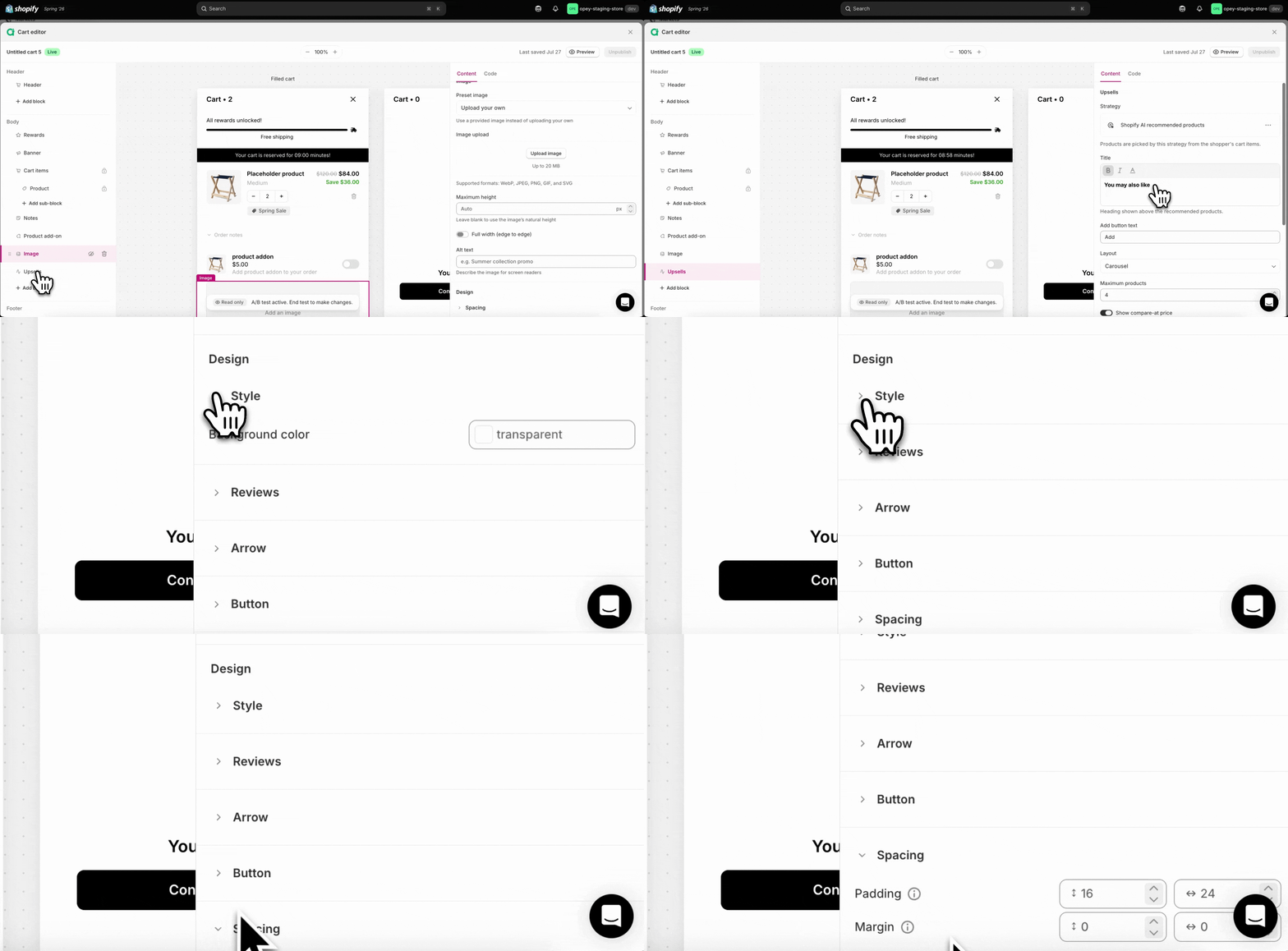
Every block except [**Custom code**](/aftersell/cart/custom-code-blocks) has its own per-block design overrides at the bottom of its settings panel — headed **Design** on every block but **Express payments**, whose overrides sit in unlabelled Style and Spacing sections. (Custom code has no settings panel at all — the block *is* the code, so it shows only a Code tab.) They control things like style, spacing and other block-specific design settings. These **per block design settings**, when blank, will fall back to the global setting for that property.
Many blocks also include a **Text** section within their Design panel, where you can set typography for specific text elements in that block — font family, size, line height, and letter spacing. Blocks with multiple text elements (such as Notes and Empty cart) show a **Text element** picker so you can style each one independently.
 ## Fonts and drawer position
* **Fonts:** the cart inherits your **theme's font** by default. You can set a custom font family for select text elements (such as the product title and upsells heading) from the **Text** section in each block's Design settings — see [Cart items block](/aftersell/cart/cart-items-block) and [Upsells block](/aftersell/cart/upsells-block) for details.
* **Drawer position:** the drawer's **width** is adjustable (Desktop width, above); there's no left/right position setting.
## Behavior settings
Beyond styling, **Cart settings** also holds behavior options — opening the drawer on add to cart, and the theme selectors that keep your storefront in sync. See [Cart settings](/aftersell/cart/cart-settings).
## When to use custom CSS instead
The built-in settings cover the common cases. For anything beyond them — targeting a specific element, custom spacing, responsive tweaks — use [Custom CSS](/aftersell/cart/custom-css).
## Fonts and drawer position
* **Fonts:** the cart inherits your **theme's font** by default. You can set a custom font family for select text elements (such as the product title and upsells heading) from the **Text** section in each block's Design settings — see [Cart items block](/aftersell/cart/cart-items-block) and [Upsells block](/aftersell/cart/upsells-block) for details.
* **Drawer position:** the drawer's **width** is adjustable (Desktop width, above); there's no left/right position setting.
## Behavior settings
Beyond styling, **Cart settings** also holds behavior options — opening the drawer on add to cart, and the theme selectors that keep your storefront in sync. See [Cart settings](/aftersell/cart/cart-settings).
## When to use custom CSS instead
The built-in settings cover the common cases. For anything beyond them — targeting a specific element, custom spacing, responsive tweaks — use [Custom CSS](/aftersell/cart/custom-css).