> ## Documentation Index
> Fetch the complete documentation index at: https://docs.aftersell.com/llms.txt
> Use this file to discover all available pages before exploring further.

# Custom code blocks

> The Aftersell Cart Custom code block: add your own HTML or React anywhere in the drawer, including inside Cart items.

> The **Custom code** block adds your own HTML or React to the cart. Put it in any section of the drawer, or nest it inside [**Cart items**](/aftersell/cart/cart-items-block) as a sub-block so it repeats for each line. Unlike other blocks, it has no Content settings and no Design section: the block *is* the code, so you work entirely in its **Code** tab.

<Frame>
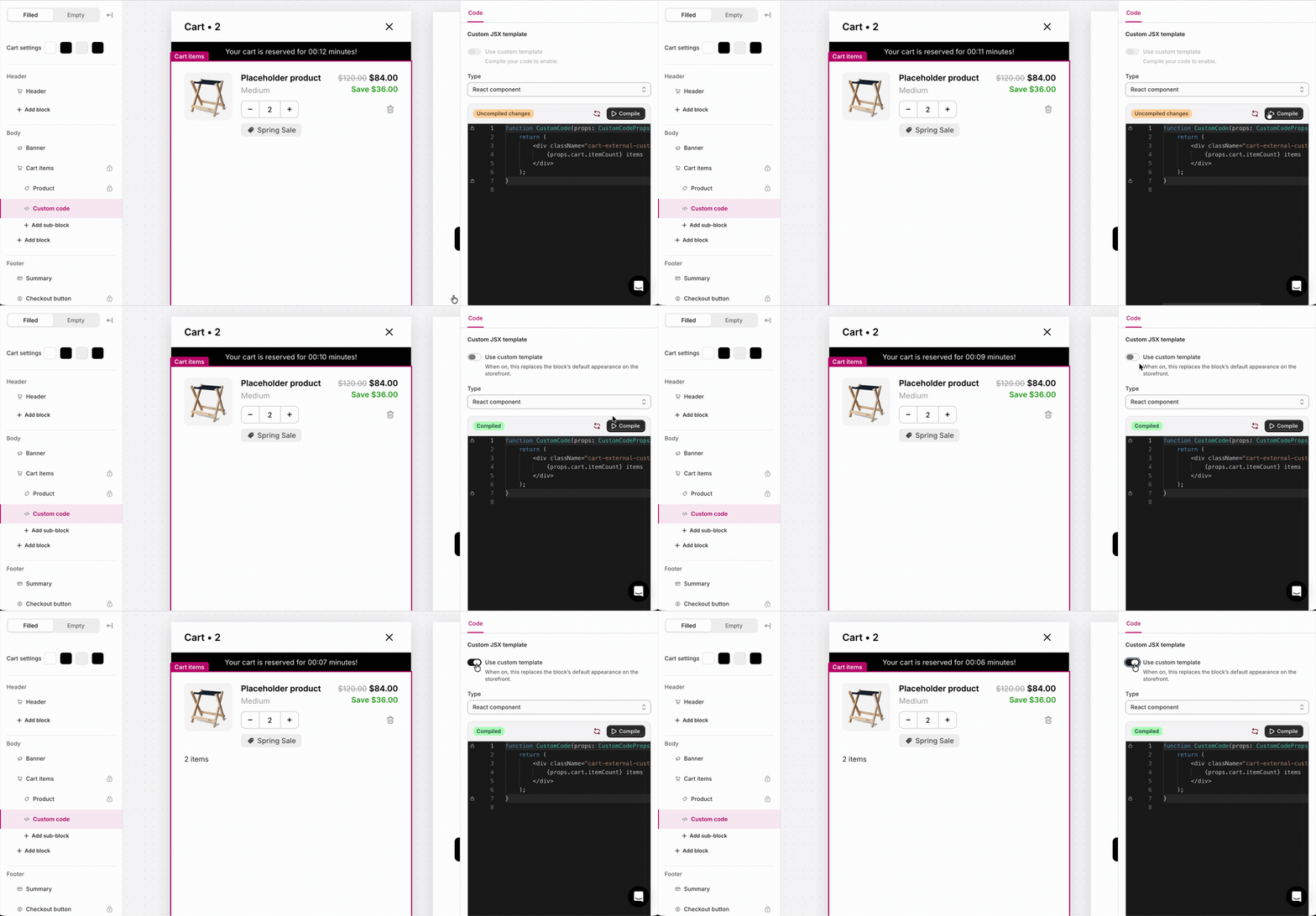
  <img src="https://mintcdn.com/aftersell/1Y3gBpUfxv16VGSW/images/aftersell/cart-custom-code-block-add-and-enable.gif?s=6717cc64a8765b0c06b65990f99e12ff" alt="Animated preview of adding and turning on a Custom code block in the Aftersell Cart editor" title="Animated preview of adding and turning on a Custom code block in the Aftersell Cart editor" width="1200" height="558" data-path="images/aftersell/cart-custom-code-block-add-and-enable.gif" />
</Frame>

## Add and turn on a Custom code block

1. Add a **Custom code** block to any section, or as a sub-block under **Cart items**.
2. Select it and open the **Code** tab.
3. Choose **HTML** or **React component**. New blocks default to HTML.
4. Write your code.
5. If you chose React, click <span style={{display:'inline-flex',alignItems:'center',gap:'4px',background:'#1C1C1C',color:'#fff',border:'1px solid #0A0A0A',borderRadius:'4px',padding:'0 6px',fontSize:'0.85em',fontWeight:500,lineHeight:'1.4em',verticalAlign:'middle'}}><svg width="8" height="9" viewBox="0 0 10 12" fill="none" aria-hidden="true" style={{display:'block'}}><path d="M1.5 1.2v9.6L8.8 6 1.5 1.2Z" stroke="#fff" strokeWidth="1.5" strokeLinejoin="round" /></svg>Compile</span>.
6. Turn on **"Use custom template"**. For this block, that switch means “show my custom code”, and it defaults off, so nothing renders until you enable it.
7. Keep the sidebar eye toggle on so the block stays visible to shoppers.

Both the eye toggle and **"Use custom template"** must be on for the block to appear.

## Behavior

* The block renders nothing until the cart has loaded.
* It also renders nothing when the sidebar eye is off, **"Use custom template"** is off, the code is empty, or React fails to compile or render. Because a failure is silent, check your block in [preview](/aftersell/cart/previewing-carts) before publishing.

## HTML mode

HTML mode substitutes a small set of tokens into your markup. It’s for static or token-driven content, not for running logic.

* **Inline `<script>` tags do not run**, and HTML mode has **no access to the SDK or `window`.**
* For logic, use [**React mode**](#react-mode) or [Custom scripts](/aftersell/cart/custom-scripts) with the [Cart SDK](/aftersell/cart/sdk-overview).

### Tokens

Token values are **formatted strings** (shop money format, a percentage with `%`, or a quantity), ready to drop into markup:

| Token                    | What it shows                                                        |
| ------------------------ | -------------------------------------------------------------------- |
| `{{pre_cart_total}}`     | Cart total before discounts.                                         |
| `{{post_cart_total}}`    | Cart total after discounts.                                          |
| `{{savings_amount}}`     | Amount saved (pre-discount total minus post-discount total).         |
| `{{savings_percentage}}` | Savings as a percentage, including the `%` sign (for example `15%`). |
| `{{cart_quantity}}`      | Number of visible items in the cart.                                 |

### Example

```html theme={"theme":{"light":"snazzy-light","dark":"github-dark"}}
<div class="cart-external-custom-code_html">
  You saved {{savings_amount}} ({{savings_percentage}})
</div>
```

## React mode

React mode compiles a component and passes it as cart data plus an `add-to-cart` action.

* The editor locks the wrapper to `function CustomCode(props: CustomCodeProps) { … }`, and you edit only the body between those lines.
* You must click <span style={{display:'inline-flex',alignItems:'center',gap:'4px',background:'#1C1C1C',color:'#fff',border:'1px solid #0A0A0A',borderRadius:'4px',padding:'0 6px',fontSize:'0.85em',fontWeight:500,lineHeight:'1.4em',verticalAlign:'middle'}}><svg width="8" height="9" viewBox="0 0 10 12" fill="none" aria-hidden="true" style={{display:'block'}}><path d="M1.5 1.2v9.6L8.8 6 1.5 1.2Z" stroke="#fff" strokeWidth="1.5" strokeLinejoin="round" /></svg>Compile</span> then turn on **"Use custom template"**, before the block shows.
* Your component can use `useState`, `useEffect`, `useMemo`, `useRef`, and `useCallback`.
* Unlike HTML mode, React runs in the page context, so it can call `window` and the [Cart SDK](/aftersell/cart/sdk-overview) when those are available.
* If your component throws errors at runtime, the block renders nothing and the rest of the cart keeps working.

### Props

Totals and savings amounts are integers in the currency’s [minor unit](/aftersell/cart/sdk-actions#formatmoneycents) (cents for USD), so `$12.50` is `1250`, not `12.50`. They’re not formatted money strings like the HTML tokens.

| Prop                                            | Type                        | Description                                                                                                                |
| ----------------------------------------------- | --------------------------- | -------------------------------------------------------------------------------------------------------------------------- |
| `cart`                                          | `AftersellCart`             | The current cart. See the [cart object reference](/aftersell/cart/sdk-cart-object).                                        |
| `line`                                          | `AftersellCartLine \| null` | Set only when the block is a Cart items sub-block (one render per line); `null` in a section.                              |
| `preCartTotal`                                  | `number`                    | The cart total **before discounts** (Shopify's `original_total_price`), in the currency's minor unit (e.g. cents).         |
| `postCartTotal`                                 | `number`                    | The cart total **after discounts**, in the currency's minor unit.                                                          |
| `savings`                                       | `{ amount, percentage }`    | Savings amount and percentage.                                                                                             |
| `addProduct(variantId, quantity?, properties?)` | `function`                  | Adds a product to the cart, stamped with this block's attribution so [analytics](/aftersell/cart/analytics) can credit it. |

### The cart and line shapes

`cart` and `line` are the same objects the SDK exposes everywhere else, so they're documented once in the **[cart object reference](/aftersell/cart/sdk-cart-object)**: every field on the cart, on a line, and on a bundle.

The ones you'll reach for most: `cart.items`, `cart.itemCount`, `cart.totalPrice`, `line.title`, `line.quantity`, `line.finalLinePrice`.

Three things specific to this block:

* **`line` is only set on a Cart items sub-block**, where your component renders once per line. Placed as a section, `line` is `null` and you read `cart.items` instead.
* **Bundle children aren't in `cart.items`.** When lines are [grouped into a bundle](/aftersell/cart/sdk-use-case-bundles), only the anchor line appears; its children live on `line.bundle.children`.
* **Lines hidden by a [line transform](/aftersell/cart/sdk-hooks#registerlinetransform) aren't there either**, though they still count toward `cart.totalPrice`.

### Examples

Show the item count:

```jsx theme={"theme":{"light":"snazzy-light","dark":"github-dark"}}
function CustomCode(props) {
  return (
    <div className="cart-external-custom-code_jsx">
      {props.cart.itemCount} items
    </div>
  );
}
```

As a Cart items sub-block, use `props.line` for per-product content. The block renders once per line, tagged with that line's product and variant:

```jsx theme={"theme":{"light":"snazzy-light","dark":"github-dark"}}
function CustomCode(props) {
  if (!props.line) return null;
  return (
    <div className="cart-external-custom-code_jsx">
      {props.line.productTitle}
      {props.line.variantTitle ? ` · ${props.line.variantTitle}` : ''}
    </div>
  );
}
```

### Reading enrichment metadata

Each item in `cart.items` carries a `metadata` field: an empty object `{}` until a [cart enricher](/aftersell/cart/sdk-hooks#registercartenricher) populates it. Once populated, it is keyed by the enricher's `id` and contains the Storefront data for that line's product or variant:

```jsx theme={"theme":{"light":"snazzy-light","dark":"github-dark"}}
function CustomCode(props) {
  return (
    <ul>
      {(props.cart.items ?? []).map((item) => {
        const note = item.metadata?.shipping?.shippingNote;
        return (
          <li key={item.key}>
            {item.title}
            {note ? ` · ${note.value}` : ''}
          </li>
        );
      })}
    </ul>
  );
}
```

`metadata` is always present and defaults to an empty object `{}` until the enricher's async fetch completes (the "not yet enriched" test is `Object.keys(item.metadata).length === 0`). Use optional chaining (`item.metadata?.enricherId`) when reading a specific enricher's key, since that key is absent until enrichment lands.

### Reading discount codes and line discounts

`cart.discountCodes` lists the discount codes applied to the cart, and each line's `discountAllocations` lists the discounts applied to that specific line:

```jsx theme={"theme":{"light":"snazzy-light","dark":"github-dark"}}
function CustomCode(props) {
  const codes = props.cart.discountCodes;
  return (
    <div>
      {codes.length > 0 && (
        <p>Active discounts: {codes.join(', ')}</p>
      )}
      <ul>
        {(props.cart.items ?? []).map((item) => {
          return (
            <li key={item.key}>
              {item.title}
              {item.discountAllocations.map(
                (discount) => ` · ${discount.title} (-${(discount.amount / 100).toFixed(2)})`
              )}
            </li>
          );
        })}
      </ul>
    </div>
  );
}
```

## Placement and limits

* **Region:** any (top, body, or bottom). Also available as a Cart items sub-block.
* **Maximum:** unlimited.
* **State:** filled and empty cart (as a section block). As a Cart items sub-block, it only renders when the cart has lines, one instance per line.
* Not locked, so you can remove or hide it.
* There is no per-block Design section. Style through your own markup, [**Custom CSS**](/aftersell/cart/custom-css), and your global [**Design settings**](/aftersell/cart/design-settings).

## When to use custom code block vs. custom template vs. custom script

|                                                         | What it does                                                                          | When to use it                                                        | Example                                                                                                                                                                   |
| ------------------------------------------------------- | ------------------------------------------------------------------------------------- | --------------------------------------------------------------------- | ------------------------------------------------------------------------------------------------------------------------------------------------------------------------- |
| **Custom code block**                                   | Adds a *new* block of your own HTML or React.                                         | Something the built-in blocks don’t cover.                            | An estimated-total line that adds your flat shipping rate to the cart total, or a delivery-cutoff countdown above the checkout button.                                    |
| **[Custom template](/aftersell/cart/custom-templates)** | Replaces the rendering of an *existing* block with your JSX, using that block’s data. | The built-in block is almost right, but you need different markup.    | Rebuild the [Product row](/aftersell/cart/cart-items-block#custom-template) so the variant name, savings, and quantity picker sit on one line.                            |
| **[Custom script](/aftersell/cart/custom-scripts)**     | Runs JavaScript against the cart via the [Cart SDK](/aftersell/cart/sdk-overview).    | Cart-wide logic, events, and configuration rather than drawer markup. | Spend \$75, get a free tote: [add the gift](/aftersell/cart/sdk-use-case-free-gift) once the cart crosses the threshold, and take it back out if the shopper drops below. |