> ## Documentation Index
> Fetch the complete documentation index at: https://docs.aftersell.com/llms.txt
> Use this file to discover all available pages before exploring further.

# Cart items block

> The Cart items block: the line-item list, the Product row, and the host for nested sub-blocks.

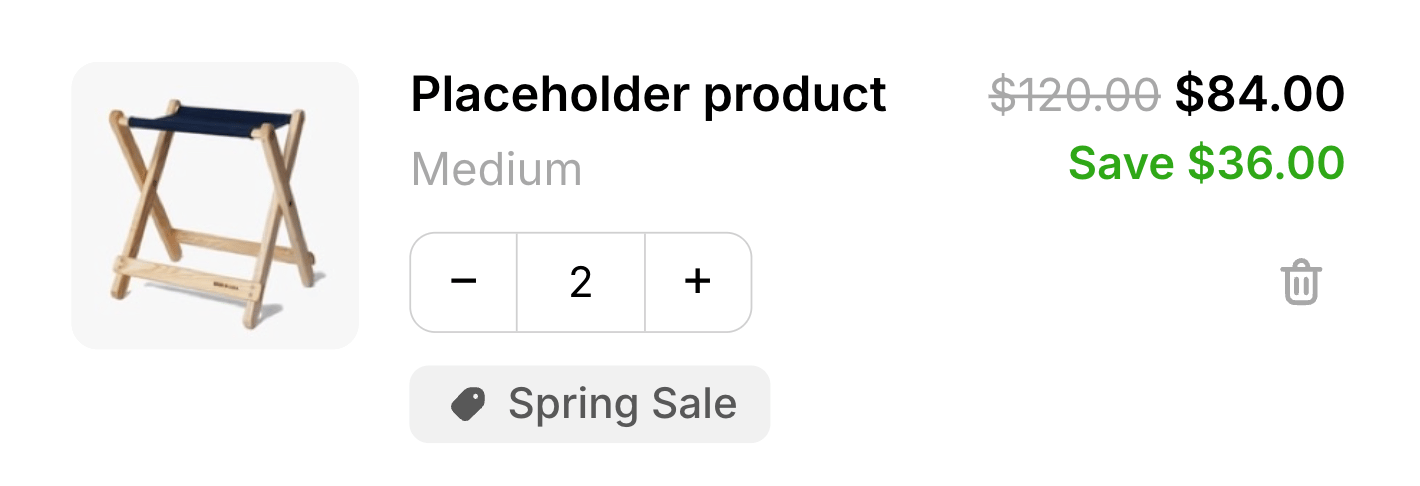
> The **Cart items** block is the list of line items in the cart, rendering each product the shopper has added with its image, title, variant, price, quantity stepper, and remove control. It's a required block, and it's the container that hosts the cart's sub-blocks (the **Product** row, [**Subscription upgrade**](/aftersell/cart/subscription-upgrade-block), and [**Custom code**](/aftersell/cart/custom-code-blocks)), providing the structure that per-line sub-blocks attach to.

<Frame>
  <img src="https://mintcdn.com/aftersell/1Y3gBpUfxv16VGSW/images/aftersell/cart-items-block-line-product-title-variant.png?fit=max&auto=format&n=1Y3gBpUfxv16VGSW&q=85&s=3c9f088b55cfd8450dcb8670dfe0728a" alt="Cart items block showing line items with product image, title, variant, price, quantity stepper, and remove control" width="1420" height="486" data-path="images/aftersell/cart-items-block-line-product-title-variant.png" />
</Frame>

## The Product row

Inside Cart items sits the **Product** sub-block: the actual line-item row. It's locked and added automatically, so every Cart items block always has exactly one Product row that you can't remove; you reposition other sub-blocks around it. Its settings control how each line's pricing is displayed:

| Setting                                    | What it controls                                                                                                                                                                                                                                                                                                            | Default                                         |
| ------------------------------------------ | --------------------------------------------------------------------------------------------------------------------------------------------------------------------------------------------------------------------------------------------------------------------------------------------------------------------------- | ----------------------------------------------- |
| **Strike-through price**                   | Which price is shown struck through: **Compare-at or pre-discount, whichever is higher**, **Compare-at price**, **Pre-discount price**, or **No strike-through**.                                                                                                                                                           | Compare-at or pre-discount, whichever is higher |
| **Strike-through price for subscriptions** | The same choice for subscription lines, with two differences: an extra **Subscription compare-at price** option, and **Compare-at price** renamed **Product compare-at, then subscription compare-at**.                                                                                                                     | Compare-at or pre-discount, whichever is higher |
| **Savings label**                          | Whether savings show as an **Amount**, a **Percentage**, or are **Hidden**.                                                                                                                                                                                                                                                 | Amount                                          |
| **Bundle price**                           | How the displayed price is calculated for bundle lines. **Automatic** shows the total of all items in the bundle (or the main item's price when the other items are free). **Main item price only** shows only the main (anchor) item's price. This is a display label only — Shopify's cart total is always authoritative. | Automatic                                       |
| **Savings text**                           | The savings label. Supports the `{{value}}` token.                                                                                                                                                                                                                                                                          | `Save {{value}}`                                |

The row itself renders the product image (linking to the product page when available), title, variant, price and any struck compare-at price, a quantity stepper, and a remove button. Bundle lines show a disclosure list of their components.

### Text styling

The Product row includes a **Text** section in its Design settings. Use it to control the typography of individual text elements in each line item. Select a text element from the picker to adjust its settings:

| Setting            | What it controls                                                                                                                                          |
| ------------------ | --------------------------------------------------------------------------------------------------------------------------------------------------------- |
| **Text color**     | Color of the selected text element.                                                                                                                       |
| **Font**           | **Theme font** (inherits your theme's font) or **Custom font** (enter the name of a font your theme already loads). Available for **Product title** only. |
| **Size**           | Font size in pixels.                                                                                                                                      |
| **Weight**         | Font weight: Light, Regular, Medium, Semibold, or Bold.                                                                                                   |
| **Line height**    | Line height as a multiplier of the font size (for example, `1.4`).                                                                                        |
| **Letter spacing** | Letter spacing in pixels. Negative values tighten the text.                                                                                               |

The text elements you can style are grouped by category:

**Product**

* **Product title** — the product name on each line. Also supports a custom font family.
* **Variant** — the variant label (for example, *Size: Medium*).
* **Subscription plan** — the read-only plan label shown on subscription lines.

**Pricing**

* **Price** — the line's current price.
* **Compare-at price** — the struck-through original price.
* **Savings** — the savings label (for example, *Save \$5.00*). Size and line height only — bold and color are set in the Rich Text Editor above.

**Bundle**

* **Bundle toggle** — the disclosure header that expands a bundle's component list.
* **Bundle item title** — the title of each component inside a bundle.
* **Bundle item variant** — the variant label for each bundle component.

Leaving any field blank keeps the element's default value.

<Tip>
  Clicking a text element directly in the cart preview highlights it and opens its controls in the panel automatically.
</Tip>

### Discount tags design

The Product row includes a **Discount tags** section in its Design settings. Use it to style the discount tag pills that appear on each line item:

| Setting              | What it controls                          | Default   |
| -------------------- | ----------------------------------------- | --------- |
| **Background color** | Fill color of the discount tag pill.      | `#F1F1F1` |
| **Text color**       | Text color inside the discount tag pill.  | `#585858` |
| **Border radius**    | Corner rounding of the discount tag pill. | `6px`     |

These settings apply only to line-item discount tags in the Cart items block. Discount code tags in the [Summary block](/aftersell/cart/summary-block) are styled separately.

## Sub-blocks and how they position

Cart items is the only block that hosts sub-blocks. **Sub-blocks render once per line, inside every product row**, positioned relative to the pinned Product row:

* Sub-blocks ordered **before** the Product row appear **above** the product content in each line.
* Sub-blocks ordered **after** the Product row appear **below** the product content in each line.

So a [Subscription upgrade](/aftersell/cart/subscription-upgrade-block) placed after the Product row shows beneath each eligible line, not once at the bottom of the whole list.

## Behavior

* When the cart has no items, the drawer switches to the empty state and this block isn't shown.
* **One cart change runs at a time.** While a quantity update or removal is in flight, the row's controls are disabled to keep the cart consistent, then re-enabled once the change settles.
* Lowering a line's quantity below 1 removes it. A quantity the store rejects (for example, beyond available stock) re-syncs to the last valid value.
* **Bundles change as a unit.** Adjusting the quantity on a bundle's anchor line scales the whole bundle in one operation — if a child is included at 3 per anchor, taking the anchor from 1 to 2 takes that child to 6. Removing the anchor removes every member of the bundle at once.
* **Some bundles can't be re-quantified.** If any of a bundle's children is included at a fractional rate (1.5 per anchor, say), the quantity stepper on that bundle is locked: the +/− buttons and the quantity field are both disabled, and typed quantities aren't accepted. The bundle can still be removed.
* **Subscription lines show their plan.** When a line has a selling plan and the [Subscription upgrade](/aftersell/cart/subscription-upgrade-block) sub-block is turned off or not added, the Product row shows a read-only plan label beneath the variant — for example, *Delivers every month (save 30%)*. When that sub-block is enabled it presents the plan in its own picker, so the read-only label is suppressed rather than duplicated.

## Placement and limits

* **Region:** body.
* **Maximum:** 1 per cart state.
* **State:** filled cart only.
* **Locked and added by default.** Cart items can't be removed or hidden, only repositioned.

## Custom template

Supports a [custom template](/aftersell/cart/custom-templates) from its Code tab, which replaces this block's built-in markup with your JSX. These are the props it receives.

The **Cart items** container has no custom template. The **Product** row inside it does, and it's the richest surface in the cart: your template renders once per line.

### Line content

| Prop               | Type                        | What it's for                                                                                                                                                                                                  |
| ------------------ | --------------------------- | -------------------------------------------------------------------------------------------------------------------------------------------------------------------------------------------------------------- |
| `title`            | `string`                    | Product title, as plain text.                                                                                                                                                                                  |
| `variantTitle`     | `string \| null`            | Variant label. `null` for single-variant products and native bundles.                                                                                                                                          |
| `url`              | `string \| null`            | Product page URL. `null` when the line shouldn't link out.                                                                                                                                                     |
| `imageUrl`         | `string \| null`            | Line image. `null` when the product has none.                                                                                                                                                                  |
| `quantity`         | `number`                    | Current quantity on the line.                                                                                                                                                                                  |
| `price`            | `string`                    | Line price, **already formatted**.                                                                                                                                                                             |
| `compareAtPrice`   | `string \| null`            | The struck-through "was" price, already formatted. `null` when there's nothing to strike.                                                                                                                      |
| `savingsHtml`      | `string \| null`            | Savings label as sanitized HTML. `null` when hidden or there's no saving.                                                                                                                                      |
| `discountTags`     | `string[]`                  | Titles of discounts on this line, e.g. `['Spring Sale']`. `[]` when none.                                                                                                                                      |
| `sellingPlanLabel` | `string \| null`            | Read-only subscription plan name. `null` when it's a one-time line, or when the [Subscription upgrade](/aftersell/cart/subscription-upgrade-block#custom-template) sub-block is rendering the plan UI instead. |
| `bundle`           | `object \| null`            | [Bundle](/aftersell/cart/sdk-cart-object#bundles) view model on an anchor line. `null` otherwise.                                                                                                              |
| `productId`        | `number`                    | Shopify product ID.                                                                                                                                                                                            |
| `variantId`        | `number`                    | Shopify variant ID.                                                                                                                                                                                            |
| `line`             | `AftersellCartLine`         | The full [cart line](/aftersell/cart/sdk-cart-object#cart-lines), for anything the props above don't cover.                                                                                                    |
| `formatMoney`      | `(cents: number) => string` | Formats a minor-unit amount. Use it for prices you read off `line`.                                                                                                                                            |

<Warning>
  **`price` and `compareAtPrice` are formatted strings; everything on `line` is in cents.** Don't do arithmetic on `price`. Compute from `line.finalLinePrice` and friends, then run the result through `formatMoney`.
</Warning>

### Quantity and removal

| Prop                | Type                                             | What it's for                                                                                                                                                                                                                |
| ------------------- | ------------------------------------------------ | ---------------------------------------------------------------------------------------------------------------------------------------------------------------------------------------------------------------------------- |
| `increment`         | `() => void`                                     | Adds one to the line.                                                                                                                                                                                                        |
| `decrement`         | `() => void`                                     | Removes one from the line.                                                                                                                                                                                                   |
| `remove`            | `() => void`                                     | Removes the line entirely.                                                                                                                                                                                                   |
| `quantityInput`     | `string`                                         | Current value for a controlled quantity `<input>`. A string, so mid-typing states survive.                                                                                                                                   |
| `onQuantityInput`   | `(event: Event) => void`                         | `onInput` handler for that field.                                                                                                                                                                                            |
| `commitQuantity`    | `() => void`                                     | Applies the typed quantity. Wire to `onBlur`.                                                                                                                                                                                |
| `onQuantityKeyDown` | `(event: KeyboardEvent) => void`                 | `onKeyDown` handler, so Enter commits.                                                                                                                                                                                       |
| `busy`              | `boolean`                                        | `true` while any cart mutation is in flight. Disable your controls on this.                                                                                                                                                  |
| `pending`           | `'increment' \| 'decrement' \| 'remove' \| null` | Which action is currently in flight, for a targeted spinner.                                                                                                                                                                 |
| `stepperLocked`     | `boolean`                                        | `true` when quantity can't be changed, because the line is a bundle anchor with a child included at a fractional per-anchor rate. Hide or disable the stepper — the built-in handlers already reject changes while it's set. |

```jsx theme={"theme":{"light":"snazzy-light","dark":"github-dark"}}
function CustomTemplate(props) {
  return (
    <div className="cart-external-cart-items__row" style={{ display: 'flex', gap: '12px', opacity: props.busy ? 0.6 : 1 }}>
      {props.imageUrl && <img src={props.imageUrl} alt="" width={64} height={64} />}

      <div style={{ flex: 1 }}>
        {props.url ? <a href={props.url}>{props.title}</a> : <span>{props.title}</span>}
        {props.variantTitle && <div style={{ opacity: 0.6 }}>{props.variantTitle}</div>}
        {props.sellingPlanLabel && <div style={{ opacity: 0.6 }}>{props.sellingPlanLabel}</div>}

        {props.discountTags.map((tag) => (
          <span key={tag} style={{ fontSize: '11px', border: '1px solid', borderRadius: '4px', padding: '1px 5px' }}>
            {tag}
          </span>
        ))}

        {!props.stepperLocked && (
          <div style={{ display: 'flex', alignItems: 'center', gap: '6px', marginTop: '6px' }}>
            <button type="button" onClick={props.decrement} disabled={props.busy}>&minus;</button>
            <input
              value={props.quantityInput}
              onInput={props.onQuantityInput}
              onBlur={props.commitQuantity}
              onKeyDown={props.onQuantityKeyDown}
              size={2}
            />
            <button type="button" onClick={props.increment} disabled={props.busy}>+</button>
            <button type="button" onClick={props.remove} disabled={props.busy}>
              {props.pending === 'remove' ? 'Removing…' : 'Remove'}
            </button>
          </div>
        )}
      </div>

      <div style={{ textAlign: 'right' }}>
        <div>{props.price}</div>
        {props.compareAtPrice && <s style={{ opacity: 0.5 }}>{props.compareAtPrice}</s>}
        {props.savingsHtml && <div dangerouslySetInnerHTML={{ __html: props.savingsHtml }} />}
      </div>
    </div>
  );
}
```

### Rendering a bundle

On a bundle's anchor line, `bundle.children` holds its contents. Children never appear as their own rows, so if you don't render them the shopper won't see what's in the bundle:

```jsx theme={"theme":{"light":"snazzy-light","dark":"github-dark"}}
function CustomTemplate(props) {
  return (
    <div>
      <div>{props.title} {props.price}</div>

      {props.bundle && (
        <ul style={{ margin: '4px 0 0 12px', fontSize: '12px', opacity: 0.7 }}>
          {props.bundle.children.map((child, i) => (
            <li key={child.key ?? i}>{child.quantity} × {child.title}</li>
          ))}
        </ul>
      )}
    </div>
  );
}
```

A child's `key` is `null` for a Shopify native bundle component, so fall back to the index as above.

## Design

Style this block with its **Design** section in the settings panel. These are per-block overrides that layer on top of your global design and fall back to it when blank.

What are design settings? Learn more here: [Design settings](/aftersell/cart/design-settings).
